
MCP server · Research
Hacker News MCP server
by erithwik
Lets your AI read Hacker News for you: top stories, comments, searches and user activity.
This is a small helper that connects your AI assistant to Hacker News, the popular tech news site where people share links and discuss them. Once it is set up, you can just ask your AI what is trending or what people are saying about a topic, and it will go look it up for you. It is handy if you follow tech news but do not want to click through the site yourself.
What is an MCP server? The 30-second version
On its own, your AI can only chat with you using what it already knows. An MCP server is a small helper program that gives your AI a new skill or a connection to an app or service. This particular helper connects your AI to Hacker News, so it can look up stories, comments and users there when you ask. You do not need to understand how it works under the hood. You just ask a question, and the helper fetches the answer.
What this MCP server does
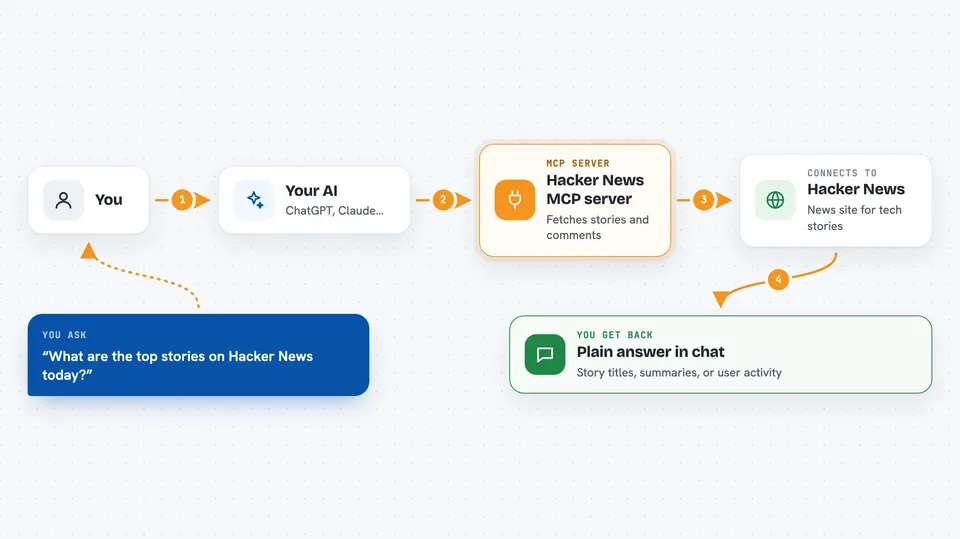
You ask your AI something about Hacker News, like what is on the front page today. The AI passes your request to this helper program. The helper then talks to Hacker News over the internet and pulls back the stories, comments or user details you asked about. Your AI reads that information and gives you a short answer in the chat. You never have to open the Hacker News site yourself.
 Click to zoom
What you can do with it
- Get today's top, new, Ask HN or Show HN stories
- Read the comments on a specific story
- Search Hacker News for stories about a topic
- Look up what a Hacker News user has been posting
- Ask for a summary of what people are saying in a discussion
Try asking your AI
- “What are the top stories on Hacker News today?”
- “Summarize the comments on the top story about AI”
- “What has Hacker News been saying about careers in AI?”
- “What has the user pg been up to lately?”
What it gives back to you
You get back plain answers in the chat: a list of story titles, a short summary of a discussion, or a rundown of a user's recent activity. If you ask for comments, your AI will read them and give you the main points instead of pasting everything. It is all text, no files or downloads.
Before you start
What you need
- The Claude desktop app (or another AI app that supports MCP servers)
- The uvx tool installed on your computer (a small program runner)
Good to know
It only reads public Hacker News content, so there is nothing private or destructive to worry about, but the answers are only as fresh as what Hacker News is showing at that moment.
Install it with your AI
Add Hacker News MCP server to your AI, no technical skills needed
You don't install anything by hand. You copy one prompt, paste it into an AI that can work on your computer, and it checks, installs and connects the server for you, asking you when it needs something.
Sign in to get the install prompt
Members get a ready-made prompt that lets the Claude desktop app check Hacker News MCP server, install it and connect it for them, step by step. You don't need any technical skills: you copy, paste and answer a few questions. Your connected AI can also find and install any of the 4,361 MCP servers here for you.
Who it's for
Anyone who follows tech news and wants quick summaries of Hacker News without browsing the site, especially busy office workers and developers.


