MCP server · Finance and crypto · official
Everstake MCP server
by everstake · official
Lets your AI look up Everstake staking data: live APY, uptime, chains, rewards estimates and company info.

This is a small helper made by Everstake, a company that runs staking for many crypto networks. Once it is connected, your AI assistant can pull Everstake's staking facts and figures for you, like which chains they support, current rewards rates, uptime, and how to get in touch. It is handy if you work with crypto, custody, or finance and want quick answers without digging through websites.
What is an MCP server? The 30-second version
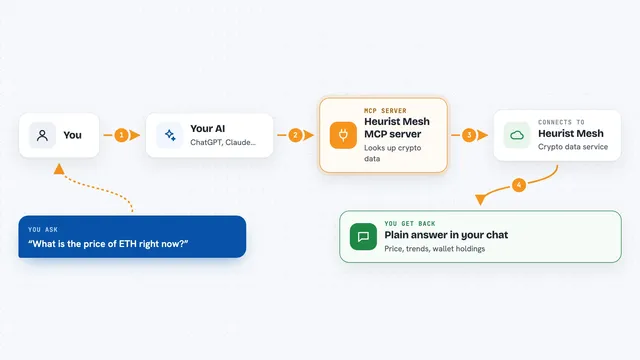
On its own, your AI can only chat with you using what it already knows. An MCP server is a small helper program that gives your AI a new skill or a connection to a real service. This one connects your AI to Everstake's staking data and company information. So when you ask about staking rates or supported chains, the AI can go ask Everstake through this helper and bring the answer back to you.
What this MCP server does
You ask your AI a question, like which networks Everstake supports or what the current rewards rate is. The AI sends that request to this MCP server. The server then either reads Everstake's prepared company information or fetches live numbers from Everstake's dashboard. The answer comes back into your chat as a clear list, table, or short summary. If you ask it to, it can also send an integration or staking inquiry to Everstake's sales team.
 Click to zoom
What you can do with it
- Look up which blockchains Everstake supports, with APY, fees and status
- Check live uptime metrics for Everstake's validators
- Estimate staking rewards for a network and an amount
- Read Everstake's company profile, certifications and security details
- See which custody integrations are supported, like Fireblocks or BitGo
- Find developer docs, SDK links and API references
- Submit an integration or staking inquiry to Everstake sales
Try asking your AI
- “Which networks does Everstake support and what are the current APY rates?”
- “Estimate the staking rewards for 100 ETH on Ethereum with Everstake”
- “What certifications does Everstake have, and are they SOC 2 compliant?”
- “Send an integration inquiry to Everstake for our custody platform”
What it gives back to you
You get answers in your chat: lists of supported chains with APY and fees, uptime numbers, and a rewards estimate for the amount you gave. Company and security questions come back as short written summaries. If you ask it to send an inquiry, it tells you whether the request went through.
Before you start
What you need
- An MCP client that can run or connect to this server, like Claude Desktop or another MCP-compatible app
- A DASHBOARD_URL value from Everstake (the address of their dashboard service)
- Go 1.26.1 or newer if you run it yourself, or Docker if you prefer a container
Good to know
The request_integration tool sends a message to Everstake's sales team, so only use it when you really mean to reach out.
Install it with your AI
Add Everstake MCP server to your AI, no technical skills needed
You don't install anything by hand. You copy one prompt, paste it into an AI that can work on your computer, and it checks, installs and connects the server for you, asking you when it needs something.
Sign in to get the install prompt
Members get a ready-made prompt that lets the Claude desktop app check Everstake MCP server, install it and connect it for them, step by step. You don't need any technical skills: you copy, paste and answer a few questions. Your connected AI can also find and install any of the 4,361 MCP servers here for you.
Who it's for
People in crypto, finance, custody, exchanges or asset management who want quick staking facts and Everstake company details inside their AI chat.