
MCP server · Developer tools · official
Extentos MCP server
by extentos · official
Lets your AI add smart-glasses features like camera, voice and audio to Android and iOS apps, and test them without real glasses.
This is a helper for people building apps that work with smart glasses, like the Ray-Ban Meta. It plugs into your AI coding assistant and gives it a set of tools for adding glasses features to a phone app. It is most useful if you already write a bit of Android or iOS code, or work closely with someone who does.
What is an MCP server? The 30-second version
On its own, your AI can only chat with you. An MCP server is a small helper program that gives your AI a new skill or a connection to another service. This one connects your AI to Extentos, a toolkit for smart-glasses apps, so the AI can look up how the glasses SDK works, write the right code, and even run a test version in your browser. You ask in plain words, and the AI uses this helper behind the scenes.
What this MCP server does
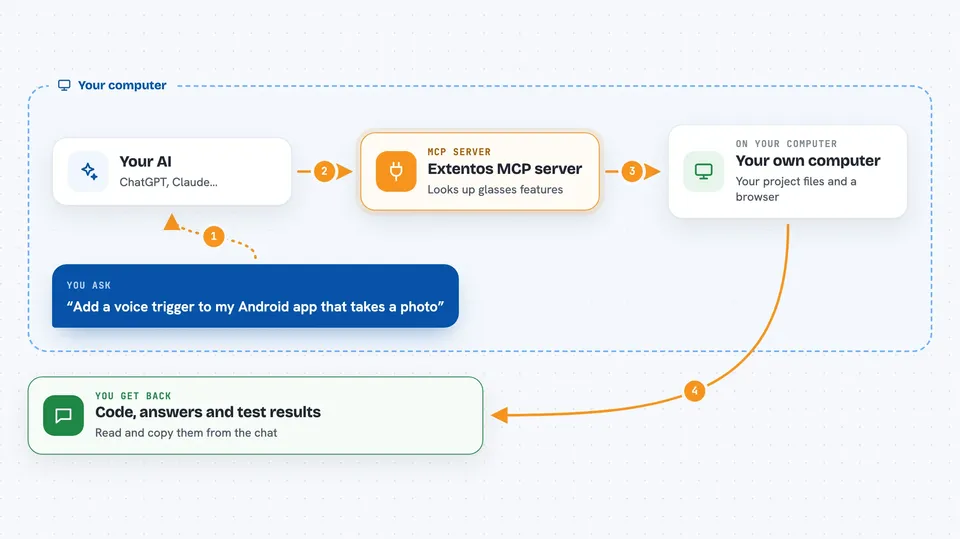
You tell your AI what you want, for example add a voice trigger that takes a photo. The AI uses this helper to look up the right way to call the glasses features in Kotlin or Swift. The helper can also write the connection setup files into your project and check that everything is wired correctly. Then it can open a browser simulator that runs the same code as real glasses, so you can test the whole flow without owning a pair. When you are ready, it walks you through the checklist for going live on real glasses.
 Click to zoom
What you can do with it
- Look up what glasses features are available and how to call them
- Scaffold the connection screen and config files into your Android or iOS app
- Check your existing integration for missing pieces or mistakes
- Run a browser simulator and feed it a test video or voice line
- Simulate pressing the glasses capture button or tapping the display
- Read the event log to see what happened during a test run
- Get a checklist and credential guide for moving to real glasses
Try asking your AI
- “Add a voice trigger to my Android app that takes a photo with the glasses”
- “Check my iOS project and tell me what is missing in the glasses integration”
- “Start a simulator session and inject a transcript saying take a picture”
- “What do I need to do before shipping this to real Ray-Ban Meta glasses”
What it gives back to you
You get answers in the chat: explanations, code snippets in Kotlin or Swift, and lists of what is missing or wrong in your project. The simulator tools give you back session state, event logs, and the display tree so you can see what the app did. Some tools also write files into your project, like the connection screen and manifest changes. Everything shows up as normal text and code blocks you can read and copy.
Before you start
What you need
- Node.js 20 or newer installed on your computer
- An MCP client like Claude Code, Cursor, or Cline
- A free Extentos account for scaffolding and simulator sessions (the server walks you through sign-in)
- Meta DAT credentials and an AI provider key only when you move from the simulator to real glasses
Good to know
Some tools write files into your project and can change your connection screen or config, so keep your work in version control and review changes before accepting them.
Install it with your AI
Add Extentos MCP server to your AI, no technical skills needed
You don't install anything by hand. You copy one prompt, paste it into an AI that can work on your computer, and it checks, installs and connects the server for you, asking you when it needs something.
Sign in to get the install prompt
Members get a ready-made prompt that lets the Claude desktop app check Extentos MCP server, install it and connect it for them, step by step. You don't need any technical skills: you copy, paste and answer a few questions. Your connected AI can also find and install any of the 4,609 MCP servers here for you.
Who it's for
App developers and technical teams building Android or iOS apps that connect to Meta smart glasses, or anyone working closely with them.




