MCP server · Security
SpendShield MCP server
Lets your AI ask permission before it spends money, and keeps a record of every attempt.
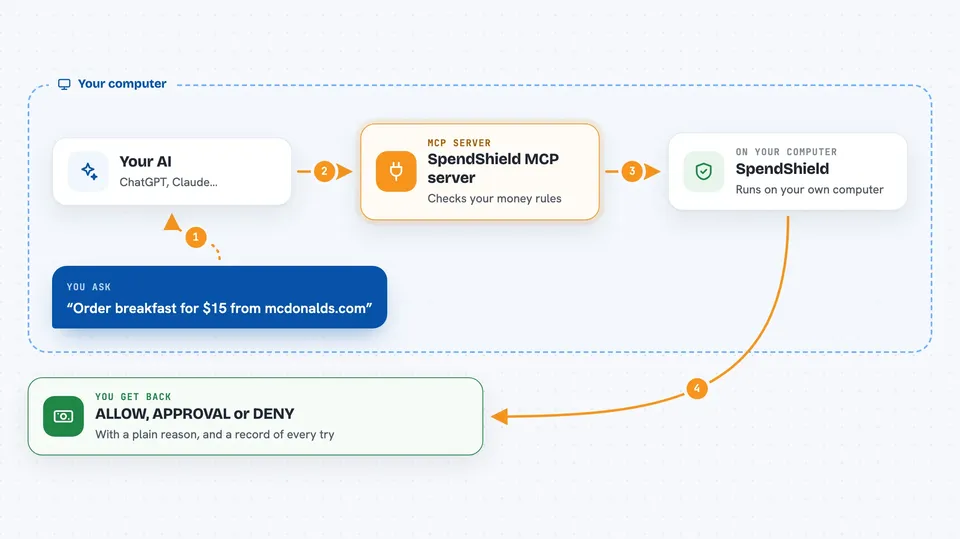
SpendShield is a helper that sits between an AI agent and your money. Before any payment goes through, SpendShield checks it against rules you write and answers with ALLOW, APPROVAL or DENY. It is handy for anyone whose AI can pay for things, like shopping agents or automated refunds.
What is an MCP server? The 30-second version
On its own, your AI can only chat. An MCP server is a small helper program that gives your AI a new skill or a connection to another service. This one connects your AI to SpendShield, a spending guardrail, so the AI has to ask before any money moves. You set the rules once, and the AI checks with SpendShield every time it wants to pay.
What this MCP server does
You ask your AI to buy something or send a payment. Before doing it, the AI calls this helper and describes the amount and the merchant. SpendShield compares that against your policy, like a daily budget, a per-payment limit, and a list of allowed or blocked shops. It answers ALLOW, APPROVAL or DENY with a short reason, and every attempt is written into a tamper-detecting log. Money only moves when the answer is ALLOW.
 Click to zoom
What you can do with it
- Set a daily or monthly spending limit for your AI
- Block payments to specific merchants by name
- Require a human approval for payments over a certain amount
- Get a clear ALLOW, APPROVAL or DENY answer with a reason
- Review a log of every payment your AI tried to make
- Test a new policy before it goes live
- Check the status of your current budget and rules
Try asking your AI
- “Order breakfast for $15 from mcdonalds.com”
- “Send a $500 refund to scam-vip.com”
- “Buy another breakfast, same as yesterday”
- “Check if a $75 payment to amazon.com would be allowed”
What it gives back to you
You get a short answer in the chat: ALLOW, APPROVAL or DENY, plus a plain reason like merchant is blocked or over the daily budget. You can also ask for a summary of recent attempts, and SpendShield shows each one with its decision and reason. If something needs a human, it tells you that too.
Before you start
What you need
- Python installed on your computer
- The spendshield package (installed with pip)
- A policy file you write yourself, or the built-in defaults
- The Claude desktop app or another tool that can run MCP servers
Good to know
This tool can block or allow real payments, so test it with dry-run mode first and keep the management tools away from untrusted agents.
Install it with your AI
Add SpendShield MCP server to your AI, no technical skills needed
You don't install anything by hand. You copy one prompt, paste it into an AI that can work on your computer, and it checks, installs and connects the server for you, asking you when it needs something.
Sign in to get the install prompt
Members get a ready-made prompt that lets the Claude desktop app check SpendShield MCP server, install it and connect it for them, step by step. You don't need any technical skills: you copy, paste and answer a few questions. Your connected AI can also find and install any of the 4,609 MCP servers here for you.
Who it's for
Anyone whose AI can spend money, like people building shopping agents, refund bots, or automated payment flows.