
MCP server · Finance and crypto
Investor Agent MCP server
by ferdousbhai
Lets your AI look up stock prices, company facts, options, and market mood from Yahoo Finance.
This is a helper that connects your AI assistant to stock market data. You ask a question about a company or a ticker, and the AI goes and fetches the numbers for you. It is handy for people who follow the markets or invest for the long term and want quick answers without opening five websites.
What is an MCP server? The 30-second version
On its own, your AI can only chat with you using what it already learned. An MCP server is a small helper program that gives your AI a new skill, in this case a connection to Yahoo Finance and a few other market sources. Once it is connected, your AI can look up live stock data and hand it back to you in the chat. You do not need to know how it works inside. You just ask, and the helper does the fetching.
What this MCP server does
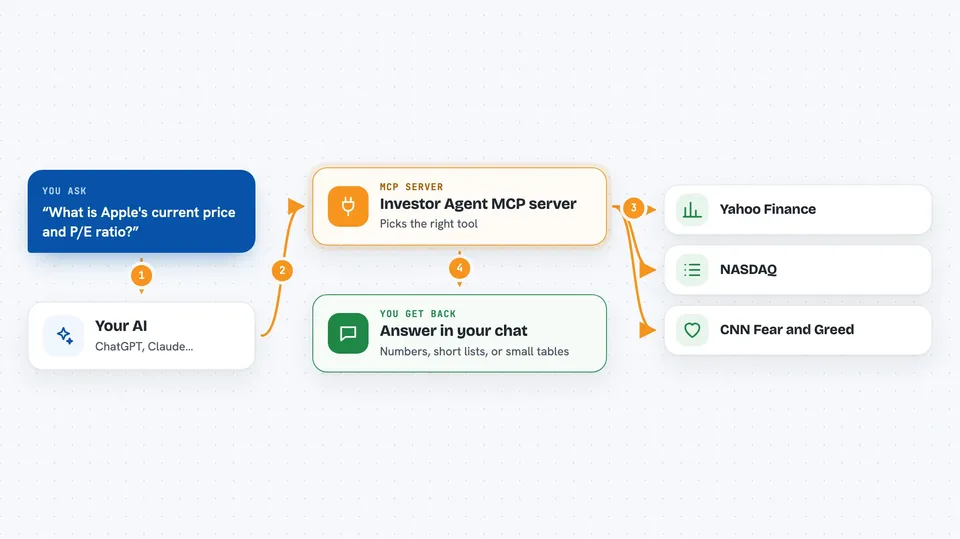
You type a question about a stock, like a price or a company fact. Your AI reads the question, picks the right tool from this server, and sends the request out. The helper then talks to Yahoo Finance and a couple of other market sources and pulls back the data. Your AI turns that raw data into a clear answer in your chat window. You get the numbers, a short summary, or a table without leaving the conversation.
 Click to zoom
What you can do with it
- Look up a stock's price, financials, earnings, and analyst ratings
- Pull historical price data for a ticker over a chosen period
- See options contracts sorted by open interest
- Check which stocks are gaining, losing, or most active today
- Find upcoming earnings dates from NASDAQ
- Read the CNN Fear and Greed index for stocks or crypto
- Calculate a technical indicator like SMA, EMA, RSI, MACD, or Bollinger Bands
Try asking your AI
- “What is Apple's current price and P/E ratio?”
- “Show me the weekly price history for MSFT over the last year.”
- “What are the top gaining stocks today?”
- “When does Nvidia report earnings next?”
- “What is the RSI for Tesla right now?”
What it gives back to you
You get answers in plain text in your chat, often with numbers, short lists, or small tables. For example, a stock lookup comes back as a summary of price, financials, and ratings. Price history comes back as a list of dates and values. Market movers come back as a ranked list of tickers with their changes.
Before you start
What you need
- The Claude desktop app or another AI app that supports MCP servers
- Node.js installed on your computer (the free software that runs npx)
Good to know
The data comes from public sources and can be delayed or wrong, so do not treat it as financial advice or as a live trading feed.
Install it with your AI
Add Investor Agent MCP server to your AI, no technical skills needed
You don't install anything by hand. You copy one prompt, paste it into an AI that can work on your computer, and it checks, installs and connects the server for you, asking you when it needs something.
Sign in to get the install prompt
Members get a ready-made prompt that lets the Claude desktop app check Investor Agent MCP server, install it and connect it for them, step by step. You don't need any technical skills: you copy, paste and answer a few questions. Your connected AI can also find and install any of the 4,609 MCP servers here for you.
Who it's for
Long-term investors, finance students, and anyone who follows the stock market and wants quick answers inside their AI chat.



