
MCP server · Finance and crypto
Bullrun MCP server
by ferinator
Ask your AI to screen stocks and ETFs, pull company financials, and review your own Bullrun portfolios.
Bullrun is a helper that lets your AI act like a research analyst for stocks, ETFs and funds. You ask a question in plain English, and it looks up market data or your own portfolios on the Bullrun service. It is handy for anyone who wants quick answers about companies or funds without opening ten browser tabs.
What is an MCP server? The 30-second version
On its own, your AI can only chat with you using what it already knows. An MCP server is a small helper program that gives your AI a new skill or a connection to an outside service. This one connects your AI to Bullrun, a stock and fund research service. Once connected, your AI can look things up there and bring the answers back into your chat.
What this MCP server does
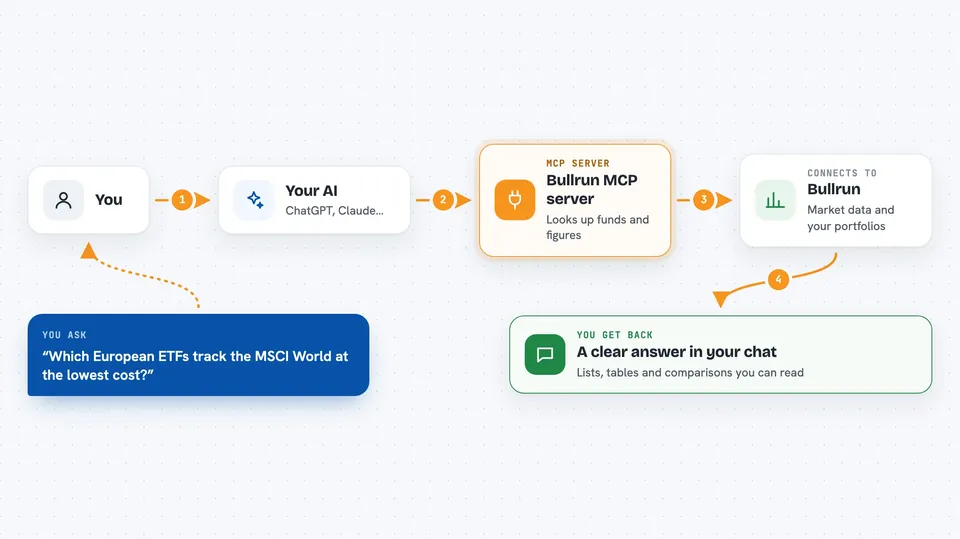
You ask your AI a question, like which European ETFs track the MSCI World at the lowest cost. Your AI sends that request to the Bullrun server, which queries the market data behind bull-run.org. Bullrun sends back the matching funds, figures or financial statements, and your AI turns them into an answer you can read. If you sign in with Google, the same helper can also look at your own Bullrun portfolios and show their holdings and performance. Some tools only suggest draft portfolios for you to review, and they never change your live positions.
 Click to zoom
What you can do with it
- Screen global stocks by sector, country or market cap and sort by P/E or dividend yield
- Pull a company snapshot with price, valuation and recent financials
- Compare ETFs side by side on cost, performance, risk and holdings
- Find the cheapest fund tracking a specific index
- Check overlap between two funds you already hold
- Review your own Bullrun portfolios with weights, sectors and returns
- Draft a new paper portfolio from a plain-English brief
Try asking your AI
- “Show me the cheapest UCITS ETFs tracking the MSCI World, sorted by expense ratio”
- “Give me a financial snapshot for ASML, including the last three years of revenue and margins”
- “How much overlap is there between these two ETFs I own?”
- “Look at my main Bullrun portfolio and tell me where my sector concentration is highest”
What it gives back to you
You get answers in your normal chat: lists of stocks or funds, tables of figures, short summaries, and comparisons. For portfolios, it can show holdings with weights, sectors and returns, plus risk and concentration notes. The draft tools save a suggested portfolio for you to review in Bullrun, and they do not touch your real positions.
Before you start
What you need
- A paid Claude plan if you use Claude web, Desktop or mobile connectors
- A Google account to sign in to Bullrun
- A Bullrun Pro account for the draft portfolio tools (optional)
Good to know
The portfolio tools read your own Bullrun account data, so only connect it if you are comfortable with that, and remember the draft tools save suggestions for review rather than changing your real holdings.
Install it with your AI
Add Bullrun MCP server to your AI, no technical skills needed
You don't install anything by hand. You copy one prompt, paste it into an AI that can work on your computer, and it checks, installs and connects the server for you, asking you when it needs something.
Sign in to get the install prompt
Members get a ready-made prompt that lets the Claude desktop app check Bullrun MCP server, install it and connect it for them, step by step. You don't need any technical skills: you copy, paste and answer a few questions. Your connected AI can also find and install any of the 4,609 MCP servers here for you.
Who it's for
Everyday investors, analysts and finance-curious office workers who want quick, plain-English answers about stocks, ETFs and their own portfolios.



