MCP server · Developer tools
shipstores MCP server
by FidelisMM
Lets your AI help publish iOS and Android apps: builds, listings, screenshots, privacy labels and review replies.
shipstores is a helper that connects your AI assistant to the two big app stores: Apple's App Store Connect and Google's Play Console. It is made for people who ship mobile apps and are tired of clicking through those consoles step by step. If you build apps with Expo or EAS, it can also start and check your builds for you.
What is an MCP server? The 30-second version
On its own, your AI can only chat with you. An MCP server is a small helper program that gives your AI a new skill or a connection to another service. This one connects your AI to the App Store and Google Play, so it can look things up and do things there when you ask. You stay in charge: the AI asks before it publishes or submits anything.
What this MCP server does
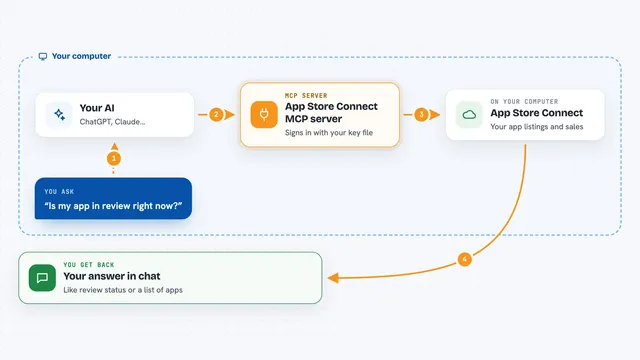
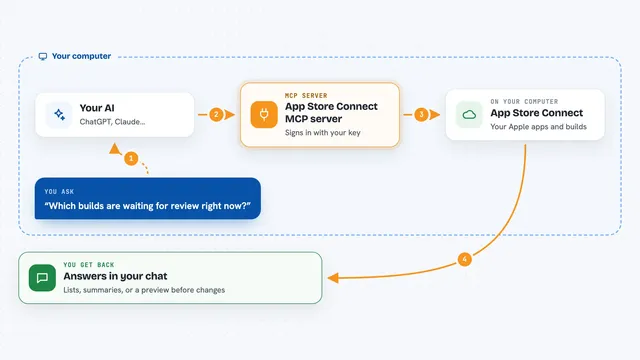
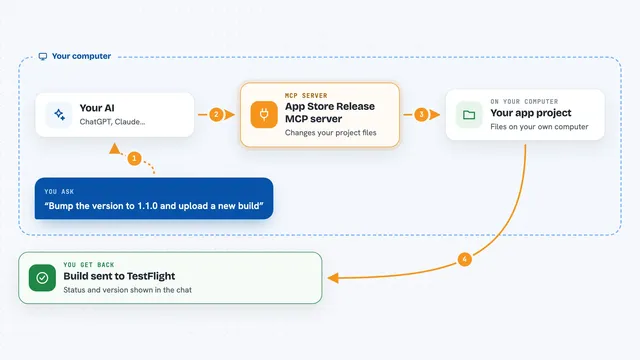
You tell your AI what you want, like uploading a new build or updating your store listing. The AI uses this helper, and the helper talks to Apple, Google or Expo on your behalf. Then it brings the result back into your chat, for example a list of builds, a rejection message, or a confirmation that a change was made. Some steps, like creating a brand new app record, still need you to fill in a form in your browser, and the helper opens the right page and tells you what to type.
What you can do with it
- Upload a new app build to App Store Connect or Google Play
- Update your store listing text, screenshots and categories
- Check the status of a build or a release
- Read an App Review rejection and help you reply to it
- Fill in privacy labels and Google Play's App content forms
- Start, check and download Expo EAS builds
- Submit a version for review or promote a release to production
Try asking your AI
- “Run store_doctor to check my App Store and Google Play credentials”
- “List my latest iOS builds and tell me which one is ready to attach”
- “Read the latest App Review message and summarise what Apple wants”
- “Upload these screenshots to my Play listing and update the description”
What it gives back to you
You get answers in your chat: lists of apps, builds or versions, status updates, and the text of messages from Apple or Google. When it changes something, like a listing or a price, it tells you what it did. Some steps also give you links or values to copy into a browser form. It can download files too, like an .ipa build, when you ask.
Before you start
What you need
- Python 3.12 or newer and the uv tool
- An App Store Connect API key (Apple gives you one in Users and Access, with Admin or App Manager role)
- A Google Play service account file, invited in Play Console with release permissions
- Xcode command line tools if you upload iOS builds
Good to know
Some tools publish, submit or change things in your store accounts, so check what the AI is about to do before you say yes.
Install it with your AI
Add shipstores MCP server to your AI, no technical skills needed
You don't install anything by hand. You copy one prompt, paste it into an AI that can work on your computer, and it checks, installs and connects the server for you, asking you when it needs something.
Sign in to get the install prompt
Members get a ready-made prompt that lets the Claude desktop app check shipstores MCP server, install it and connect it for them, step by step. You don't need any technical skills: you copy, paste and answer a few questions. Your connected AI can also find and install any of the 4,361 MCP servers here for you.
Who it's for
Mobile app developers and small teams who publish to the App Store and Google Play and want less manual console work.