MCP server · Developer tools
App Store Connect MCP server
by pofky
Lets your AI edit your App Store listing, check reviews and sales, and submit releases for you.

This is a helper for people who publish iPhone or iPad apps. Once it is connected, your AI assistant can look at your App Store Connect account and make changes there for you, like editing your app description or checking if your app is still in review. It is handy if you already use ChatGPT or Claude for writing and want it to handle the boring App Store paperwork too.
What is an MCP server? The 30-second version
On its own, your AI can only chat. It cannot see your App Store Connect account or change anything there. An MCP server is a small helper program that gives your AI a new skill, and this one connects it to App Store Connect, Apple's website where you manage your apps. So when you ask your AI about your app, it can actually go and look, and when you ask it to change something, it can do that too.
What this MCP server does
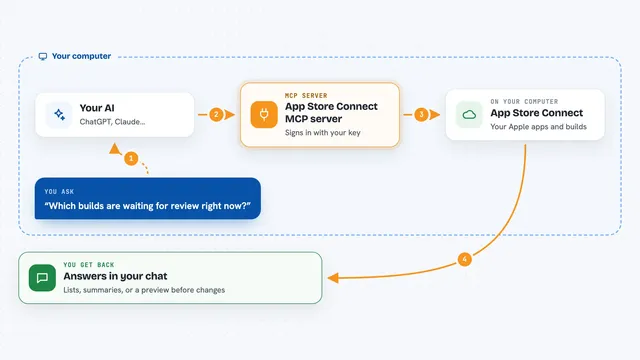
You ask your AI something like "is my app in review?" or "update my keywords". Your AI passes that request to this helper program running on your computer. The helper signs in to App Store Connect using a special key file you downloaded from Apple, and asks Apple for the information or makes the change. Then it hands the answer back to your AI, which explains it to you in the chat. For bigger actions like submitting to review or releasing, it asks you to confirm first, so nothing happens by accident.
 Click to zoom
What you can do with it
- List all your apps with their names and IDs
- Check the current review status of a version
- Read customer reviews filtered by rating or country
- See your downloads and revenue by territory
- Edit your app description, keywords and what's new text
- Upload screenshots and attach a build to a version
- Run a preflight check before you submit, to catch common rejection reasons
- Submit a version for review and release it once approved
Try asking your AI
- “List my App Store Connect apps”
- “Is my app in review right now?”
- “Show me my 1-star reviews from this month”
- “Run a preflight check on my next version before I submit”
What it gives back to you
You get answers in plain chat text. Sometimes that is a list, like all your apps or your recent reviews. Sometimes it is a short summary, like a morning briefing across all your apps, or a preflight report telling you what still needs fixing. When it changes something, it tells you what it changed, like the new description text or the fact that a build was attached.
Before you start
What you need
- An Apple Developer account with access to App Store Connect
- An App Store Connect API key (Apple gives you three things: an Issuer ID, a Key ID, and a .p8 file you download once)
- Node.js installed on your computer
- A Claude Desktop, Claude Code, Cursor, Windsurf or Cline setup that supports MCP servers
Good to know
Some tools can change your live App Store listing, submit your app for review or release it to the public, so check what your AI is about to do before you say yes.
Install it with your AI
Add App Store Connect MCP server to your AI, no technical skills needed
You don't install anything by hand. You copy one prompt, paste it into an AI that can work on your computer, and it checks, installs and connects the server for you, asking you when it needs something.
Sign in to get the install prompt
Members get a ready-made prompt that lets the Claude desktop app check App Store Connect MCP server, install it and connect it for them, step by step. You don't need any technical skills: you copy, paste and answer a few questions. Your connected AI can also find and install any of the 4,361 MCP servers here for you.
Who it's for
iOS and macOS app developers, indie makers and small teams who publish to the App Store and already use an AI assistant while they work.