
MCP server · Developer tools
Axint MCP server
Check and prove AI-written Swift code for Apple apps before you merge it.
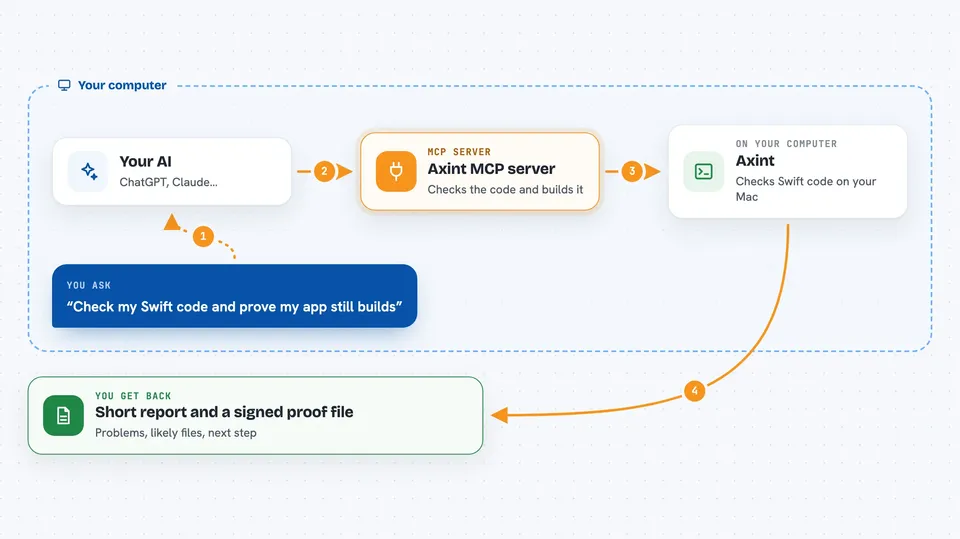
Axint is a helper for teams who let an AI write Swift code for iPhone, iPad, or Mac apps. It checks that code, runs the real Xcode build and tests, and tells you what still needs fixing. It is handy if you use an AI assistant to write Apple app code and want proof it actually works before it goes into your project.
What is an MCP server? The 30-second version
On its own, your AI can only chat with you. An MCP server is a small helper program that gives your AI a new skill or a connection to a tool. This one connects your AI to Axint, so it can check Swift code, run builds and tests, and hand back a proof report. You ask your AI in plain words, and it calls Axint behind the scenes.
What this MCP server does
You ask your AI to check some Swift code or prove a project builds. The AI passes that request to Axint through this MCP server. Axint looks at the code, finds the Xcode project, runs the build and tests, and compares what it finds with Apple's own tools. Then it sends back a short report with the problems, the likely files, and the exact next step, plus a signed proof file you can keep.
 Click to zoom
What you can do with it
- Check Swift code your AI wrote and see what is wrong
- Run the real Xcode build and tests for a project
- Get a short repair packet with the exact fix to try next
- Generate App Intents, SwiftUI views, and widgets from a small description
- Save a signed proof file that shows the build passed
- Ask for a review of accessibility or privacy concerns
- Run the same proof check in a pull request on a Mac runner
Try asking your AI
- “Check the Swift code in this file and tell me what is broken”
- “Prove that my project at /Users/me/MyApp still builds and passes tests”
- “Give me a fix packet for the build failure in my last run”
- “Generate an App Intent that creates a calendar event from a title and a date”
What it gives back to you
You get back a short report in the chat: a verdict, the findings, the likely files, and the next action to take. It also writes a signed proof file and full logs to a folder on your computer. The report stays small enough for your AI to read and act on in the next turn.
Before you start
What you need
- Node.js installed on your computer
- A Mac with Xcode if you want real build and test proof
- Your project folder on that Mac
Good to know
With the --fix option it can change files in your project, so keep your work in version control and review the changes before you merge.
Install it with your AI
Add Axint MCP server to your AI, no technical skills needed
You don't install anything by hand. You copy one prompt, paste it into an AI that can work on your computer, and it checks, installs and connects the server for you, asking you when it needs something.
Sign in to get the install prompt
Members get a ready-made prompt that lets the Claude desktop app check Axint MCP server, install it and connect it for them, step by step. You don't need any technical skills: you copy, paste and answer a few questions. Your connected AI can also find and install any of the 4,361 MCP servers here for you.
Who it's for
Apple app developers, iOS and macOS teams, and anyone using an AI assistant to write Swift code who wants proof it builds before merging.


