
MCP server · Finance and crypto
Finmap MCP server
by finmap-org
Lets your AI look up historical stock data from US, UK, Russian and Turkish exchanges.
This is a helper that connects your AI assistant to finmap.org, a place that keeps historical stock market data. Once it is connected, you can ask your AI plain questions about companies, sectors and market numbers, and it will go and fetch the answers for you. It is handy for anyone who works with market data but does not want to click through a website or build spreadsheets by hand.
What is an MCP server? The 30-second version
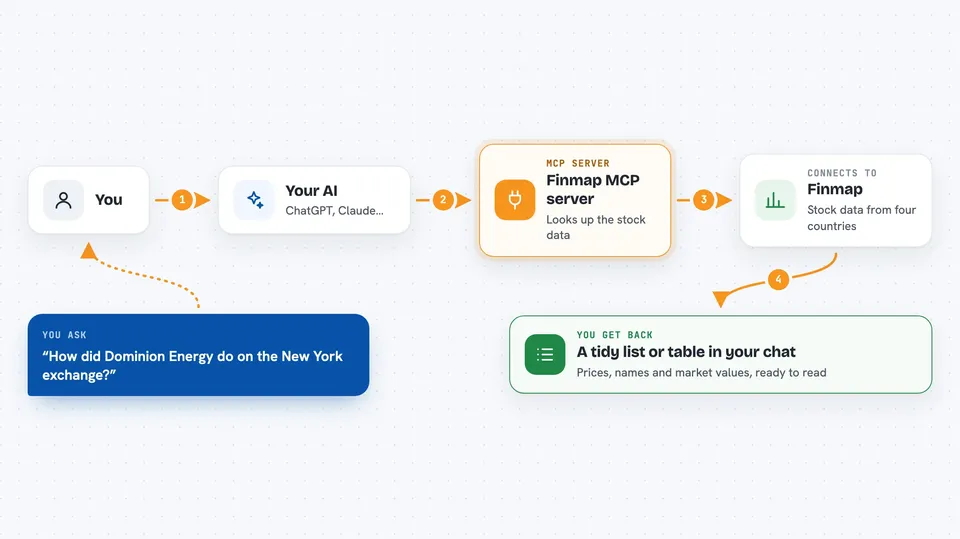
On its own, your AI can only chat with you using what it already knows. An MCP server is a small helper program that gives your AI a new skill or a connection to an outside service. This one connects your AI to finmap.org, so when you ask about a stock or a sector, the AI can go and look it up there instead of guessing. You just ask in normal words, and the helper does the fetching behind the scenes.
What this MCP server does
You ask your AI something like which companies are in a sector, or how a stock did on a certain day. The AI passes that request to this helper, which talks to finmap.org and pulls the matching data. The helper sends the numbers and names back to your AI. Your AI then turns them into a readable answer or a small table right in the chat. You never have to visit the finmap site yourself.
 Click to zoom
What you can do with it
- List the stock exchanges it covers and when their data starts
- See which sectors exist on an exchange and how many companies are in each
- Find companies by name or ticker symbol
- Get a market overview for an exchange on a chosen date
- Rank stocks by market cap, price change, volume or number of trades
- Pull a snapshot for one stock, like price, volume and market cap
- Read a short company profile for US-listed companies
Try asking your AI
- “List the stock exchanges finmap covers and when their data starts”
- “Show me the sectors on the London Stock Exchange and how many companies each has”
- “Rank the top 5 UK stocks by market cap”
- “Give me a snapshot for Dominion Energy on the New York Stock Exchange”
What it gives back to you
You get back plain lists, numbers and short summaries in the chat. For example, a ranked list of companies with their ticker, sector and market cap, or a single stock's price, volume and market cap. It can also return sector breakdowns and company profiles. Your AI usually turns these into a tidy answer or a small table for you.
Before you start
What you need
- The Claude desktop app or another AI tool that supports MCP servers
- Node.js installed if you run the local version (the hosted version needs nothing extra)
Good to know
The data comes from finmap.org and updates on different schedules per exchange, so it may not be live to the minute.
Install it with your AI
Add Finmap MCP server to your AI, no technical skills needed
You don't install anything by hand. You copy one prompt, paste it into an AI that can work on your computer, and it checks, installs and connects the server for you, asking you when it needs something.
Sign in to get the install prompt
Members get a ready-made prompt that lets the Claude desktop app check Finmap MCP server, install it and connect it for them, step by step. You don't need any technical skills: you copy, paste and answer a few questions. Your connected AI can also find and install any of the 4,609 MCP servers here for you.
Who it's for
Anyone who needs quick historical stock data, like analysts, finance students, journalists or office workers who track markets.



