
MCP server · Developer tools
ASO Agent Readiness Scanner
Scan any website and get a plain score for how ready it is for AI agents, plus a fix plan.
This is a free scanner that checks whether a website is set up well for AI agents. You give it a web address, and it tells you what is missing and how to fix it. It is handy for anyone who runs a website and wants to know if AI tools can find and use it.
What is an MCP server? The 30-second version
On its own, your AI can only chat with you. An MCP server is a small helper program that gives your AI a new skill. This one gives your AI the ability to scan websites for agent readiness. You ask your AI to scan a site, and this helper does the checking and hands back a report.
What this MCP server does
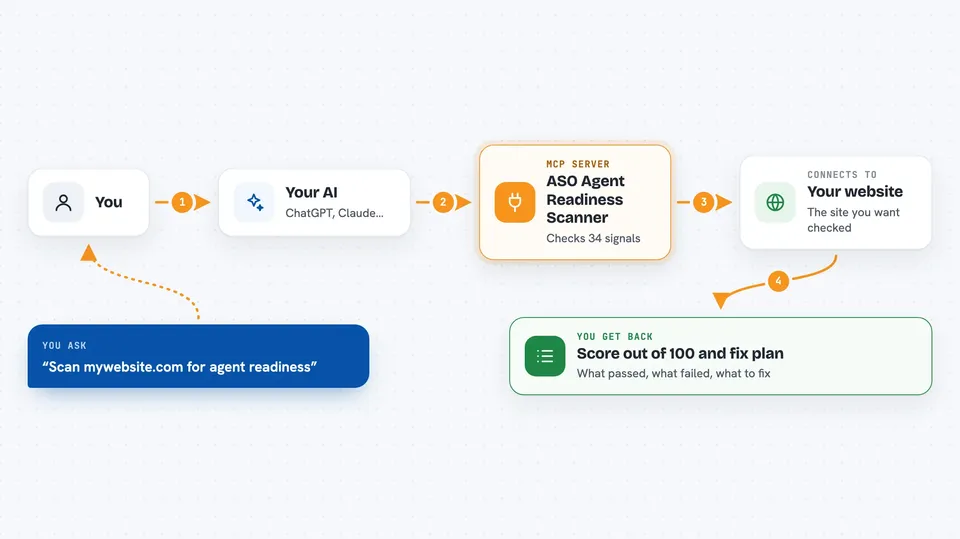
You ask your AI to scan a website. The AI passes that address to this helper. The helper visits the site and looks at 34 different signals, like robots.txt rules for AI crawlers, llms.txt files, and agent cards. It adds up the results into a score out of 100 and a maturity level. Then it gives you a list of what passed, what failed, and what to fix.
 Click to zoom
What you can do with it
- Scan any website and get an agent readiness score
- See which of the 34 checks passed, partly passed, or failed
- Get a prioritized fix plan with ready-to-paste templates
- Check just one signal, like llms.txt or an agent card
- List all the checks the scanner runs
- Read the scoring rubric behind the ASO levels
- Audit a paid API endpoint for x402 payment compliance
Try asking your AI
- “Scan example.com for agent readiness”
- “What's my ASO score for mywebsite.com?”
- “Give me a fix plan to make my site agent-ready”
- “Check only the llms-txt signal for example.com”
What it gives back to you
You get back a report in the chat with your score out of 100, a maturity level like ASO-4 Trustable, and a breakdown by pillar. Each check shows whether it passed, partly passed, or failed, with evidence and a recommendation. The fix plan gives you templates you can copy and paste. Nothing on your site is changed.
Before you start
What you need
- Node.js 18 or newer on your computer
- The web address you want to scan
Good to know
The scanner only reads public pages and never changes anything, but any report it gives is a directional self-assessment, not an official certification.
Install it with your AI
Add ASO Agent Readiness Scanner to your AI, no technical skills needed
You don't install anything by hand. You copy one prompt, paste it into an AI that can work on your computer, and it checks, installs and connects the server for you, asking you when it needs something.
Sign in to get the install prompt
Members get a ready-made prompt that lets the Claude desktop app check ASO Agent Readiness Scanner, install it and connect it for them, step by step. You don't need any technical skills: you copy, paste and answer a few questions. Your connected AI can also find and install any of the 4,609 MCP servers here for you.
Who it's for
Website owners, developers, and marketers who want to know if AI agents can find, trust, and use their site.



