
MCP server · Security
x402 Notary MCP server
Get a signed, timestamped receipt for any AI answer so you can prove later what was said and when.
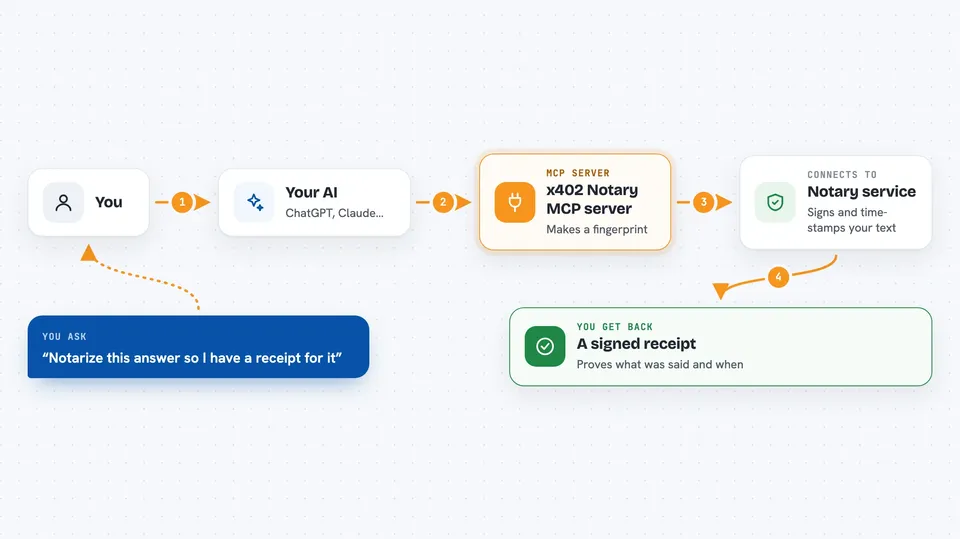
This is a helper that gives your AI a way to stamp its own answers with a receipt. You send it a question and an answer, and it hands back a signed proof that this exact text existed at that moment. It is handy for anyone who needs to show later that an AI really produced a certain answer, like people writing reports, doing audits, or passing work between AI helpers.
What is an MCP server? The 30-second version
On its own, your AI can only chat with you. An MCP server is a small helper program you connect once, and it gives your AI a new skill. This one connects your AI to a notary service called x402 Notary, so when you ask it to, your AI can send text there and get back a signed receipt. Think of it like a notary public for AI answers, except it works in seconds and costs a tiny fraction of a cent.
What this MCP server does
You ask your AI to notarize something, like a question you asked and the answer it gave. Your AI passes that text to this helper. The helper makes a short fingerprint of the text, signs it with the notary's private key, and adds a timestamp. It pays a very small fee in USDC automatically, then hands back a receipt with the fingerprint, the signature, and the time. Later, you or anyone else can check that receipt to confirm the text has not been changed.
 Click to zoom
What you can do with it
- Notarize a single AI answer and get a signed receipt
- Notarize up to 20 answers in one go for an audit trail
- Verify any receipt for free to check it has not been tampered with
- Fetch the public proof details for a receipt you saved earlier
- Look up live stats like how many receipts have been made and which models are used most
- Get the notary's public key so you can check receipts offline without asking the service
Try asking your AI
- “Notarize this answer so I have a receipt for it”
- “Make a receipt for the last three answers you gave me”
- “Verify this receipt and tell me if the text still matches”
- “Show me the notary stats and the public key”
What it gives back to you
You get back a receipt with an ID, a content fingerprint, a signature, and the time it was stamped. The receipt also shows whether it has been sealed into a batch with a Merkle root, which is a way of locking many receipts together. In the chat, your AI will usually show you the receipt ID and a short summary, and you can save the full details if you need them. Verification just returns a simple yes or no with the reason if something does not match.
Before you start
What you need
- A dedicated low-balance Base wallet with a small amount of USDC (about $1 covers 1,000 receipts)
- The wallet's private key, set as WALLET_PRIVATE_KEY in the setup
- Node.js installed on your computer so npx can run the helper
- For Solana instead of Base: a dedicated low-balance Solana keypair and the Solana rail settings
Good to know
The notary fees are tiny but real, so keep the wallet you connect small and dedicated, and remember that notarizing sends a fingerprint of your text to the service even though the raw text itself is not stored.
Install it with your AI
Add x402 Notary MCP server to your AI, no technical skills needed
You don't install anything by hand. You copy one prompt, paste it into an AI that can work on your computer, and it checks, installs and connects the server for you, asking you when it needs something.
Sign in to get the install prompt
Members get a ready-made prompt that lets the Claude desktop app check x402 Notary MCP server, install it and connect it for them, step by step. You don't need any technical skills: you copy, paste and answer a few questions. Your connected AI can also find and install any of the 4,609 MCP servers here for you.
Who it's for
People who need a record of what an AI said, like auditors, compliance staff, researchers writing reports, and anyone passing AI work to someone else who might question it later.



