
MCP server · Research
FoundRole Jobs MCP server
by foundrole
Ask your AI for jobs and get live openings with pay, visa and ghost-posting checks, plus a tracker.
This connects your AI assistant to FoundRole, a job board with a built-in application tracker. Once it is set up, you can ask for jobs in plain words and get real openings back, each one checked for pay, visa sponsorship and whether it looks like a ghost posting. It is handy if you are job hunting and already use ChatGPT, Claude or a similar assistant.
What is an MCP server? The 30-second version
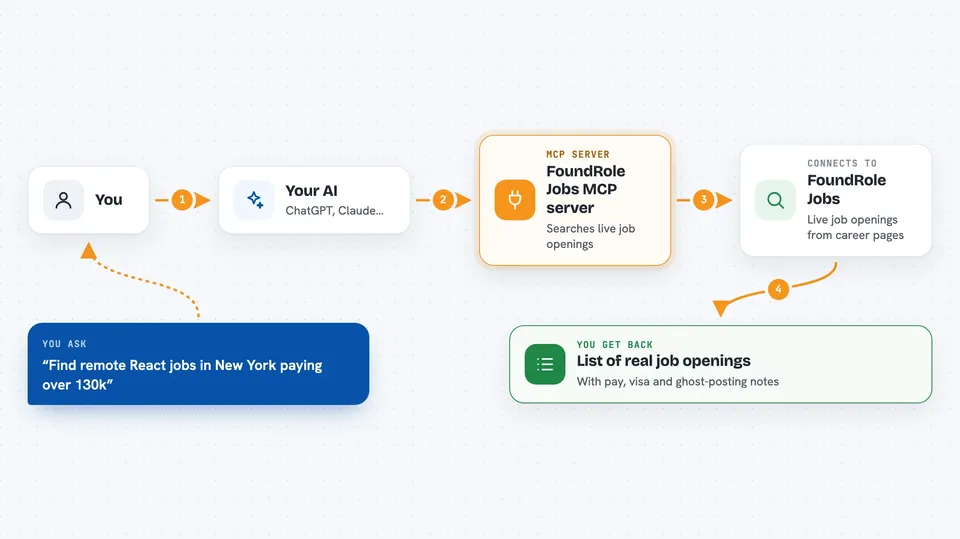
On its own, your AI can only chat with you. An MCP server is a small helper that gives it a new skill, in this case a connection to FoundRole's job board and tracker. When you ask for jobs, your AI passes the request to this helper, the helper talks to FoundRole, and the results come back into your chat. You sign in once through your browser, and after that your assistant can search, save and track jobs for you.
What this MCP server does
You ask your AI something like find remote React jobs in New York paying over 130k. Your AI sends that to the FoundRole helper, which searches live openings pulled from company career pages. The helper also checks each posting for ghost-posting risk, real pay, and whether the company has sponsored visas before. The results come back in your chat, and you can save any of them to your tracker or set a reminder. Everything uses the same FoundRole account you would see on the website.
 Click to zoom
What you can do with it
- Search live job openings by title, location, company, salary or posting date
- Check if a posting looks like a ghost job or is really hiring
- See what a role likely pays and whether the company sponsors visas
- Score how well a job matches your resume
- Save jobs to a Kanban tracker and move them through Applied, Interviewing, Offered
- Set reminders and email alerts for new matches
- Paste a job from LinkedIn or a careers page and get the same checks
Try asking your AI
- “Find senior backend engineer roles in San Francisco posted this week”
- “Does Stripe sponsor visas and what does this role really pay”
- “Compare these two roles on fit, pay and sponsorship”
- “Save this job to my tracker and mark it Applied”
- “Recommend jobs that match my resume”
What it gives back to you
You get back a list of real job openings with details like company, location, pay range and posting date. Each one comes with notes on ghost-posting risk, salary benchmarks and visa sponsorship history. You can also get match scores against your resume, a view of your tracker board, or a summary of your saved jobs. In some apps like ChatGPT, results show up as interactive panels instead of plain text.
Before you start
What you need
- A free FoundRole account (you sign in through your browser the first time)
- An AI assistant that supports MCP, like ChatGPT, Claude, Cursor or VS Code
- For some clients, Node.js installed if you use the local bridge option
Good to know
It can change your FoundRole tracker and alerts, but it never applies to jobs or emails anyone for you.
Install it with your AI
Add FoundRole Jobs MCP server to your AI, no technical skills needed
You don't install anything by hand. You copy one prompt, paste it into an AI that can work on your computer, and it checks, installs and connects the server for you, asking you when it needs something.
Sign in to get the install prompt
Members get a ready-made prompt that lets the Claude desktop app check FoundRole Jobs MCP server, install it and connect it for them, step by step. You don't need any technical skills: you copy, paste and answer a few questions. Your connected AI can also find and install any of the 4,609 MCP servers here for you.
Who it's for
Job seekers, career changers, and anyone who wants to run their job search from inside ChatGPT or Claude.


