MCP server · Chat
OpenClaw MCP server
by freema
Let your AI hand tasks to an OpenClaw assistant that runs them in the background and reports back.

This is a small helper that connects your AI chat to OpenClaw, an AI assistant that can do longer jobs for you. Once it is set up, you can ask your chat to pass a task to OpenClaw and check on it later. It is handy if you already use OpenClaw and want to reach it from Claude instead of a messaging app.
What is an MCP server? The 30-second version
On its own, your AI can only chat with you. An MCP server is a small helper program that gives your AI a new skill or a connection to another app. This one connects your AI to OpenClaw, so when you ask for something, your AI can hand the job to OpenClaw and bring the answer back to your chat. Think of it as one assistant passing a note to another assistant.
What this MCP server does
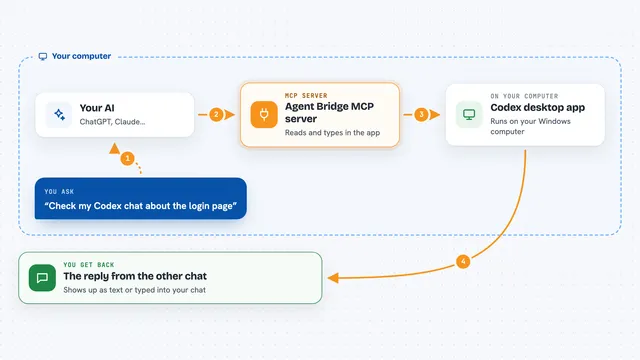
You type a request in your AI chat, like asking OpenClaw to check something or run a job. Your AI passes that request to this helper, which forwards it to your OpenClaw gateway. OpenClaw does the work and sends an answer back. For longer jobs, the helper can queue the task and give you a task id so you can check progress later. You then see the result or the status right in your chat.
 Click to zoom
What you can do with it
- Send a message to OpenClaw and get its reply
- Check whether your OpenClaw gateway is up and healthy
- List the OpenClaw instances you have set up
- Queue a long-running task and get a task id right away
- Check the progress of a queued task
- List your queued tasks and filter them
- Cancel a pending task
Try asking your AI
- “Ask OpenClaw to summarise the latest notes in my project folder”
- “Send this question to my staging OpenClaw instance: is the deploy done?”
- “Queue a task for OpenClaw to run the test suite, then tell me the task id”
- “Check the status of my OpenClaw gateway”
What it gives back to you
You get answers in plain chat text, like OpenClaw's reply to your message. For queued work you get a task id, and later a status update or the final result. Status checks come back as short health or list messages. Everything shows up right in the same conversation you are already in.
Before you start
What you need
- An OpenClaw gateway running with its HTTP API turned on
- The gateway token for your OpenClaw setup
- Node.js 20 or newer, or Docker if you prefer that route
- A client secret you generate yourself if you use the remote Claude.ai setup
Good to know
It can pass tasks to OpenClaw that may change things or run code on your machine, so only connect it to a gateway you trust and keep authentication on.
Install it with your AI
Add OpenClaw MCP server to your AI, no technical skills needed
You don't install anything by hand. You copy one prompt, paste it into an AI that can work on your computer, and it checks, installs and connects the server for you, asking you when it needs something.
Sign in to get the install prompt
Members get a ready-made prompt that lets the Claude desktop app check OpenClaw MCP server, install it and connect it for them, step by step. You don't need any technical skills: you copy, paste and answer a few questions. Your connected AI can also find and install any of the 4,361 MCP servers here for you.
Who it's for
People who already run OpenClaw and want to reach it from Claude Desktop or Claude.ai without leaving their chat.