
MCP server · Security
Wazuh MCP server
by gbrigandi
Ask your AI about your Wazuh security alerts, agents, and vulnerabilities in plain language.
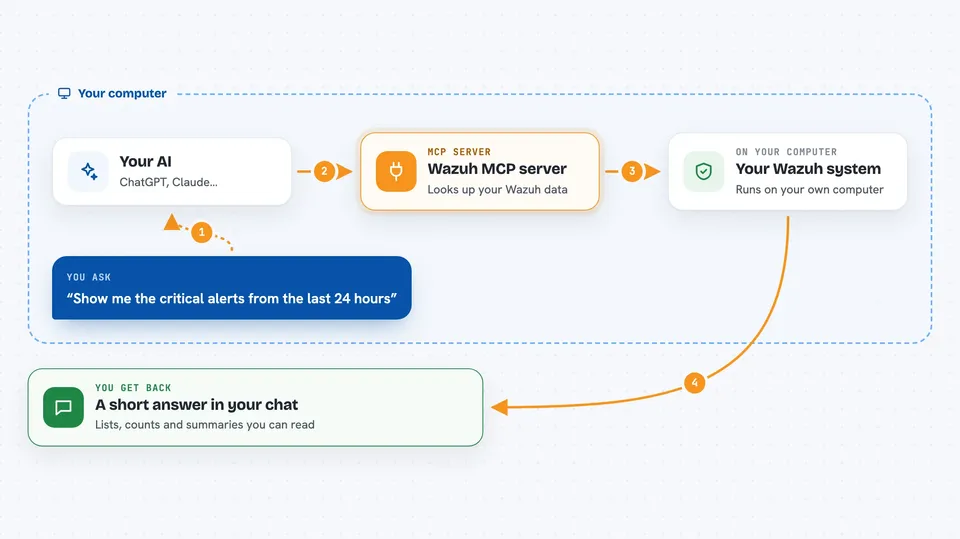
This is a small helper program that connects your AI assistant to Wazuh, a security monitoring system many companies use. Once it is set up, you can ask questions about your security alerts, agents, and vulnerabilities in normal words instead of clicking through dashboards. It is handy for security analysts, IT admins, and compliance teams who already run Wazuh.
What is an MCP server? The 30-second version
On its own, your AI can only chat with you using what it already knows. An MCP server is a small helper program that gives your AI a new skill or a connection to another system. This one connects your AI to your Wazuh security system, so the AI can look things up there and bring answers back to you. You just ask in plain language, and the helper does the technical talking behind the scenes.
What this MCP server does
You ask your AI something like "show me critical vulnerabilities on web servers". The AI passes that request to this helper program. The helper then talks to your Wazuh system using the details you configured, such as the address and login. Wazuh sends back the matching data, and the helper turns it into a clean answer. You see the result right in your chat, as a list, a summary, or a set of numbers.
 Click to zoom
What you can do with it
- Review recent security alerts and spot the ones that need attention
- Check which agents are running and which have gone quiet
- List vulnerabilities on a specific agent and prioritize patching
- See which processes and network ports are open on an agent
- Look at your detection rules and how well they are working
- Check the health of your Wazuh cluster and its nodes
- Search manager logs when you are investigating an incident
Try asking your AI
- “Show me the critical alerts from the last 24 hours”
- “Which agents are currently offline?”
- “List the critical vulnerabilities on agent 001”
- “Are we meeting PCI-DSS logging requirements?”
What it gives back to you
You get answers in the chat, usually as short lists or summaries. For example, a list of alerts with severity and time, a count of offline agents, or the names of vulnerable software on a machine. Some requests return numbers and statistics, like weekly totals or cluster status. It reads and reports; it does not change anything in Wazuh for you.
Before you start
What you need
- A running Wazuh server (version 4.12 recommended) with its API turned on and reachable
- The Wazuh API address, port, username, and password
- The Wazuh Indexer address, port, username, and password
- An MCP-compatible AI app, such as the Claude desktop app
Good to know
It reads your security data, so treat the Wazuh login details as sensitive and keep the SSL check turned on in production.
Install it with your AI
Add Wazuh MCP server to your AI, no technical skills needed
You don't install anything by hand. You copy one prompt, paste it into an AI that can work on your computer, and it checks, installs and connects the server for you, asking you when it needs something.
Sign in to get the install prompt
Members get a ready-made prompt that lets the Claude desktop app check Wazuh MCP server, install it and connect it for them, step by step. You don't need any technical skills: you copy, paste and answer a few questions. Your connected AI can also find and install any of the 4,361 MCP servers here for you.
Who it's for
Security analysts, IT administrators, and compliance teams who already use Wazuh and want to query it in plain language.




