
MCP server · Analytics
Duplicacy backup MCP server
by GeiserX
Ask your AI how your Duplicacy backups are doing and get status, history and health answers.
This is a small helper that lets your AI assistant check on your Duplicacy backups. Duplicacy is a backup tool, and this server reads the numbers it produces so your AI can tell you what happened. It is handy if you run backups on a server and want to ask questions about them in plain words instead of opening dashboards.
What is an MCP server? The 30-second version
On its own, your AI can only chat with you. An MCP server is a small helper program that gives your AI one new skill. This helper connects your AI to your Duplicacy backup monitoring, so it can look up backup status and history for you. You ask a question, and the AI uses this helper to fetch the answer.
What this MCP server does
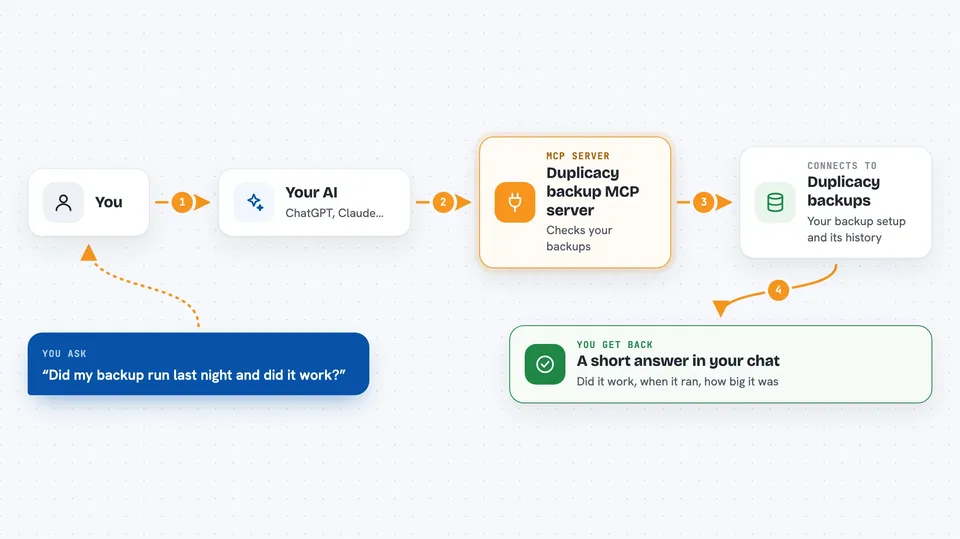
You ask your AI something like whether last night's backup finished. The AI passes that question to this helper. The helper reads the numbers from your Duplicacy exporter, which is a small service that watches your backups. Then the AI turns those numbers into a short answer in the chat, like whether the backup succeeded, when it ran, and how big it was.
 Click to zoom
What you can do with it
- Check whether your latest backup finished successfully
- See the history of past backup runs
- List the snapshots that exist in your backup storage
- Check the status of cleanup (prune) jobs
- Look at the overall health of your backup setup
- Ask follow-up questions about a failed or slow backup
Try asking your AI
- “Did my Duplicacy backup run last night and did it succeed?”
- “Show me the last five backup runs and how long each took”
- “Which snapshots do I have in my backup storage?”
- “Is anything wrong with my backup setup right now?”
What it gives back to you
You get short written answers in the chat, based on the live numbers from your exporter. That can be a yes or no about a backup, a small list of recent runs with times and sizes, or a list of snapshots. If something looks off, the AI can point at which part looks unhealthy.
Before you start
What you need
- A running Duplicacy backup setup
- The duplicacy-exporter service running and reachable, since this server reads its numbers
- The address of that exporter (a URL, for example http://localhost:9750)
- Either Docker or Node.js, depending on how you choose to run this server
Good to know
This server only reads backup information, but it listens on a local port by default, so do not expose it to the internet without adding authentication in front.
Install it with your AI
Add Duplicacy backup MCP server to your AI, no technical skills needed
You don't install anything by hand. You copy one prompt, paste it into an AI that can work on your computer, and it checks, installs and connects the server for you, asking you when it needs something.
Sign in to get the install prompt
Members get a ready-made prompt that lets the Claude desktop app check Duplicacy backup MCP server, install it and connect it for them, step by step. You don't need any technical skills: you copy, paste and answer a few questions. Your connected AI can also find and install any of the 4,609 MCP servers here for you.
Who it's for
People who run Duplicacy backups on a home server or at work and want a quick, plain-language way to check on them.



