MCP server · Design tools
Mermaid MCP server
Turn a project folder or GitHub repo into a Mermaid diagram and a PNG image.

This is a helper that lets your AI look through a project's files and draw a diagram of how it is put together. You point it at a folder on your computer or at a GitHub repository, and it can list the files, read them, and make a Mermaid diagram. It is handy for anyone who has to understand an unfamiliar codebase quickly.
What is an MCP server? The 30-second version
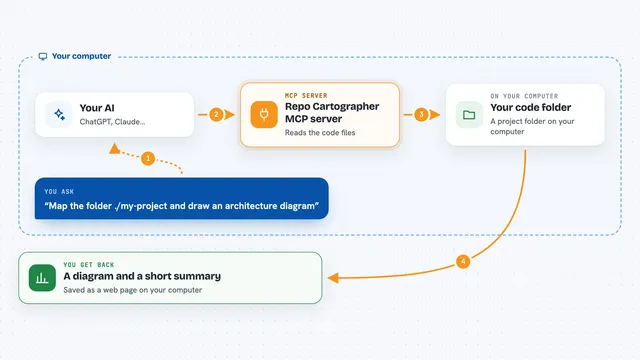
On its own, your AI can only chat with you. An MCP server is a small helper program that gives your AI a new skill or a connection to an app or service. This one connects your AI to your project files and to a diagram service called Kroki, so the AI can look things up and draw diagrams for you. When you ask, the AI uses this helper to read your files and turn them into a picture.
What this MCP server does
You ask your AI to make a diagram of a project. The AI uses this helper to list the files in a local folder or a GitHub repository. Then it reads the files you care about. Next it writes Mermaid diagram text based on what it read. Finally it sends that text to Kroki, which turns it into a PNG image. You get the image back in the chat and it is also saved as a file on your computer.
 Click to zoom
What you can do with it
- List files in a local project folder or a GitHub repository
- Read the contents of a specific file from either source
- Generate a Mermaid diagram from what it read
- Render that Mermaid diagram into a PNG image
- Save the PNG to a folder on your computer
- Filter files by pattern, like only Python files
- Choose a branch or version of a GitHub repo to look at
Try asking your AI
- “List all the Python files in this project and then draw a diagram of how they connect.”
- “Read the main server file and the tools files from this GitHub repo and make a flowchart.”
- “Make a Mermaid diagram of the folder structure of my project and render it as a PNG.”
- “Show me a diagram of how the pieces of this repository fit together.”
What it gives back to you
You get a PNG image of the diagram right in the chat, plus the same image saved as a file in a diagrams folder inside your project. The AI may also show you the list of files it looked at and a short summary of what it found. If something goes wrong, like a file being too big or a path being outside your project, you get a clear error message instead of a diagram.
Before you start
What you need
- Python 3.10 or newer installed on your computer
- Internet access, because the diagram service Kroki and GitHub are online
- The project folder you want to look at, or a GitHub repository address
- A GitHub token if you want to avoid GitHub rate limits (optional but recommended)
Good to know
It can read files inside the project folder you point it at, so only set PROJECT_ROOT to a folder you are comfortable sharing with your AI, and be aware that it saves PNG files that can overwrite existing ones with the same name.
Install it with your AI
Add Mermaid MCP server to your AI, no technical skills needed
You don't install anything by hand. You copy one prompt, paste it into an AI that can work on your computer, and it checks, installs and connects the server for you, asking you when it needs something.
Sign in to get the install prompt
Members get a ready-made prompt that lets the Claude desktop app check Mermaid MCP server, install it and connect it for them, step by step. You don't need any technical skills: you copy, paste and answer a few questions. Your connected AI can also find and install any of the 4,361 MCP servers here for you.
Who it's for
Developers, technical writers, and anyone who needs to understand a codebase quickly, especially when joining a new project or reviewing someone else's work.