
MCP server · Developer tools
Repo Cartographer MCP server
Ask your AI to draw an architecture map of a code folder, so you can see how it is built without reading every file.
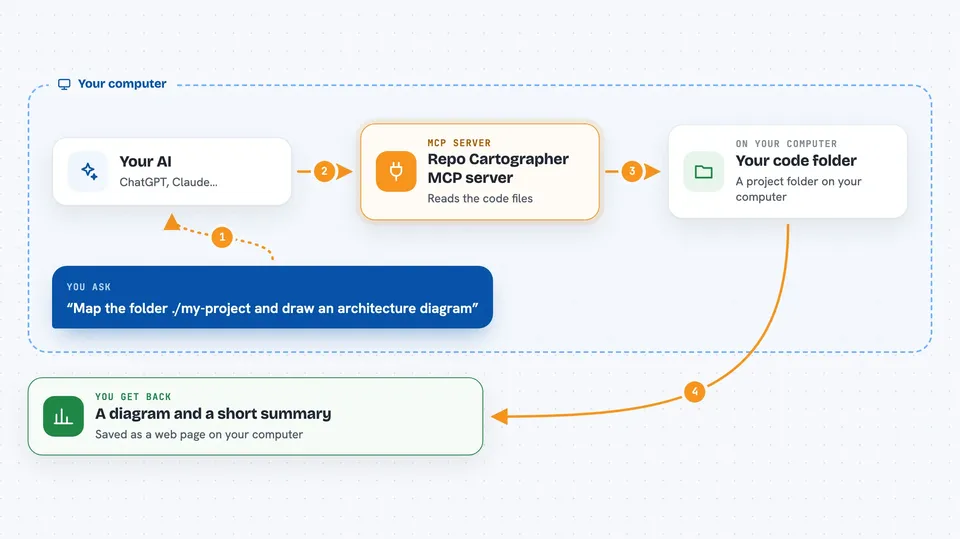
This is a helper for your AI that looks at a folder full of code and draws a map of how it fits together. You point it at the folder, and you get back a diagram plus a short description of what is inside. It is handy when you have inherited a project and you are not the person who wrote it.
What is an MCP server? The 30-second version
On its own, your AI can only chat. It cannot see the files on your computer or open other programs for you. An MCP server is a small helper program you connect to your AI to give it one new skill, and this one gives your AI the skill of reading a code folder and drawing a map of it. Once it is connected, you can ask in plain words and the AI will quietly use this helper behind the scenes.
What this MCP server does
You point it at a folder on your computer that holds a project's code. The helper walks through the files and collects simple facts: which languages are used, where the program starts, which folders group together, and which files use which other files. It then writes a first draft diagram in a text format called Mermaid, which many websites show as a proper picture. Your AI reads those facts and the draft, tidies them up, and explains the whole thing to you in normal language.
 Click to zoom
What you can do with it
- Draw an architecture diagram of a folder of code
- See which programming languages and frameworks a project uses
- Find the files where the program starts running
- List the main folders and what each one seems to do
- Show which files depend on which other files
- Save the diagram as a web page you can share with your team
- Set rules about which parts of a project may talk to each other, and get a warning when a change breaks them
Try asking your AI
- “Use repo-cartographer to map the folder ./my-project and draw me an architecture diagram”
- “What languages and frameworks does this folder use?”
- “Which files does the program start from, and what are the main modules?”
- “Check this project against my architecture rules and tell me what is broken”
What it gives back to you
Most of the time you get a picture: a diagram saved as a web page file on your computer, plus the raw diagram text. In the chat you also get a short written summary of what was found, such as the languages, the entry points and the main folders. If you ask it to check your architecture rules, it lists the rule breaks it spotted and where they are. It only reads and reports, it does not change your code.
Before you start
What you need
- Node.js 18 or newer on your computer (a free program that runs this helper)
- A folder of code saved on your computer
- An AI app that can connect to MCP servers, like the Claude desktop app, Claude Code or Cursor
Good to know
It reads every file inside the folder you point it at, so avoid pointing it at folders holding private information you would not want shared, and note that the checking command is designed to fail a build when a rule is broken.
Install it with your AI
Add Repo Cartographer MCP server to your AI, no technical skills needed
You don't install anything by hand. You copy one prompt, paste it into an AI that can work on your computer, and it checks, installs and connects the server for you, asking you when it needs something.
Sign in to get the install prompt
Members get a ready-made prompt that lets the Claude desktop app check Repo Cartographer MCP server, install it and connect it for them, step by step. You don't need any technical skills: you copy, paste and answer a few questions. Your connected AI can also find and install any of the 4,361 MCP servers here for you.
Who it's for
People who have to work with a codebase they did not write, such as project managers, new developers, technical writers and anyone preparing onboarding notes or a handover.




