MCP server · Developer tools
Tentra MCP server
by rdanieli
Turn plain English into architecture diagrams, code exports, and drift reports for your repo.

Tentra is a helper that lets your AI assistant design software systems and keep a memory of your codebase. You describe what you want in normal words, and it draws the picture, writes starter code, and tells you when your diagram no longer matches reality. It is handy for developers and architects who plan systems and want their AI to remember how the code fits together.
What is an MCP server? The 30-second version
On its own, your AI can only chat. An MCP server is a small helper program that gives your AI a new skill or a connection to an app or service. This one connects your AI to Tentra, a hosted architecture platform, so the AI can create diagrams, scan your code, and answer questions about your project. You just ask in plain words, and the AI uses this helper behind the scenes.
What this MCP server does
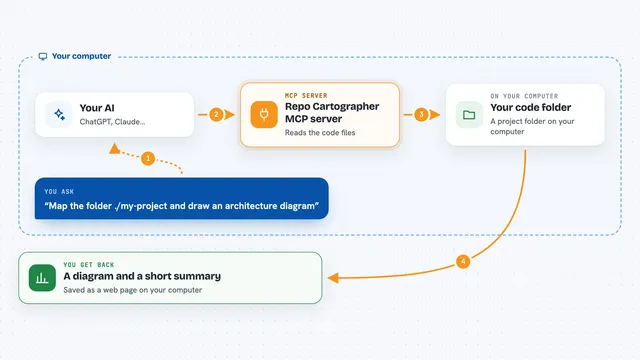
You tell your AI something like "design a payment system" or "scan this codebase." The AI passes that to the Tentra helper, which talks to the Tentra service. Tentra builds a diagram, indexes your files, or checks for drift, and sends the result back. Your AI then shows you a link, a summary, or a downloadable file right in the chat.
 Click to zoom
What you can do with it
- Describe a system in plain words and get an interactive architecture diagram
- Scan your local codebase and turn it into a diagram of services, databases, and queues
- Export a design as starter code for Spring Boot, FastAPI, Terraform, and 11 other frameworks
- Check whether your diagram still matches your code and see what drifted
- Ask where a symbol is used and get every caller without re-reading files
- List the most connected pieces of your code (god nodes) and quality hotspots
- Store architecture decisions and link them to the code they affect
Try asking your AI
- “Design a payment system with Stripe, Kafka, and PostgreSQL”
- “Scan this codebase and generate the architecture”
- “Export this architecture to Java Spring Boot”
- “What changed since last time? Is my diagram outdated?”
What it gives back to you
You get back a link to an interactive diagram, a written summary, or a downloadable zip of starter code. For code questions, you get lists of symbols, callers, or a narrative walkthrough. Drift checks return a report with an accuracy score and the files that changed.
Before you start
What you need
- A Tentra account and API key from trytentra.com/settings
- Node.js installed if you want the local install (needed for scanning your codebase)
- An AI coding tool that supports MCP, like Cursor, Claude Code, Codex, or Windsurf
Good to know
It reads your codebase and stores architecture data in your Tentra account, so only point it at repos you are allowed to share with that service.
Install it with your AI
Add Tentra MCP server to your AI, no technical skills needed
You don't install anything by hand. You copy one prompt, paste it into an AI that can work on your computer, and it checks, installs and connects the server for you, asking you when it needs something.
Sign in to get the install prompt
Members get a ready-made prompt that lets the Claude desktop app check Tentra MCP server, install it and connect it for them, step by step. You don't need any technical skills: you copy, paste and answer a few questions. Your connected AI can also find and install any of the 4,361 MCP servers here for you.
Who it's for
Developers, tech leads, and architects who plan systems and want their AI to remember how the code is put together.