
MCP server · Finance and crypto
Finbud Data MCP server
by glaksmono
Lets your AI pull live stock, options, crypto and forex data, plus company financials and news.
This is a helper that connects your AI assistant to Finbud Data, a service that provides financial market information. Once it is set up, you can ask your AI about stocks, options, crypto, forex, company earnings and economic events, and it will fetch real numbers instead of guessing. It is handy for anyone who works with markets, does research, or just wants quick answers about a company or a ticker.
What is an MCP server? The 30-second version
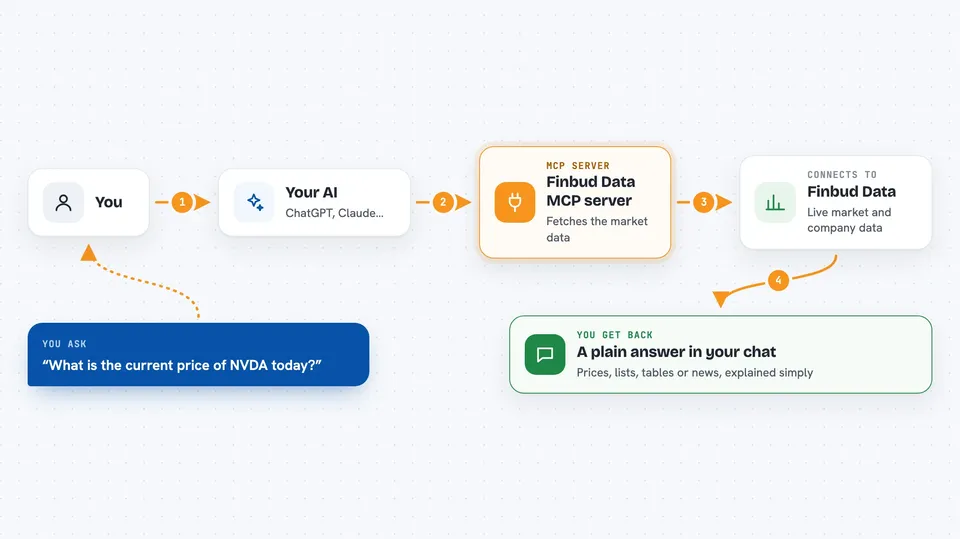
On its own, your AI can only chat with you using what it already learned. An MCP server is a small helper program that gives your AI a new skill or a connection to an outside service. This one connects your AI to Finbud Data, so when you ask about a stock price or a company's balance sheet, the AI can go look it up for you. You do not need to understand how it works under the hood, you just ask in plain words.
What this MCP server does
You ask your AI a question, like what Apple's latest earnings were or which stocks gained the most today. The AI passes your request to this helper program. The helper talks to Finbud Data over the internet and asks for the specific information you need. Finbud Data sends back the numbers, news or lists, and the helper hands them to your AI. Your AI then explains the answer to you in the chat, in normal language.
 Click to zoom
What you can do with it
- Look up real-time stock quotes for one or more tickers
- Check analyst ratings, price targets and earnings estimates for a company
- Read a company's income statement, balance sheet, cash flow and key ratios
- See which stocks are the top gainers, losers or most active today
- Browse earnings calendars and earnings call transcripts
- Follow insider trading and U.S. congress disclosure data
- Get recent news for stocks, crypto and forex
- Explore options chains, trades and technical indicators
Try asking your AI
- “What is the current price of NVDA and how has it moved today?”
- “Show me Apple's last three years of revenue and net income.”
- “Which stocks gained the most today?”
- “What are analysts saying about Tesla right now?”
- “Any recent news about Bitcoin?”
What it gives back to you
You get answers in plain language in your chat, based on real data from Finbud. Depending on what you ask, that could be a price, a short list of stocks, a table of financial figures, a summary of analyst opinions, or a few recent news headlines. Your AI may also show the raw numbers it received so you can check them.
Before you start
What you need
- A Finbud Data API key (a kind of password for apps; you get one from Finbud)
- Node.js installed on your computer if you run it locally
- An AI client that supports MCP servers, such as the Claude desktop app
Good to know
This tool only reads data from Finbud, it does not place trades or move money, but the information it returns may be delayed or incomplete and should not be your only source for investment decisions.
Install it with your AI
Add Finbud Data MCP server to your AI, no technical skills needed
You don't install anything by hand. You copy one prompt, paste it into an AI that can work on your computer, and it checks, installs and connects the server for you, asking you when it needs something.
Sign in to get the install prompt
Members get a ready-made prompt that lets the Claude desktop app check Finbud Data MCP server, install it and connect it for them, step by step. You don't need any technical skills: you copy, paste and answer a few questions. Your connected AI can also find and install any of the 4,609 MCP servers here for you.
Who it's for
Anyone who needs quick, factual financial data at work, like analysts, investors, finance students, journalists and business researchers.



