
MCP server · Security
GuardVibe MCP server
by goklab
Your AI can scan your code for security problems and suggest fixes while you build.
GuardVibe is a security scanner that plugs into the AI coding assistant you already use. It checks the code your AI writes for common security mistakes, like exposed passwords or outdated packages with known bugs. It is handy if you are building a web app with AI help and want a second pair of eyes on what gets produced.
What is an MCP server? The 30-second version
On its own, your AI can only chat with you and write code in the conversation. An MCP server is a small helper program that gives your AI a new skill, in this case a connection to GuardVibe's security scanner. Once connected, your AI can ask GuardVibe to check your project files, look for known problems, and report back. You do not run GuardVibe yourself; your AI calls it when you ask it to.
What this MCP server does
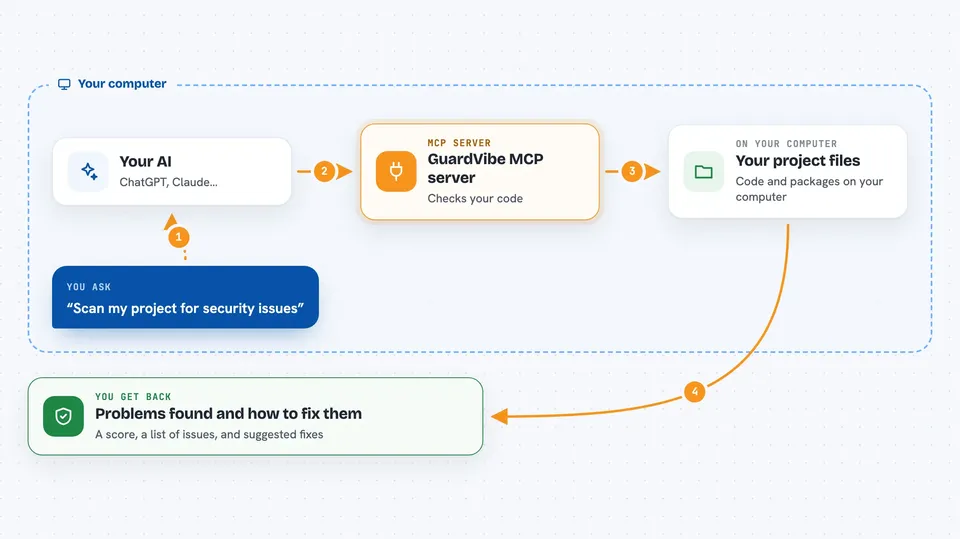
You ask your AI to check your project for security issues. Your AI passes that request to GuardVibe, which reads your code files and dependency list. GuardVibe compares what it finds against hundreds of security rules and a daily-updated list of known vulnerable package versions. It then hands back a list of findings, a security score, and suggested fixes your AI can apply. You see the results in your chat window or in a report file.
 Click to zoom
What you can do with it
- Scan your whole project for security problems and get a score
- Check your package list for known vulnerable versions
- Find hardcoded passwords and API keys in your code
- Spot missing login checks on your web routes
- Get concrete fix suggestions your AI can apply
- Check your AI tool setup for unsafe settings
- Run a security check before you commit code
Try asking your AI
- “Scan my project for security issues and tell me what to fix first”
- “Are any of my npm packages known to be vulnerable?”
- “Check if I left any API keys or passwords in my code”
- “Look at my Next.js routes and tell me which ones are missing login checks”
What it gives back to you
You get a list of findings grouped by type, each with a short explanation and a severity level. You also get a security score for your project and a checklist of fixes. If you ask for a fix, your AI can show you the exact code change to make. Everything appears right in your chat or in a report file you can open.
Before you start
What you need
- Node.js installed on your computer (version 18 or newer)
- An AI coding assistant that supports MCP, like Claude Code, Cursor, or VS Code Copilot
Good to know
It reads your project files to scan them, and the fix suggestions change your code, so review the changes before you accept them.
Install it with your AI
Add GuardVibe MCP server to your AI, no technical skills needed
You don't install anything by hand. You copy one prompt, paste it into an AI that can work on your computer, and it checks, installs and connects the server for you, asking you when it needs something.
Sign in to get the install prompt
Members get a ready-made prompt that lets the Claude desktop app check GuardVibe MCP server, install it and connect it for them, step by step. You don't need any technical skills: you copy, paste and answer a few questions. Your connected AI can also find and install any of the 4,361 MCP servers here for you.
Who it's for
Developers and makers who build web apps with AI coding assistants and want a simple security check without setting up a big security platform.




