MCP server · Health and learning
Suunto MCP server
by googlarz
Ask your AI about your Suunto workouts, heart rate, sleep and recovery, and even send workouts to your watch.
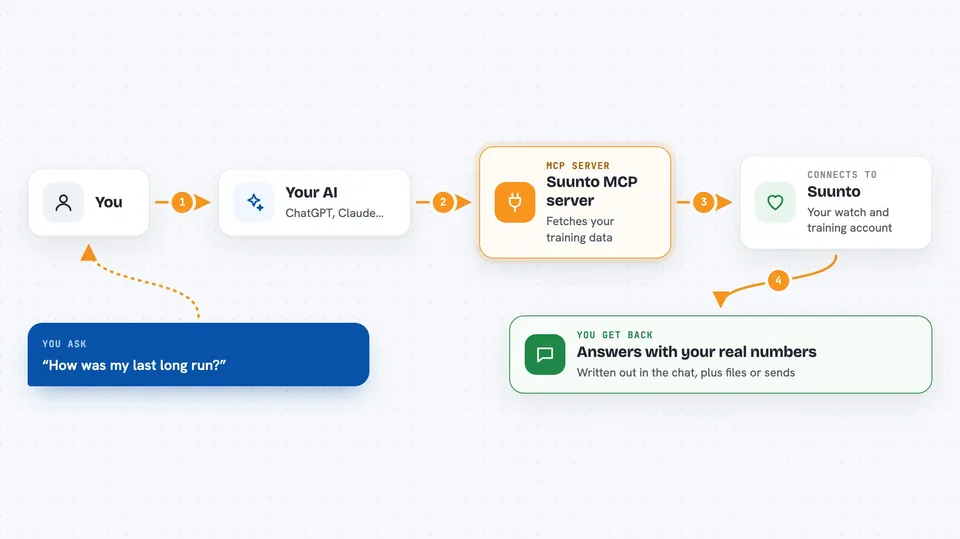
This is a small helper that connects your Suunto watch data to an AI assistant like Claude. Instead of clicking around dashboards, you just ask questions in plain words. It is handy for anyone who trains with a Suunto watch and wants quick, real answers with numbers.
What is an MCP server? The 30-second version
On its own, your AI can only chat with you. An MCP server is a small helper program that gives your AI a new skill or a connection to an app or service. This one connects your AI to your Suunto account, so it can look up your workouts, heart rate, sleep and recovery when you ask. You stay in charge: your AI only sees what you have approved.
What this MCP server does
You ask your AI a question about your training, like how far you ran this month. The AI passes that request to this helper program. The helper talks to Suunto's system using your own account details, and pulls the data you asked for. Then the AI reads it and answers you in the chat, with the actual numbers. It can also send things the other way, like a planned workout to your watch.
 Click to zoom
What you can do with it
- Ask how many kilometers you ran this month
- Compare your last few long runs and heart-rate drift
- Check your resting heart rate trend over recent weeks
- Look at your sleep and recovery scores
- Find every workout where you averaged above a certain heart rate
- Export a route as a GPX file to share
- Send a planned workout to your watch
Try asking your AI
- “How was my last long run?”
- “Compare my last three long runs. Has my heart-rate drift improved?”
- “What's my average resting HR trend over the last two weeks?”
- “Plan tonight's gym session and send it to my watch.”
What it gives back to you
You get answers in the chat, written in normal sentences, with the real numbers from your watch. It can show lists of workouts, comparisons, trends over time, and summaries like a coaching report. If you ask for an export, it can give you a file such as a GPX route. If you push a workout, it confirms that it was sent to your watch.
Before you start
What you need
- A Suunto watch synced to the Suunto app
- A free account on Suunto's developer portal (apizone.suunto.com), which needs approval and can take 3 to 4 weeks
- Three codes from that portal: a Client ID, a Client Secret you make up, and a Subscription Key
- Node.js and Git installed on your computer, plus an MCP-compatible AI app like Claude Desktop
Good to know
It can read your personal health and training data, and it can also send workouts to your watch, so keep your account codes private and check anything before you push it.
Install it with your AI
Add Suunto MCP server to your AI, no technical skills needed
You don't install anything by hand. You copy one prompt, paste it into an AI that can work on your computer, and it checks, installs and connects the server for you, asking you when it needs something.
Sign in to get the install prompt
Members get a ready-made prompt that lets the Claude desktop app check Suunto MCP server, install it and connect it for them, step by step. You don't need any technical skills: you copy, paste and answer a few questions. Your connected AI can also find and install any of the 4,609 MCP servers here for you.
Who it's for
Suunto watch users who train regularly and want to ask their AI quick questions about workouts, heart rate, sleep and recovery.