
MCP server · Security
mcp-bastion security proxy
by Gowthaman90
Adds a safety guard between your AI and your other tools, blocking sneaky changes and leaked secrets.
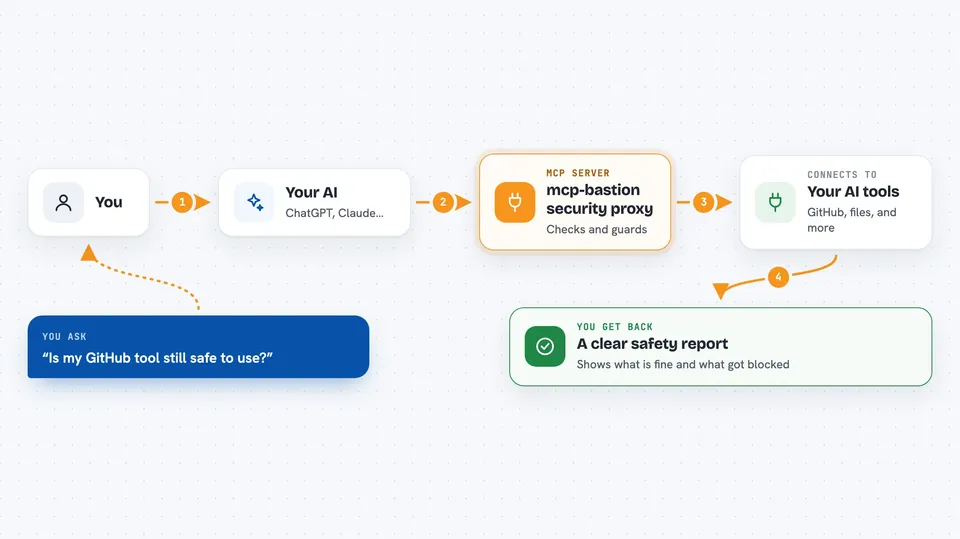
mcp-bastion is a small guard program that sits between your AI assistant and the other tools it uses. Instead of your AI talking straight to each tool, it talks to Bastion first, and Bastion checks everything on the way through. It is handy for anyone who has connected several tools to their AI and wants a bit more safety and fewer confusing errors.
What is an MCP server? The 30-second version
On its own, your AI can only chat with you. An MCP server is a small helper program that gives your AI a new skill or a connection to an app, and mcp-bastion is a special kind of helper: it stands in front of your other helpers. Your AI talks to Bastion, and Bastion talks to your real tools like GitHub or your files. That way Bastion can watch what goes in and out, reconnect tools that drop, and warn you about anything odd.
What this MCP server does
You keep using your AI the same way you always do. Behind the scenes, Bastion passes your request to the right tool, like GitHub or your files, and brings the answer back. While doing that, it checks whether a tool has quietly changed since you last approved it, looks for sneaky instructions hidden in tool descriptions, and hides any passwords or keys that show up in results. If a tool disconnects, Bastion tries to reconnect it on its own instead of leaving your AI stuck. You can also ask your AI to check the health of your tools or show a security report.
 Click to zoom
What you can do with it
- Check which of your connected tools are working and which have dropped
- Reconnect a tool that stopped responding without restarting anything
- See a security report showing if any tool changed or looks suspicious
- Block a tool that quietly changed its behavior after you approved it
- Hide leaked passwords and keys from tool results before your AI sees them
- Get a summary of recent activity mapped to common security checklists
- Keep your existing tools running unchanged, with an easy way to undo
What it gives back to you
You get plain answers in the chat, like a list of tools with connected or disconnected next to each one. The security report shows each tool's name, whether it still matches what you approved, and any warnings. If you turn on the audit feature, you can also get a summary of recent activity. When Bastion blocks or hides something, it tells you in the chat what it did and why.
Before you start
What you need
- A tool that uses MCP, like Claude Desktop, Cursor, or Claude Code
- Node.js installed on your computer (the free program that runs npx)
- A small config file listing the tools you already use
Good to know
Bastion can block a tool it thinks changed or looks risky, and only a person (not the AI) can unblock it, so you may need to clear it yourself.
Install it with your AI
Add mcp-bastion security proxy to your AI, no technical skills needed
You don't install anything by hand. You copy one prompt, paste it into an AI that can work on your computer, and it checks, installs and connects the server for you, asking you when it needs something.
Sign in to get the install prompt
Members get a ready-made prompt that lets the Claude desktop app check mcp-bastion security proxy, install it and connect it for them, step by step. You don't need any technical skills: you copy, paste and answer a few questions. Your connected AI can also find and install any of the 4,609 MCP servers here for you.
Who it's for
Anyone who has connected a few tools to their AI and wants a safety net, especially people handling work files, code, or company data.



