
MCP server · Finance and crypto
Chart Library MCP server
by grahammccain
Lets your AI look up past stock chart patterns and what happened next, using a ticker and a date.
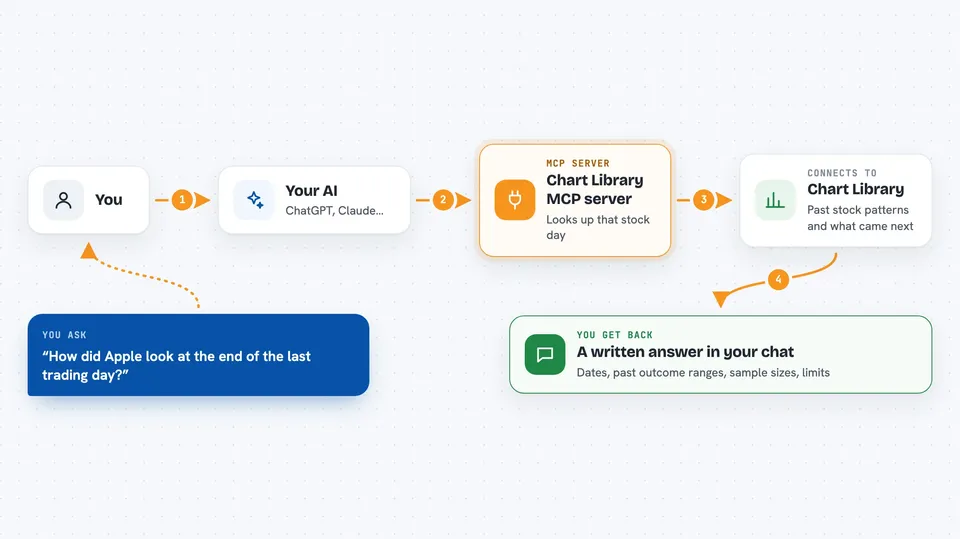
Chart Library is a service that keeps a memory of how stocks behaved in the past. This MCP server connects that memory to your AI, so you can ask about a stock and get back similar historical moments and what followed. It is handy for anyone who studies markets, writes research, or is just curious how a chart today compares to earlier ones.
What is an MCP server? The 30-second version
On its own, your AI can only chat with you. An MCP server is a small helper that gives your AI a new skill or a connection to an outside service. This helper connects your AI to Chart Library, a place that stores historical stock chart patterns and published research. Once it is connected, you can ask your AI a question about a stock, and it will go fetch the answer from Chart Library for you.
What this MCP server does
You ask your AI something like how Apple looked at the end of a recent trading day. Your AI sends that request to this helper, and the helper talks to Chart Library. Chart Library looks up the completed session for that stock, finds similar past moments, and gathers the outcome ranges and sample sizes. Your AI then shows you a plain answer in the chat, with the dates and numbers it found.
 Click to zoom
What you can do with it
- Look up the latest completed-session state for a stock ticker
- See historical analog patterns and what happened after them
- Read published daily research notes
- Search published research by keyword
- Read a full research document by its ID
- Check the calibration and quality of the published research
- Ask about a specific past date instead of the latest one
Try asking your AI
- “Read AAPL's latest completed-session state and report the historical analog ranges, sample sizes, session date and limitations.”
- “What does the daily note say for 2025-01-15?”
- “Search the research for IONQ noon casebook entries.”
- “Show me the research quality receipt and what it covers.”
What it gives back to you
You get back a written answer in the chat, not a chart image. It usually includes the stock symbol, the session date, the historical analog ranges, the sample sizes, and any limitations the service flags. Research reads come back as text documents with sections and version details. If the evidence is thin or missing, the answer says so instead of guessing.
Before you start
What you need
- The Claude desktop app or another app that supports MCP servers
- Python 3.10 or newer if you use the command-based setup
- No API key is required for the public endpoint
Good to know
This is research memory, not advice, and the numbers are historical observations, not forecasts or recommendations to buy or sell.
Install it with your AI
Add Chart Library MCP server to your AI, no technical skills needed
You don't install anything by hand. You copy one prompt, paste it into an AI that can work on your computer, and it checks, installs and connects the server for you, asking you when it needs something.
Sign in to get the install prompt
Members get a ready-made prompt that lets the Claude desktop app check Chart Library MCP server, install it and connect it for them, step by step. You don't need any technical skills: you copy, paste and answer a few questions. Your connected AI can also find and install any of the 4,609 MCP servers here for you.
Who it's for
People who follow markets, write research notes, or want to compare today's chart to past ones without doing the digging by hand.



