
MCP server · Developer tools
GridProof MCP server
by gridproof
Your AI can check a running web page for spacing and sizing mistakes and tell you how to fix them.
GridProof is a small helper for your AI that looks at a web page you are building and points out spacing and sizing problems. It is made for people who build front ends, especially with Tailwind, and who want their AI to catch the little layout slips that normally ship unnoticed. If you work with a coding assistant and care about tidy, consistent pages, this is for you.
What is an MCP server? The 30-second version
On its own, your AI can only chat with you. An MCP server is a small helper program that gives your AI a new skill or a connection to an app or service. This one connects your AI to a running web page so it can measure the page's spacing and element sizes for you. When you ask, your AI calls GridProof, GridProof looks at the page, and your AI gets back a report it can act on.
What this MCP server does
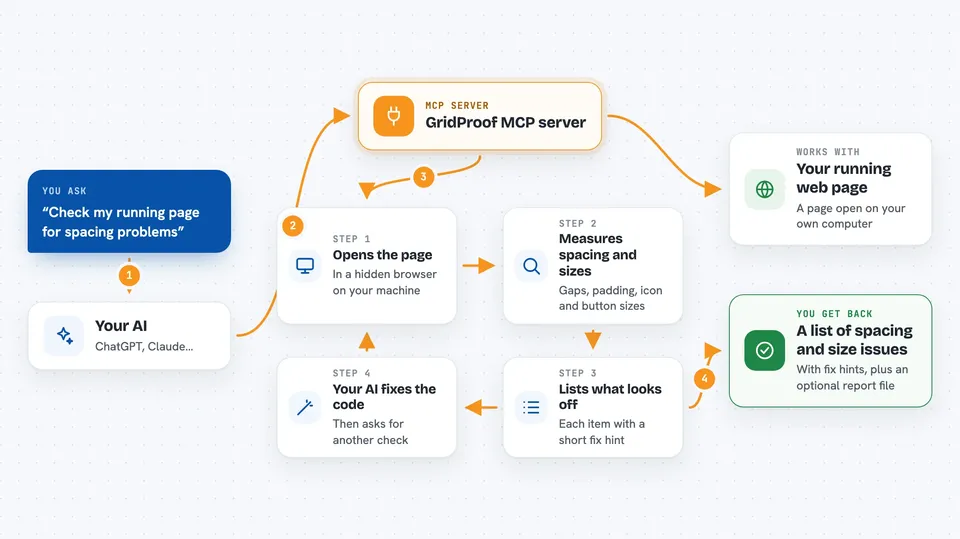
You ask your AI to check a page, and your AI calls GridProof with the address of your running site. GridProof opens that page in a hidden browser, measures the spacing, gaps, and sizes of every element, and compares them to a set of rules. It then hands your AI a list of anything that looks off, with a hint for each one. Your AI can then edit your code and ask GridProof to check again, so the loop closes without you doing the measuring.
 Click to zoom
What you can do with it
- Check a running page for spacing that is not on your design scale
- Spot off-scale Tailwind classes like py-[13px] and suggest a clean value
- Find sibling cards or items that are spaced inconsistently
- Check that icons and buttons are on a consistent size scale
- Flag tap targets that are too small for accessibility
- Get a shareable HTML report of all findings
- Re-check the page after your AI makes fixes
Try asking your AI
- “Audit http://localhost:5173 for spacing and sizing problems”
- “Check my running dev site and tell me which gaps are inconsistent”
- “Run GridProof on the page and give me the fix hints”
- “Make an HTML report of the spacing issues on my local page”
What it gives back to you
You get back a list of findings in your chat, each with the element it found, the value it saw, the value it expected, and a short hint on how to fix it. If you ask for the report, it also writes an HTML file you can open or share. Nothing in your code is changed by GridProof itself; your AI is the one that edits.
Before you start
What you need
- Node.js installed on your computer
- The Chromium browser that Playwright uses (installed once with a command)
- A running web page you can open in a browser
- A project that uses Tailwind if you want all four checks (otherwise only accessibility checks run)
Good to know
It only reads the page, it never edits your files, so the fixes are up to your AI or you.
Install it with your AI
Add GridProof MCP server to your AI, no technical skills needed
You don't install anything by hand. You copy one prompt, paste it into an AI that can work on your computer, and it checks, installs and connects the server for you, asking you when it needs something.
Sign in to get the install prompt
Members get a ready-made prompt that lets the Claude desktop app check GridProof MCP server, install it and connect it for them, step by step. You don't need any technical skills: you copy, paste and answer a few questions. Your connected AI can also find and install any of the 4,609 MCP servers here for you.
Who it's for
Front-end developers and designers who build web pages with Tailwind and use an AI coding assistant.




