
MCP server · Security
SkillsSafe MCP server
by GUCCI-atlasv
Lets your AI check skill files and prompts for hidden security threats before you trust them.
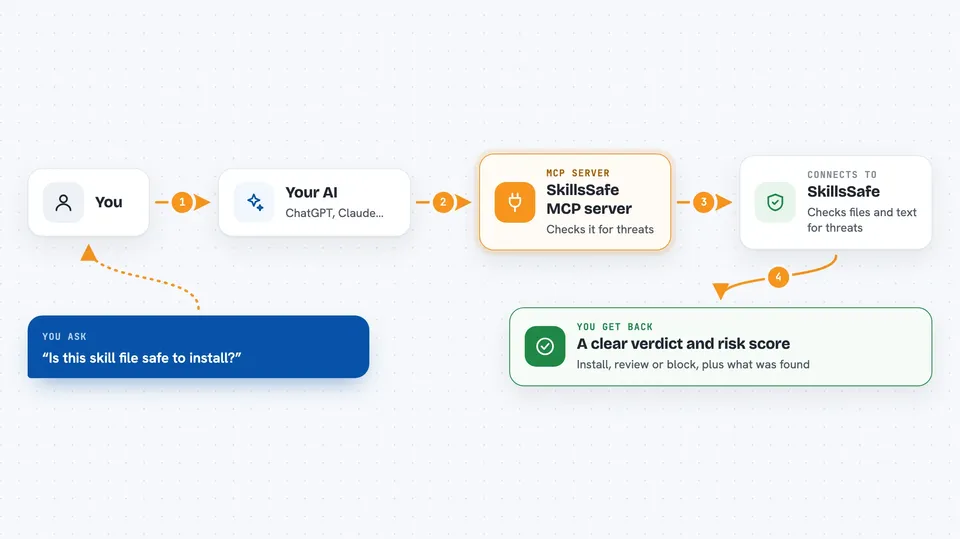
SkillsSafe is a free safety checker for AI skill files, MCP setups and system prompts. You point it at a file or a link, and it looks for sneaky things like stolen passwords, hidden instructions and strange invisible characters. It is handy if you download skills or prompts from the internet and want a second pair of eyes before using them.
What is an MCP server? The 30-second version
On its own, your AI can only chat with you. An MCP server is a small helper program that gives your AI a new skill or a connection to another service. This one connects your AI to SkillsSafe, a security checking service. Once it is connected, you can ask your AI to scan a file or a link, and it will quietly ask SkillsSafe for you and bring back the answer.
What this MCP server does
You give your AI a skill file, a link to one, or a chunk of text, and ask it to check for problems. Your AI passes that to the SkillsSafe helper, which sends it to the SkillsSafe service. The service reads it looking for things like password stealing, hidden instructions, invisible characters and known malware signs. It sends back a simple verdict, a risk score from 0 to 100, and a list of anything suspicious it found. You can then ask for the full report later using the scan ID.
 Click to zoom
What you can do with it
- Scan a skill file from a link before you install it
- Scan text you paste in directly, like a system prompt
- Get a clear verdict: install, review, or block
- See a risk score from 0 to 100
- Read a list of detected threats with their severity
- Fetch a full report again later using its scan ID
- Ask for the answer in English, Chinese or Japanese
Try asking your AI
- “Scan this skill file before I install it: https://raw.githubusercontent.com/example/skill/main/SKILL.md”
- “Check this system prompt for hidden instructions: [paste your text]”
- “Is this MCP config safe to use? Here it is: [paste config]”
- “Show me the full report for scan ID abc123”
What it gives back to you
You get a short verdict in the chat: install, review, or block. Along with it comes a risk score between 0 and 100 and a list of any threats found, each with a severity label. If you want more detail, you can ask for the full report using the scan ID. It reads like a short safety summary, not a wall of technical text.
Before you start
What you need
- The Claude desktop app or another app that supports MCP servers
- Node.js installed on your computer (the setup uses a tool called npx)
Good to know
It only reads and checks what you send it, so it will not change or delete anything, but do not paste real passwords or private keys into it.
Install it with your AI
Add SkillsSafe MCP server to your AI, no technical skills needed
You don't install anything by hand. You copy one prompt, paste it into an AI that can work on your computer, and it checks, installs and connects the server for you, asking you when it needs something.
Sign in to get the install prompt
Members get a ready-made prompt that lets the Claude desktop app check SkillsSafe MCP server, install it and connect it for them, step by step. You don't need any technical skills: you copy, paste and answer a few questions. Your connected AI can also find and install any of the 4,609 MCP servers here for you.
Who it's for
Anyone who downloads AI skills, prompts or MCP setups from the internet and wants a quick safety check first.



