
MCP server · Analytics
ERP Report Engine MCP server
Lets your AI read your ERP database safely and pull orders, stock and sales numbers for you.
This is a helper that connects your AI to the database behind your ERP system, like Logo Tiger, Netsis or Mikro. It lets your AI look up orders, stock levels and sales figures and turn them into reports. It is handy if you work with ERP data but do not want to write SQL yourself.
What is an MCP server? The 30-second version
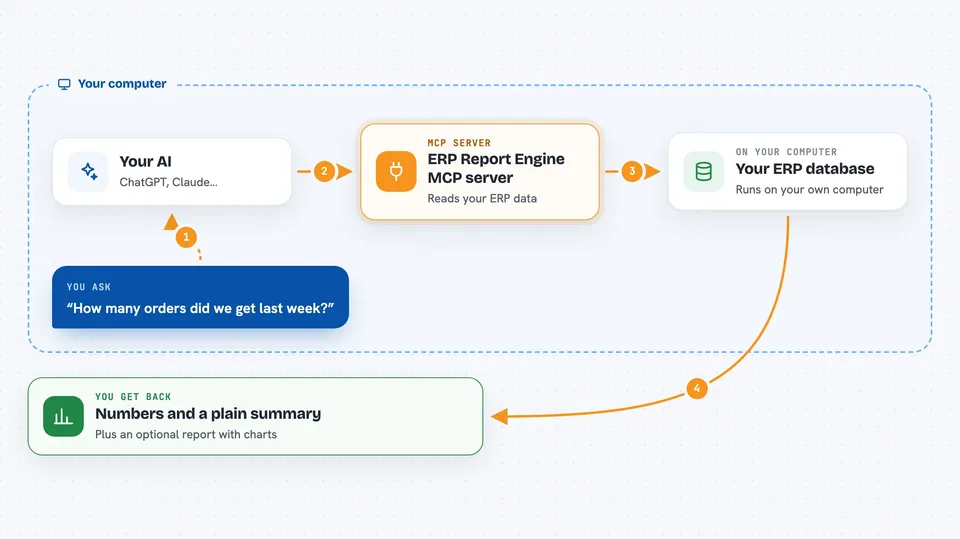
On its own, your AI can only chat with you. An MCP server is a small helper program that gives your AI a new skill or a connection to another system. This one connects your AI to your ERP database, so it can look things up there when you ask. It only reads data, and it has a guard that blocks anything that would change or delete your data.
What this MCP server does
You ask your AI a question about your business, like how many orders came in last week. Your AI sends that request to this helper. The helper turns it into a safe read-only query and runs it against your ERP database. It brings back the numbers, or a full report with charts and findings. You see the answer right in your chat.
 Click to zoom
What you can do with it
- Look up orders and order lines for a period
- Check stock levels and items running low
- Compare this week's sales to the last 8 weeks
- Find which region or product drove a change
- Spot data problems like duplicate or negative rows
- See open receivables and aging when your profile supports it
- Generate a full HTML report from one command
Try asking your AI
- “How many orders did we get last week compared to the week before?”
- “Which region drove the revenue change this week?”
- “Show me items that are below two weeks of stock cover.”
- “Were there any data quality problems in last week's orders?”
What it gives back to you
You get back lists, numbers, short summaries and findings written in plain language. For example, it might say revenue went up 6.5 percent and name the region that caused most of it. It can also produce a full HTML report with KPI cards, charts and a data quality check. Every query it ran is listed so you can see exactly what was read.
Before you start
What you need
- Python 3.10 or newer, or Docker
- A database driver for your ERP, like the MSSQL extra for Logo Tiger, Netsis or Mikro
- The connection details for your ERP database, stored in an environment variable
- A read-only database login (recommended)
Good to know
It can read your ERP data, so use a read-only database login and keep your connection details in an environment variable. The guard blocks writes, but the read-only login is the layer that holds if the guard has a hole.
Install it with your AI
Add ERP Report Engine MCP server to your AI, no technical skills needed
You don't install anything by hand. You copy one prompt, paste it into an AI that can work on your computer, and it checks, installs and connects the server for you, asking you when it needs something.
Sign in to get the install prompt
Members get a ready-made prompt that lets the Claude desktop app check ERP Report Engine MCP server, install it and connect it for them, step by step. You don't need any technical skills: you copy, paste and answer a few questions. Your connected AI can also find and install any of the 4,361 MCP servers here for you.
Who it's for
Finance, operations and reporting staff who use an ERP system and want quick answers or weekly reports without writing SQL or buying a BI license.


