MCP server · Apple, iOS and Mac
iMessage Query MCP server
Lets your AI read and summarize your iMessage conversations with a chosen phone number.
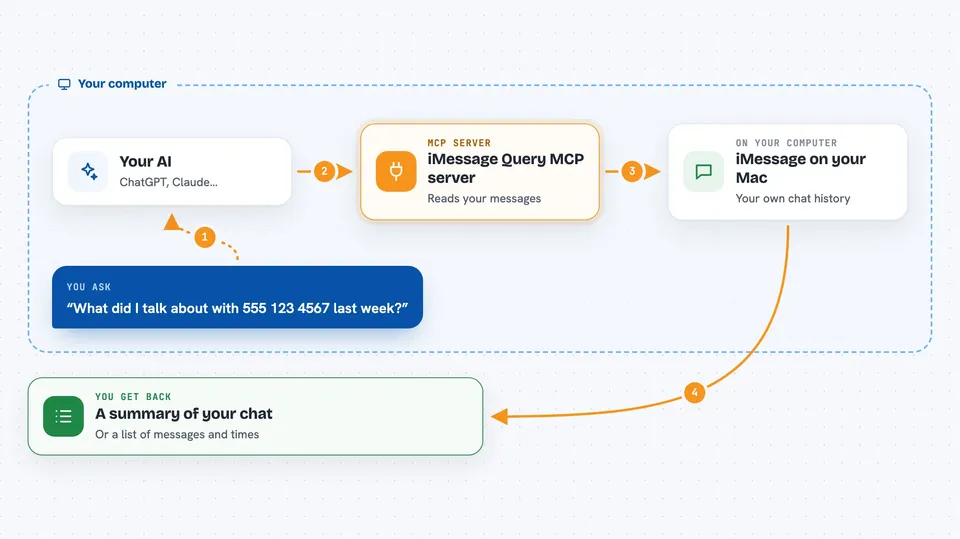
This is a small helper that lets your AI look at your iMessage history on your Mac. You ask a question, and it pulls the messages for a phone number you name. It is handy if you want a quick recap of a chat without scrolling for ages.
What is an MCP server? The 30-second version
On its own, your AI can only chat with you. An MCP server is a small helper program that gives your AI one new skill. This helper connects your AI to your iMessage database on your Mac, so it can look up conversations when you ask. You stay in control: it only reads, and only when you ask a question.
What this MCP server does
You ask your AI something about a chat, like what you and a friend talked about last week. Your AI passes that request to this helper. The helper opens your iMessage database on your Mac, finds the messages for the phone number you gave, and checks that the number is valid. It also notes any attachments and can limit the results to a date range. Then it hands the messages back to your AI, which turns them into an answer for you.
 Click to zoom
What you can do with it
- Get the message history for a specific phone number
- Limit the messages to a date range you choose
- See whether messages had attachments
- Ask for a summary of a long conversation
- Check what was said on a certain day
- Look up the last messages from one contact
Try asking your AI
- “What did I talk about with +1 555 123 4567 last week?”
- “Summarize my messages with 5551234567 from January 1 to January 15.”
- “Did anyone send me an attachment in my chat with +1 555 987 6543?”
- “Show me the last few messages I exchanged with 5551234567.”
What it gives back to you
You get a written answer in the chat, based on the messages it found. That can be a summary, a list of messages with times, or a note about attachments. If the number is not valid or there are no messages in that range, it tells you that instead.
Before you start
What you need
- A Mac, because iMessage only lives there
- Python 3.6 or newer installed
- The Claude desktop app or the Cline plugin in VS Code
Good to know
It reads your private iMessage history, so only connect it on a computer you trust and be mindful about which conversations you ask it to open.
Install it with your AI
Add iMessage Query MCP server to your AI, no technical skills needed
You don't install anything by hand. You copy one prompt, paste it into an AI that can work on your computer, and it checks, installs and connects the server for you, asking you when it needs something.
Sign in to get the install prompt
Members get a ready-made prompt that lets the Claude desktop app check iMessage Query MCP server, install it and connect it for them, step by step. You don't need any technical skills: you copy, paste and answer a few questions. Your connected AI can also find and install any of the 4,361 MCP servers here for you.
Who it's for
Mac users who want quick recaps or searches of their iMessage chats without scrolling through the app.