MCP server · Apple, iOS and Mac
iCloud MCP server
by MrGo2
Lets your AI read and send your iCloud email, calendar, contacts, reminders, notes and messages for you.
This is a helper that connects your AI assistant to your Apple world: Mail, Calendar, Contacts, Reminders, Notes, Messages and Safari. You ask in plain words, and the AI looks things up or makes changes in those apps for you. It is handy if you live in Apple apps all day and want your AI to handle the small stuff.
What is an MCP server? The 30-second version
On its own, your AI can only chat. An MCP server is a small helper program that gives your AI a new skill or a connection to an app. This one connects your AI to your Apple services, so it can check your inbox, look at your calendar or add a reminder when you ask. You set it up once, and after that your AI just uses it quietly in the background.
What this MCP server does
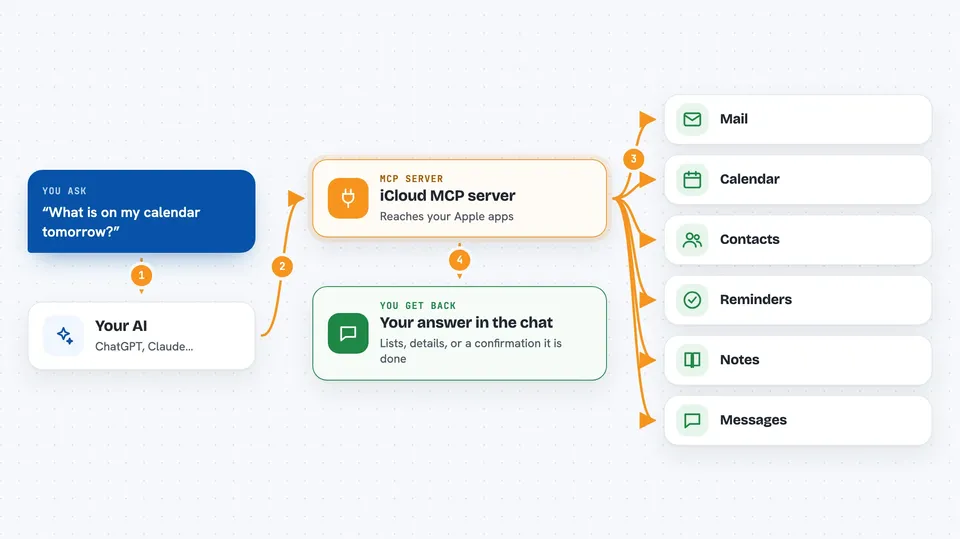
You type a request, like asking what is on your calendar tomorrow. Your AI passes that request to this helper program. The helper then talks to your Apple apps, either by driving the apps on your Mac or by connecting to iCloud over the internet. It brings the answer back and your AI shows it to you in the chat. When you ask it to send or change something, it does that too and tells you it is done.
 Click to zoom
What you can do with it
- List and read your recent emails, and search them by sender or subject
- Send a new email to someone
- Show your upcoming calendar events and add new ones
- Look up a contact by name, email or phone number
- See and add reminders on your lists
- Read and search your Apple Notes
- Read your Messages chats and send a message
- Check which Safari tabs are open and open a new page
Try asking your AI
- “What is on my calendar for the next three days?”
- “Show me the last ten unread emails in my inbox.”
- “Find the phone number for Sarah in my contacts.”
- “Add a reminder to call the dentist tomorrow at 9am.”
- “Send a message to Tom saying I will be ten minutes late.”
What it gives back to you
You get answers in the chat: lists of emails with sender and subject, calendar events with times, contact details, reminders and notes. When you ask it to send or change something, it confirms what it did. Longer things like an email body or a note come back as text you can read right there. Nothing is saved anywhere by the server itself.
Before you start
What you need
- Node.js 20 or newer installed on your computer
- For local mode: a Mac with the Apple apps you want to use
- For cloud mode: an iCloud account with two-factor authentication and an app-specific password (a special password Apple gives you for apps, separate from your normal one)
- For reading Messages: the imsg tool and Full Disk Access permission on your Mac
Good to know
It can send emails and messages, delete events, contacts and reminders, and change your calendar, so check what your AI is about to do before you say yes.
Install it with your AI
Add iCloud MCP server to your AI, no technical skills needed
You don't install anything by hand. You copy one prompt, paste it into an AI that can work on your computer, and it checks, installs and connects the server for you, asking you when it needs something.
Sign in to get the install prompt
Members get a ready-made prompt that lets the Claude desktop app check iCloud MCP server, install it and connect it for them, step by step. You don't need any technical skills: you copy, paste and answer a few questions. Your connected AI can also find and install any of the 4,361 MCP servers here for you.
Who it's for
Anyone who uses Apple Mail, Calendar, Contacts, Reminders, Notes or Messages daily and wants their AI to handle the small tasks.