MCP server · Email
Apple Mail MCP server
by imdinu
Let your AI read, search, and pull attachments from your Apple Mail, right from the chat.
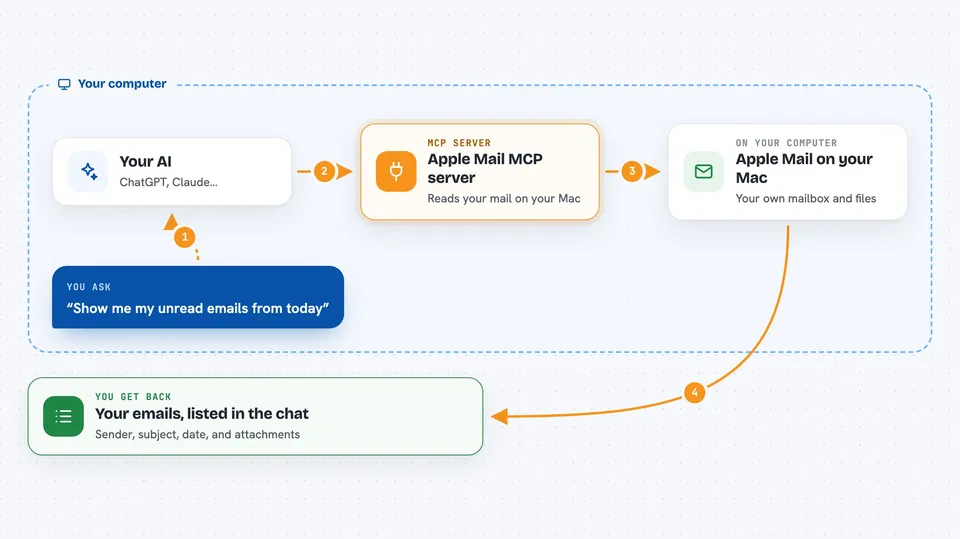
This is a small helper that connects your AI assistant to the Mail app on your Mac. Once it is set up, you can ask your AI things like "show me unread emails from today" or "find that invoice from March" and it will go look for you. It is handy for anyone who lives in their inbox and wants to stop clicking around.
What is an MCP server? The 30-second version
On its own, your AI can only chat with you. It cannot see your email. An MCP server is a small helper program that gives your AI a new skill, here the ability to open and read your Apple Mail. You install it once on your Mac, and after that your AI can look things up in your mailbox whenever you ask.
What this MCP server does
You type a request in plain English, like "find emails about the quarterly report" or "what is unread today". Your AI passes that request to this helper. The helper reads your local Apple Mail data on your Mac, including a search index it builds so it can look through the whole mailbox quickly. Then it hands the results back to your AI, and your AI shows them to you in the chat.
 Click to zoom
What you can do with it
- List your email accounts and mailboxes
- Show unread, flagged, or today's emails
- Open a single email with its full text and attachments
- Search across subjects, senders, bodies, and attachments
- Pull out all the links inside an email
- Save an attachment's content so you can read it
- Search by date range, like everything after January 1
Try asking your AI
- “Show me my unread emails from today”
- “Search my mail for anything about the quarterly report”
- “Find emails from my accountant in the last 30 days”
- “Open message 12345 and give me the PDF attachment”
What it gives back to you
You get back lists of emails with sender, subject, and date, or the full text of a single message. Search results can highlight where your words matched. If you ask for an attachment, it gives you the file's content so you can read it in the chat. Everything comes back as text your AI can summarize or act on.
Before you start
What you need
- A Mac with the Apple Mail app set up
- Python and pipx installed (pipx is a small tool that installs other tools for you)
- Full Disk Access granted to Terminal or to the app running your AI (a Mac privacy setting that lets a program read your mail files)
Good to know
This reads your private email on your Mac, so only set it up on a computer you trust and be mindful of what you ask your AI to look at.
Install it with your AI
Add Apple Mail MCP server to your AI, no technical skills needed
You don't install anything by hand. You copy one prompt, paste it into an AI that can work on your computer, and it checks, installs and connects the server for you, asking you when it needs something.
Sign in to get the install prompt
Members get a ready-made prompt that lets the Claude desktop app check Apple Mail MCP server, install it and connect it for them, step by step. You don't need any technical skills: you copy, paste and answer a few questions. Your connected AI can also find and install any of the 4,361 MCP servers here for you.
Who it's for
Anyone who works in their inbox all day on a Mac and wants their AI to dig through email for them.