
MCP server · Social media
Instagram MCP server
by HasData
Lets your AI look up public Instagram profiles and recent posts by handle, with captions, hashtags and mentions.
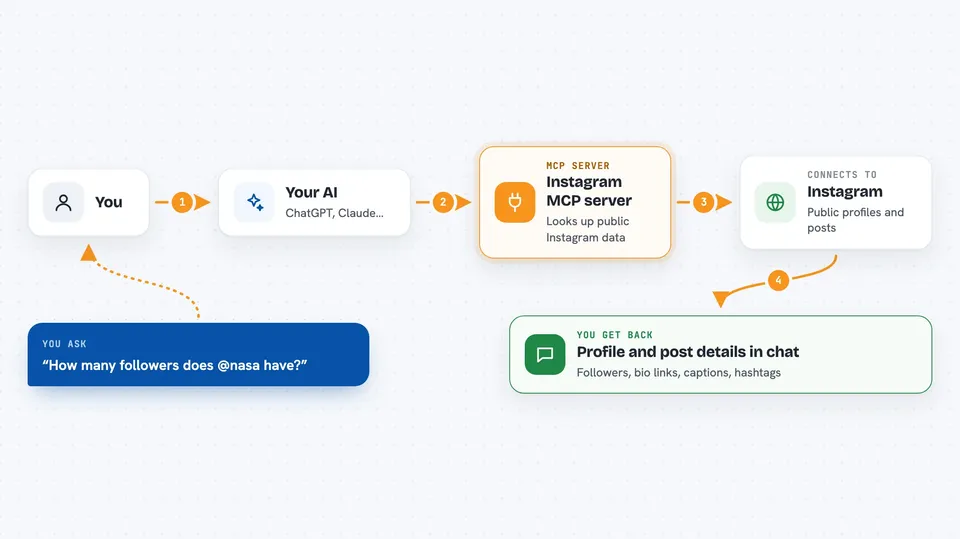
This is a small helper that lets your AI read public Instagram information for you. You ask about an account, and it fetches the profile and recent posts as tidy data. It is handy if you research creators, brands or competitors and want answers instead of screenshots.
What is an MCP server? The 30-second version
On its own, your AI can only chat with you. It cannot go and look something up on Instagram. An MCP server is a small helper program that gives your AI a new skill or a connection to an app or service. This one connects your AI to public Instagram data, so when you ask about an account, the AI can fetch it and answer you.
What this MCP server does
You ask your AI something about a public Instagram account, like its follower count or recent posts. The AI passes your request to this helper. The helper talks to HasData, which reads the public Instagram data. Then the answer comes back into your chat as a profile, a list of posts, or a summary you asked for. You never log into Instagram and nothing is posted on your behalf.
 Click to zoom
What you can do with it
- Look up a public profile by handle and see follower and following counts
- Check whether an account is verified and read its bio
- List the links in a profile bio
- Read the most recent posts from an account
- Pull out the hashtags used in captions
- Pull out the accounts mentioned in captions
- Compare several accounts on followers and following
Try asking your AI
- “Pull the profile for @nasa and tell me the follower count, whether it is verified, and every link in the bio.”
- “Compare @nasa, @natgeo and @bbcearth on followers, accounts followed and whether each is verified.”
- “Walk the last fifty posts from @nasa and list every hashtag with how often it appears.”
- “For the last twelve posts on @natgeo, list the accounts mentioned in each caption and the type of each post.”
What it gives back to you
You get answers in your chat, built from the data the helper fetched. That can be a profile summary with follower numbers and bio links, or a list of recent posts with their captions, hashtags and mentions. If you ask for a count or a comparison, your AI does the counting and gives you the result. The raw data behind it is structured, so the numbers and lists are consistent.
Before you start
What you need
- An MCP client that can talk to a remote server, like Claude Desktop, Claude Code, Cursor, Windsurf, Cline, VS Code or Gemini CLI
- A HasData API key from the HasData dashboard (free to create, no card needed)
- For Claude Desktop, either Node.js or Python so the launcher package can run
Good to know
It only reads public accounts, so private accounts return almost nothing, and each call uses credits from your HasData account (10 credits per call, with 1,000 free credits a month).
Install it with your AI
Add Instagram MCP server to your AI, no technical skills needed
You don't install anything by hand. You copy one prompt, paste it into an AI that can work on your computer, and it checks, installs and connects the server for you, asking you when it needs something.
Sign in to get the install prompt
Members get a ready-made prompt that lets the Claude desktop app check Instagram MCP server, install it and connect it for them, step by step. You don't need any technical skills: you copy, paste and answer a few questions. Your connected AI can also find and install any of the 4,609 MCP servers here for you.
Who it's for
Anyone who researches public Instagram accounts for work, like social media managers, marketers, journalists and analysts.




