MCP server · Social media · official
AdaptlyPost MCP server
by adaptlypost · official
Let your AI schedule and post to Instagram, TikTok, YouTube, X, LinkedIn and more, and read how posts did.
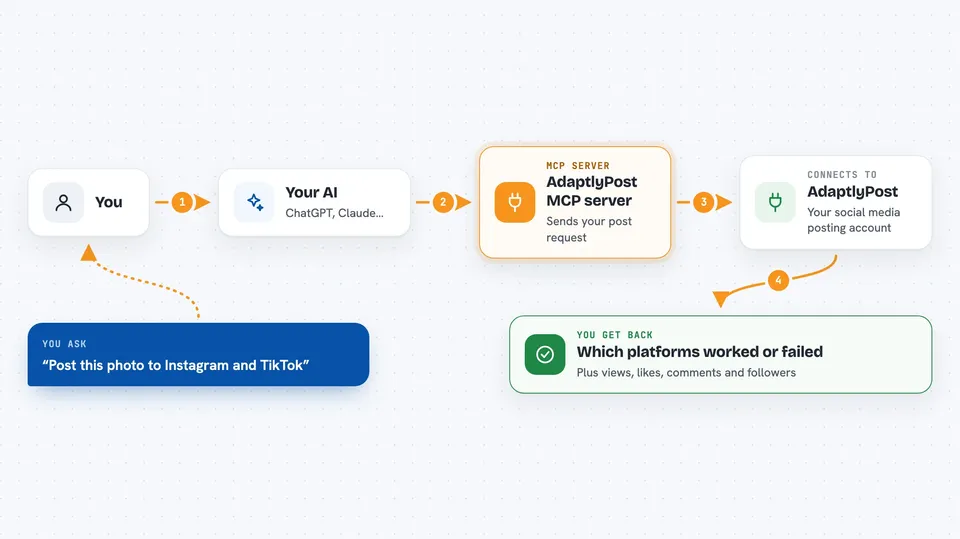
AdaptlyPost is a service that sends your posts to many social networks at once. This MCP server connects your AI assistant to your AdaptlyPost account, so you can just ask it to schedule or publish something. It is handy for anyone who runs social media for a small business, a team, or themselves.
What is an MCP server? The 30-second version
On its own, your AI can only chat with you. An MCP server is a small helper program that gives your AI a new skill or a connection to another service. This one connects your AI to AdaptlyPost, which is the service that actually talks to Instagram, TikTok, YouTube, X, LinkedIn and the rest. So when you ask your AI to post something, it passes the job to AdaptlyPost through this helper, and AdaptlyPost does the publishing for you.
What this MCP server does
You tell your AI what you want to post and where. Your AI uses this helper to send that request to your AdaptlyPost account. AdaptlyPost then posts it, or schedules it for a later time, on the networks you picked. When it is done, your AI tells you which platforms worked and which did not. You can also ask your AI to read back numbers like views, likes, comments and followers.
 Click to zoom
What you can do with it
- Post the same message to up to 10 platforms at once, with different captions per platform
- Schedule a post for any future date and time
- Bulk schedule up to 100 posts in one go
- Save a draft, review it, and publish it later
- Repeat a post daily, weekly or monthly, then pause, resume or stop it
- Check which platforms succeeded and which failed, with error details
- Retry only the platforms that failed
- Read analytics like views, likes, comments, followers and engagement
Try asking your AI
- “Schedule a LinkedIn post for tomorrow at 9am about our new feature launch”
- “Post this photo to Instagram and TikTok with a shorter caption on TikTok”
- “Show me how my posts did on X and LinkedIn this week”
- “Retry the platforms that failed on my last post”
What it gives back to you
You get back plain answers in the chat, like a confirmation that a post was scheduled, or a list of which platforms worked and which did not. If something failed, it tells you the reason per platform. When you ask for analytics, it gives you numbers like views, likes, comments and followers for the time window and platform you asked about. If you are not allowed to publish with your token, it says so and suggests saving a draft instead.
Before you start
What you need
- A free AdaptlyPost account at adaptlypost.com
- Your social media accounts connected inside AdaptlyPost
- An API token from Settings > API Tokens (a kind of password for apps; the site gives you one)
- An AI tool that supports skills or MCP, such as Claude Code, Cursor, Windsurf or Codex
Good to know
This server can publish real posts to your public social accounts, so check what your AI wrote before it goes out, and use a Contributor token if you do not want it posting on its own.
Install it with your AI
Add AdaptlyPost MCP server to your AI, no technical skills needed
You don't install anything by hand. You copy one prompt, paste it into an AI that can work on your computer, and it checks, installs and connects the server for you, asking you when it needs something.
Sign in to get the install prompt
Members get a ready-made prompt that lets the Claude desktop app check AdaptlyPost MCP server, install it and connect it for them, step by step. You don't need any technical skills: you copy, paste and answer a few questions. Your connected AI can also find and install any of the 4,361 MCP servers here for you.
Who it's for
Social media managers, small business owners, marketers and anyone who posts to several networks and wants to do it by just asking their AI.