MCP server · Social media · official
PostMCP social posting server
by postmcp · official
Lets your AI draft, check, schedule and publish posts to LinkedIn, X, Facebook, Instagram, Threads, Bluesky and YouTube Shorts.
PostMCP is an official helper that connects your AI assistant to your social media accounts. Once it is set up, you can ask your AI to write a post, check it against each network's rules, and send it out now or later. It is handy for anyone who posts for a living or runs a small brand and wants to stop copying text between apps.
What is an MCP server? The 30-second version
On its own, your AI can only chat with you. An MCP server is a small helper program that gives your AI a new skill or a connection to another service. This one connects your AI to PostMCP, which holds your social accounts and post queue. So when you ask your AI to publish something, it can actually do it through PostMCP instead of just writing the text for you to copy.
What this MCP server does
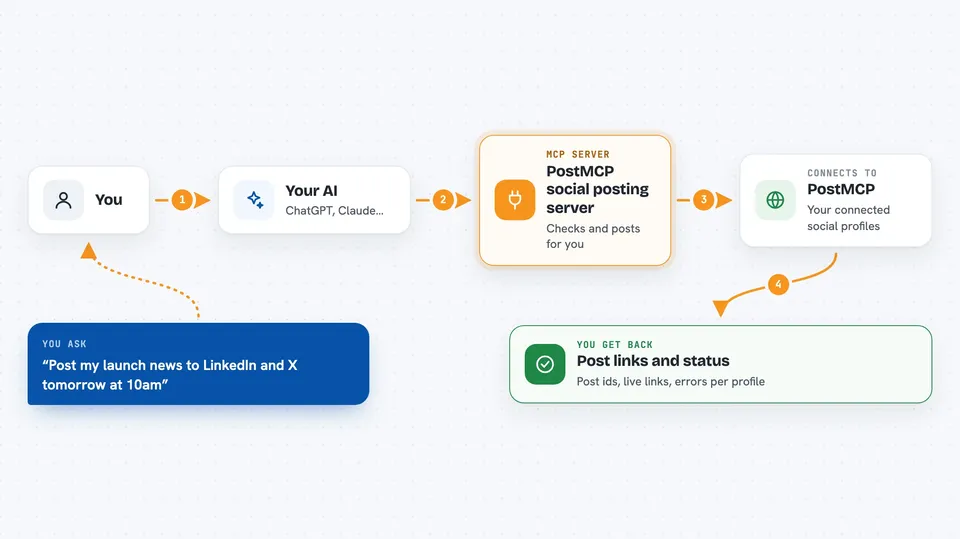
You tell your AI what you want to post and where. Your AI calls this helper, and the helper talks to PostMCP, which knows your connected profiles and their rules. PostMCP can run a dry run first, so you see character limits, missing images and the credit cost before anything goes out. Then it creates, schedules or publishes the post, and hands back the details, like post ids, live links and per-profile errors.
 Click to zoom
What you can do with it
- Check a draft before posting, to see limits and costs
- Schedule a post for a date and time in your timezone
- Publish the same post to several profiles at once
- Post a carousel or multi-photo set to Instagram, Threads, Facebook, LinkedIn, X and Bluesky
- See which connected accounts have expired logins
- Look up views, likes, comments and shares for a post
- Generate an image for a post and use it as the picture
Try asking your AI
- “Write a short launch post for LinkedIn and X, check it first, then schedule it for tomorrow at 10am my time”
- “Show me my post queue and which ones failed”
- “How did my last Instagram post do? Give me views, likes and comments”
- “Make a four-image carousel for Instagram and Threads from these image links and schedule it for Friday”
What it gives back to you
You get answers in the chat, not files to download. That can be a list of your connected profiles, a queue of posts with their status, or a summary of views, likes, comments and shares. When it creates or changes something, it tells you the post id, which profiles it went to, and any errors per profile. A dry run comes back as a short report of problems and the credit cost.
Before you start
What you need
- A PostMCP AI account with at least one social profile connected
- Your PostMCP API key from the PostMCP dashboard (a long password that lets the helper act for you)
- Node.js 18 or newer if you run it yourself on your computer
- An MCP client such as Claude Desktop, Cursor or a ChatGPT Custom GPT
Good to know
This server can publish, reschedule and delete real posts on your social accounts, and some actions spend credits, so check the dry run before you let it go ahead.
Install it with your AI
Add PostMCP social posting server to your AI, no technical skills needed
You don't install anything by hand. You copy one prompt, paste it into an AI that can work on your computer, and it checks, installs and connects the server for you, asking you when it needs something.
Sign in to get the install prompt
Members get a ready-made prompt that lets the Claude desktop app check PostMCP social posting server, install it and connect it for them, step by step. You don't need any technical skills: you copy, paste and answer a few questions. Your connected AI can also find and install any of the 4,361 MCP servers here for you.
Who it's for
Social media managers, small business owners and marketing teams who post to several networks and already use an AI assistant.