MCP server · Research
Walmart MCP server
by HasData
Lets your AI search Walmart, read product details and buyer reviews, and compare prices on walmart.com and walmart.ca.
This is a helper that connects your AI assistant to Walmart's public pages, so it can look up products, prices and reviews for you. You just ask in normal words, and it goes and fetches the information. It is handy if you compare prices, check who is selling an item, or read what buyers say before you buy.
What is an MCP server? The 30-second version
On its own, your AI can only chat with you using what it already knows. An MCP server is a small helper program that gives your AI one new skill, in this case a connection to Walmart. Once it is connected, your AI can go and look things up on Walmart when you ask, instead of guessing. This one is hosted online, so you do not install anything on your computer.
What this MCP server does
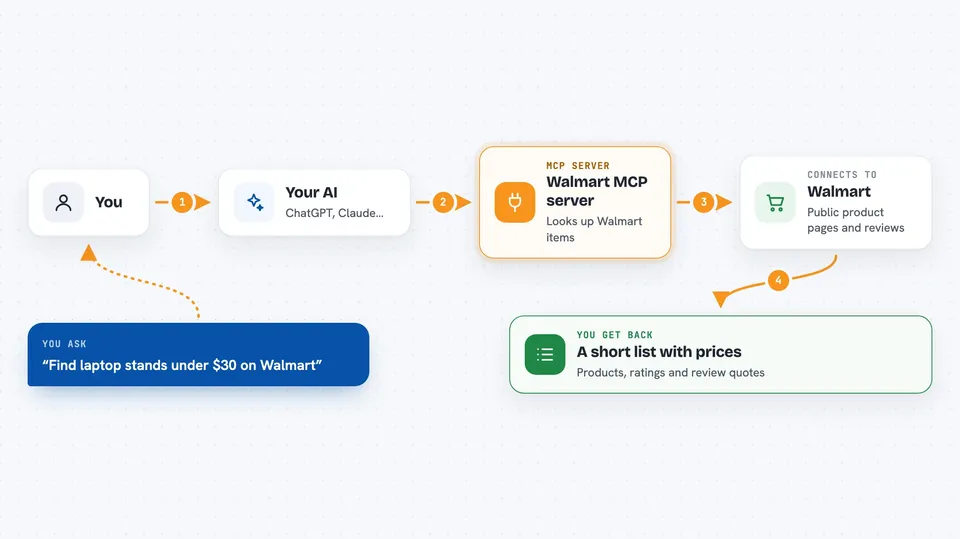
You ask your AI something like "find laptop stands under $30 on Walmart". Your AI sends that request to this helper, which reads the public Walmart pages a signed-out visitor would see. The helper sends back the matching products, prices, sellers and reviews as clean text. Your AI then turns that into a normal answer in the chat, like a short list or a summary.
 Click to zoom
What you can do with it
- Search Walmart by keyword, category or both
- See the price, brand and availability of a product
- Find out which seller holds the buy box
- Read customer reviews, including verified purchases only
- Filter reviews by star rating or by topic like battery life
- Compare the same item on walmart.com and walmart.ca
- Sort results by price, rating or bestseller
Try asking your AI
- “Find laptop stands under $30 on Walmart and sort them by price.”
- “What does item 18493462688 cost right now, and who holds the buy box?”
- “Read the reviews of this item that mention battery life.”
- “Compare the price of this item on walmart.com and walmart.ca.”
What it gives back to you
You get back answers in plain chat: lists of products with prices and ratings, details of one item, or quotes and summaries from reviews. It can also give you the raw structured data if you ask for it. Everything comes back as text your AI can read and reuse.
Before you start
What you need
- An MCP client, such as Claude Desktop, Cursor, Windsurf or VS Code
- A HasData API key (a kind of password for apps; you get one free from the HasData dashboard, no card needed)
Good to know
It only reads public Walmart pages, so it cannot log in, buy anything or change your account, but each call uses credits from your HasData account.
Install it with your AI
Add Walmart MCP server to your AI, no technical skills needed
You don't install anything by hand. You copy one prompt, paste it into an AI that can work on your computer, and it checks, installs and connects the server for you, asking you when it needs something.
Sign in to get the install prompt
Members get a ready-made prompt that lets the Claude desktop app check Walmart MCP server, install it and connect it for them, step by step. You don't need any technical skills: you copy, paste and answer a few questions. Your connected AI can also find and install any of the 4,609 MCP servers here for you.
Who it's for
Anyone who shops or compares prices on Walmart, and people who track products, sellers or reviews for work.