MCP server · Notes
RAGStack MCP server
by HatmanStack
Lets your AI search, question, and add to your RAGStack knowledge base on AWS.
This is a small helper that connects your AI assistant to a RAGStack knowledge base. A RAGStack knowledge base is a collection of your documents, images, audio and video that lives on Amazon's cloud, and you can search it or ask questions about it. It is handy if your team already stores company documents in RAGStack and you want to ask your AI about them without opening another app.
What is an MCP server? The 30-second version
On its own, your AI can only chat with what it already knows or what you paste in. An MCP server is a small helper program that gives your AI a new skill or a connection to another service. This helper connects your AI to your RAGStack knowledge base, so when you ask a question the AI can look things up there or add new files for you. You do not need to understand how it works; you just install it once and then talk to your AI like normal.
What this MCP server does
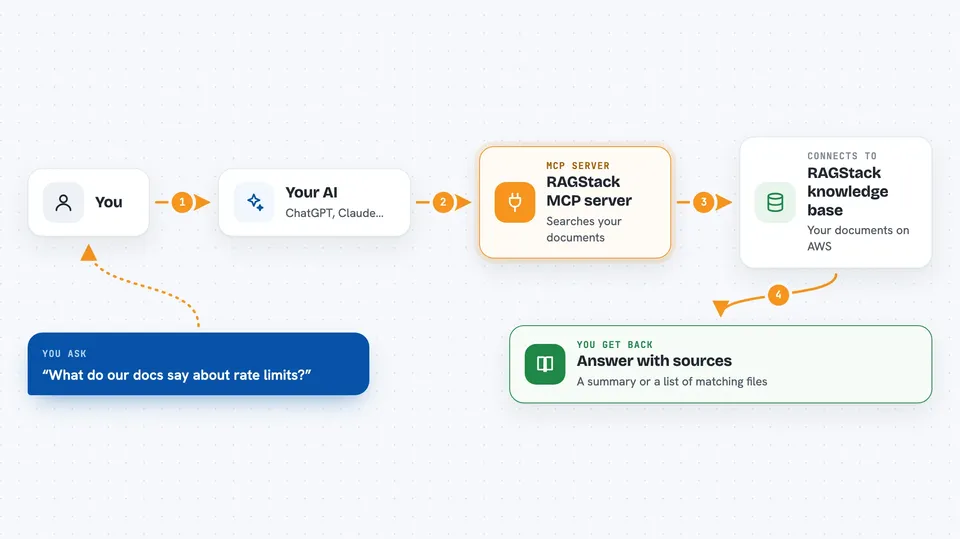
You ask your AI a question in plain words, like what your documents say about a topic. The AI passes that request to this helper, and the helper talks to your RAGStack knowledge base on AWS. RAGStack searches your documents, transcripts and images, and sends back the matching pieces or an AI-written answer with sources. You see the result right in the chat, as a list, a summary, or a confirmation that something was uploaded or scraped.
 Click to zoom
What you can do with it
- Search your knowledge base for documents that match a topic
- Ask questions and get AI answers with source citations
- Upload documents, images, audio and video files for indexing
- Scrape a website and add its pages to your knowledge base
- Check the progress of a scraping job
- Look at which metadata keys are available for filtering
- Read your current RAGStack settings
Try asking your AI
- “Search my knowledge base for authentication best practices”
- “What does our documentation say about API rate limits?”
- “Scrape the React docs at react.dev/reference”
- “Upload a new document called quarterly-report.pdf”
- “What metadata keys are available for filtering?”
What it gives back to you
You get back answers in the chat: a list of matching documents, an AI-written summary with citations, or a short confirmation that a file was uploaded or a scrape job started. For status checks you see the job ID and whether it is running or done. For metadata questions you see key names, data types and sample values. Everything shows up as normal chat text, so you can read it or ask follow-up questions.
Before you start
What you need
- A RAGStack knowledge base running on AWS
- Your RAGStack GraphQL endpoint and API key (found in the RAGStack dashboard under Settings, then API Key)
- The uvx tool, which comes with the uv Python package manager
- An AI app that supports MCP servers, such as Claude Desktop, Cursor, or VS Code with Cline or Continue
Good to know
This helper can add new content to your knowledge base, start web scraping jobs, and upload files, so it is worth checking what you ask it to do before you send the request.
Install it with your AI
Add RAGStack MCP server to your AI, no technical skills needed
You don't install anything by hand. You copy one prompt, paste it into an AI that can work on your computer, and it checks, installs and connects the server for you, asking you when it needs something.
Sign in to get the install prompt
Members get a ready-made prompt that lets the Claude desktop app check RAGStack MCP server, install it and connect it for them, step by step. You don't need any technical skills: you copy, paste and answer a few questions. Your connected AI can also find and install any of the 4,361 MCP servers here for you.
Who it's for
People whose team already keeps documents in a RAGStack knowledge base and who want to ask their AI about that content without switching apps.