MCP server · No-code
n8n Pro MCP server
Lets your AI look after your self-hosted n8n: workflows, runs, tags, users and health checks.
This is a helper that connects your AI assistant to your own n8n instance. n8n is the tool people use to build automations that move data between apps. If you run n8n yourself and want to check, fix or tidy things by just asking in plain words, this is for you.
What is an MCP server? The 30-second version
On its own, your AI can only chat. An MCP server is a small helper program that gives your AI a new skill or a connection to an app. This one connects your AI to your n8n instance, so the AI can look things up and make changes there when you ask. You install it once, and after that your AI can talk to n8n on your behalf.
What this MCP server does
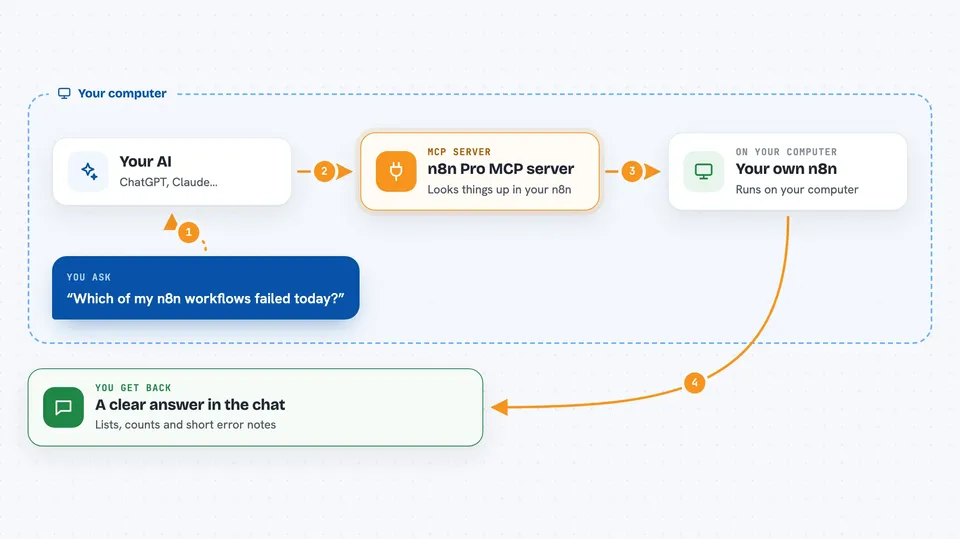
You ask your AI something about your n8n, like which workflows failed today. The AI passes that request to this helper. The helper talks to your n8n instance through n8n's official API, which is the door n8n opens for outside programs. The answer comes back and the AI explains it to you in the chat. If you ask it to change something, like turning a workflow on or off, the helper does that too.
 Click to zoom
What you can do with it
- List your workflows and filter them by name, tag, project or whether they are active
- Check which executions are running right now, useful on busy queue setups
- Summarize a failed run down to the failing node and the error message
- Turn workflows on or off, one at a time or in bulk by tag
- Create, update, clone or delete workflows
- Manage tags, variables, projects and users
- Run a health check and a security audit of your instance
Try asking your AI
- “Which of my n8n workflows failed in the last 24 hours?”
- “Show me the error from the most recent failed execution of the invoice workflow”
- “Turn off every workflow tagged old-test”
- “How many executions ran yesterday and what was the average duration?”
- “Run a health check on my n8n instance”
What it gives back to you
You get answers in the chat: lists of workflows or runs, counts, success rates, average durations, and short error summaries that name the failing node. When you ask for a change, it tells you what it did, like which workflows it turned off. Longer results come back as tidy lists or tables you can read at a glance.
Before you start
What you need
- A self-hosted n8n instance with the public API turned on
- An API key from n8n, found under Settings, then n8n API, then Create API key
- Node.js 18 or newer on the machine where the helper runs
- An MCP client such as Claude Desktop, Claude Code or Cursor
Good to know
It can change or delete real things in your n8n, including workflows and execution records, so read carefully before saying yes to a delete or a bulk change.
Install it with your AI
Add n8n Pro MCP server to your AI, no technical skills needed
You don't install anything by hand. You copy one prompt, paste it into an AI that can work on your computer, and it checks, installs and connects the server for you, asking you when it needs something.
Sign in to get the install prompt
Members get a ready-made prompt that lets the Claude desktop app check n8n Pro MCP server, install it and connect it for them, step by step. You don't need any technical skills: you copy, paste and answer a few questions. Your connected AI can also find and install any of the 4,361 MCP servers here for you.
Who it's for
People who run their own n8n instance and want to check, fix or tidy it by asking their AI instead of clicking around the n8n screens.