MCP server · No-code
n8n MCP server (Community Edition)
by drzamarian
Let your AI look at and manage your self-hosted n8n workflows, runs, and tags, safely.
This is a helper that connects your AI assistant to your own n8n setup, the tool people use to automate tasks between apps. Once connected, you can ask your AI to check your workflows, look at past runs, or tidy up tags, all in plain conversation. It is handy if you run n8n yourself and want a quicker way to see what is going on without clicking around the n8n website.
What is an MCP server? The 30-second version
On its own, your AI can only chat with you. An MCP server is a small helper program that gives your AI a new skill or a connection to an app, and here that app is your n8n instance. You install this helper, point it at your n8n address with a key, and then your AI can look things up or make changes in n8n when you ask. It runs on your own computer and talks only to your n8n, not to any outside AI service.
What this MCP server does
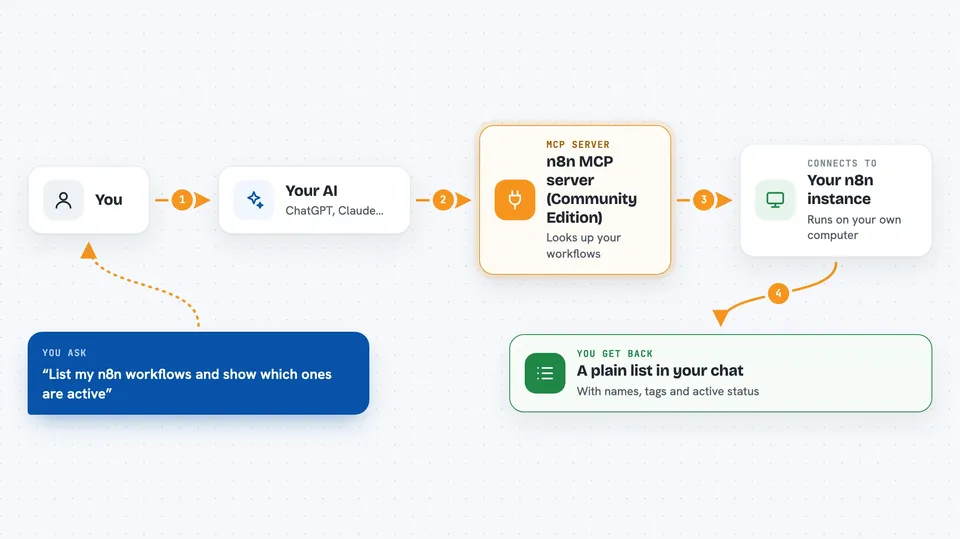
You ask your AI something like "list my workflows" or "show me the last few runs." The AI passes that request to this helper program. The helper then talks to your n8n instance using a key you gave it. n8n sends back the information, and the helper hands it to your AI, which explains it to you in the chat. By default it only reads; it will not change anything unless you turn that on.
 Click to zoom
What you can do with it
- List your workflows and see their names, tags, and status
- Look at recent runs and whether they succeeded or failed
- Read a single workflow's details without exposing secret values
- List tags and see which workflows use them
- Check the health of your n8n instance
- Search your workflows by name, node type, or tag
- Compare two versions of a workflow to see what changed
Try asking your AI
- “List my n8n workflows and show which ones are active”
- “Show me the last ten runs and which ones failed”
- “Which workflows use the tag reports”
- “Search my workflows for anything using the HTTP node”
What it gives back to you
You get back plain answers in the chat: lists of workflows with their names and status, summaries of recent runs, tag lists, and short health checks. When it reads a workflow, it leaves out secret values and hidden data, so you see the structure but not your passwords. If you have turned on write mode, it can also tell you what it changed, like a tag rename or a node update.
Before you start
What you need
- A self-hosted n8n Community Edition instance with a web address
- An n8n API key (a kind of password you create inside n8n for apps to use)
- Node.js 22 or 24 if you install it the npm way
- The Claude desktop app if you prefer the one-file install
Good to know
In write or unsafe mode it can change, activate, or permanently delete workflows, runs, credentials, and users, so keep it in read-only mode unless you really need changes.
Install it with your AI
Add n8n MCP server (Community Edition) to your AI, no technical skills needed
You don't install anything by hand. You copy one prompt, paste it into an AI that can work on your computer, and it checks, installs and connects the server for you, asking you when it needs something.
Sign in to get the install prompt
Members get a ready-made prompt that lets the Claude desktop app check n8n MCP server (Community Edition), install it and connect it for them, step by step. You don't need any technical skills: you copy, paste and answer a few questions. Your connected AI can also find and install any of the 4,361 MCP servers here for you.
Who it's for
People who run their own n8n and want to check or tidy it up by chatting with their AI instead of clicking through the n8n website.