
MCP server · Productivity · official
AI Interview Agents MCP server
by dpkdhingra91 · official
Let your AI create hiring roles, screen CVs, schedule voice interviews and read back scored reports.
This is the official helper that connects your AI assistant to AI Interview Agents, a voice-AI hiring platform. Once it is connected, you can run your recruiting steps by just typing what you want in plain language. It is handy for recruiters, hiring managers and small teams who do a lot of CV sorting and interview scheduling.
What is an MCP server? The 30-second version
On its own, your AI can only chat with you. An MCP server is a small helper program that gives your AI a new skill or a connection to an app or service. This one connects your AI to AI Interview Agents, so it can look things up and do things there for you when you ask. You stay in charge: the AI only acts when you tell it to.
What this MCP server does
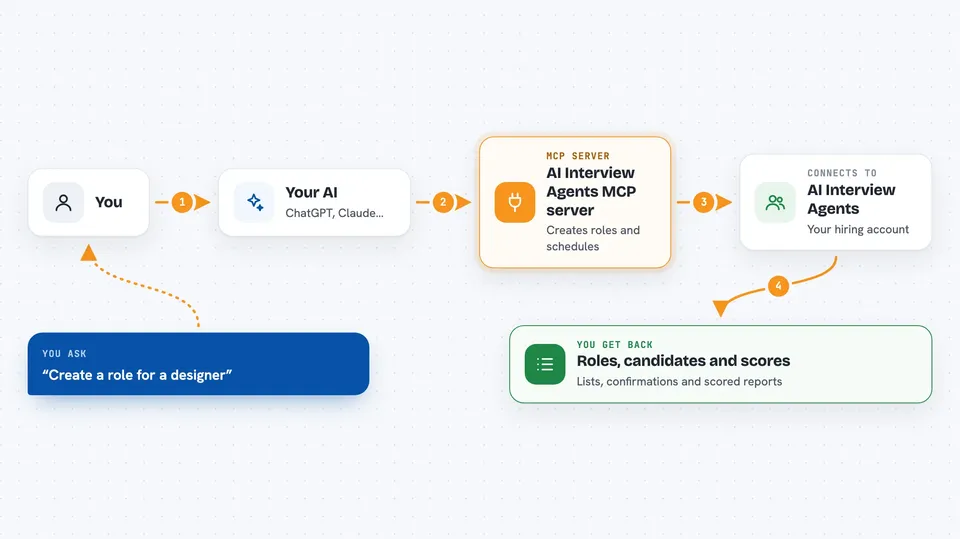
You ask your AI something like create a role for a designer, or schedule interviews for these candidates. Your AI passes that request to this helper. The helper talks to your AI Interview Agents account over a secure connection. It then creates the role, lines up the interviews or pulls back the reports. You see the result right in your chat, as a list, a summary or a set of scores.
 Click to zoom
What you can do with it
- List your open roles or create a new one from a job description
- Read dropped CV or PDF files and pull out names, emails, phone numbers, experience and skills
- Clean up a messy pasted list of candidates into a tidy format
- Schedule, reschedule, cancel or send reminders for candidate interviews
- Preview a scheduling run without sending anything, using dry run mode
- Move candidates from one role to another
- Read your candidate pipeline and pull back scored interview reports with transcripts
Try asking your AI
- “Create a role for a customer support agent in Hindi and English”
- “Here is a messy list of candidates, clean it up and add them to my sales role”
- “Schedule interviews for the shortlisted candidates next week and send reminders”
- “Show me the scored reports for everyone who interviewed for the designer role”
What it gives back to you
You get answers in your chat: lists of roles and candidates, cleaned-up candidate details, and confirmation of interviews scheduled, moved or cancelled. For reports, it brings back scored results with the interview transcript so you can read what was said. In dry run mode, you get a preview of what would happen without anything being sent.
Before you start
What you need
- An AI Interview Agents account
- An MCP client that can connect to remote servers, such as Claude or Cursor
- For the local setup: Python and a Firebase token, or you can sign in with the aiia-mcp login command
Good to know
It can create roles, book or cancel interviews and send reminders, so check what your AI is about to do before you say yes.
Install it with your AI
Add AI Interview Agents MCP server to your AI, no technical skills needed
You don't install anything by hand. You copy one prompt, paste it into an AI that can work on your computer, and it checks, installs and connects the server for you, asking you when it needs something.
Sign in to get the install prompt
Members get a ready-made prompt that lets the Claude desktop app check AI Interview Agents MCP server, install it and connect it for them, step by step. You don't need any technical skills: you copy, paste and answer a few questions. Your connected AI can also find and install any of the 4,361 MCP servers here for you.
Who it's for
Recruiters, hiring managers and small HR teams who handle a lot of CV screening and interview scheduling.




