
MCP server · Developer tools
Pandaone Audit Guard MCP server
by hellob1889
Makes your AI explain why it changed each file, and keeps a signed record of every code change.
Pandaone is a helper that watches over the files in your project and makes sure every change comes with a short explanation: what was wrong, why it was changed, and how. It is handy if you let AI tools like Claude or Cursor edit your code and you want a clear record of what they did. Think of it as a manager standing next to your codebase, asking for a note before anything gets written.
What is an MCP server? The 30-second version
On its own, your AI can only chat with you. It cannot reach into a folder on your computer or keep a reliable record of what it changed. An MCP server is a small helper program that gives your AI a new skill. This one connects your AI to Pandaone, so the AI can write files the approved way, look up past changes, and check the project status for you.
What this MCP server does
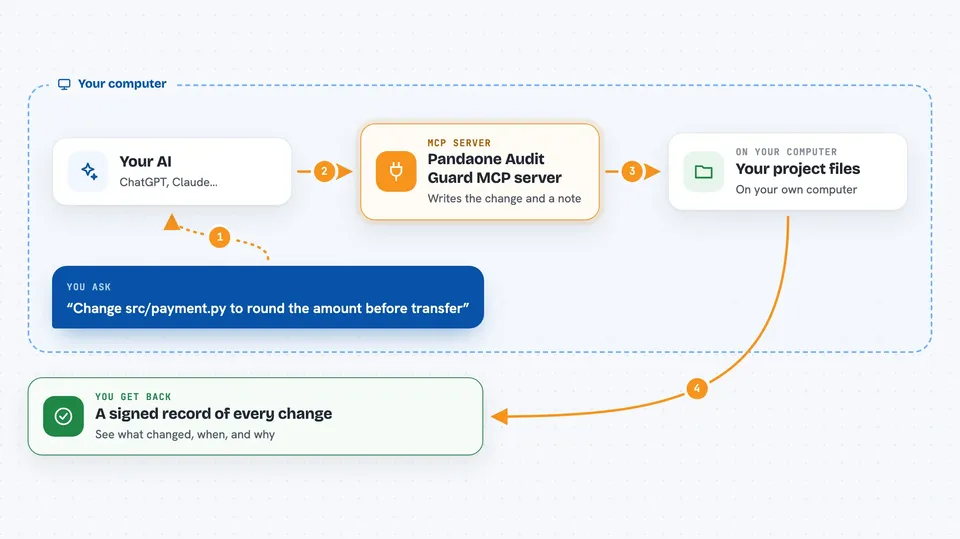
You ask your AI to change a file in your project. The AI calls this helper instead of editing the file directly. The helper asks the AI to fill in three short fields: the problem, the reason, and the approach. Then it writes the change, signs a record of it, and saves that record in an audit log. Later you can ask for the log and see every change, who made it, and why.
 Click to zoom
What you can do with it
- Set up audit tracking in a project folder
- Lock or unlock the protected files so nothing is edited quietly
- Write a file change together with a reason, problem, and approach note
- Read back the audit history and filter it
- Check the current project status and recent activity
- Install a check that runs before each commit
- Export the audit log to formats like Excel, PDF, or CSV
Try asking your AI
- “Set up Pandaone in my project folder at C:/work/myapp”
- “Change src/payment.py to round the amount before the transfer, and write the audit note for me”
- “Show me the last 10 changes in the audit log”
- “What is the current status of my project and are any files locked?”
What it gives back to you
You get back short answers in the chat, like a confirmation that a file was written with its audit note, or a list of recent changes with the file name, the reason, and the time. If you ask for the audit log, you get a table of entries you can read or export. If you ask about status, you get a summary of the project, which files are locked, and recent activity.
Before you start
What you need
- Python 3.10 or newer on your computer
- The pandaone-guard package installed (pip install pandaone-guard)
- Git installed if you want the pre-commit check
- An AI app that supports MCP, like Claude Desktop, Cursor, or ChatGPT Desktop with Developer Mode on
Good to know
This tool locks files and can block or undo changes, so try it on a copy of your project first before using it on important code.
Install it with your AI
Add Pandaone Audit Guard MCP server to your AI, no technical skills needed
You don't install anything by hand. You copy one prompt, paste it into an AI that can work on your computer, and it checks, installs and connects the server for you, asking you when it needs something.
Sign in to get the install prompt
Members get a ready-made prompt that lets the Claude desktop app check Pandaone Audit Guard MCP server, install it and connect it for them, step by step. You don't need any technical skills: you copy, paste and answer a few questions. Your connected AI can also find and install any of the 4,609 MCP servers here for you.
Who it's for
Developers and small teams who let AI tools edit their code and want a clear, checkable record of every change.



