MCP server · Productivity
Triplyfy MCP server
by helpful-AIs
Let your AI plan trips, edit itineraries, and search flights inside Triplyfy for you.
This is a helper that connects your AI assistant to Triplyfy, a simple trip-planning app where you build day-by-day itineraries with places, notes, and flights. Once connected, you can just tell your AI what you want to change or look up, and it does it in your Triplyfy trips. It is handy if you plan trips often and would rather chat than click around.
What is an MCP server? The 30-second version
On its own, your AI can only chat with you. An MCP server is a small helper that gives your AI a new skill or a connection to an app. This one connects your AI to Triplyfy, so it can look at your trips and make changes there when you ask. You stay in control: it only does what you tell it to do.
What this MCP server does
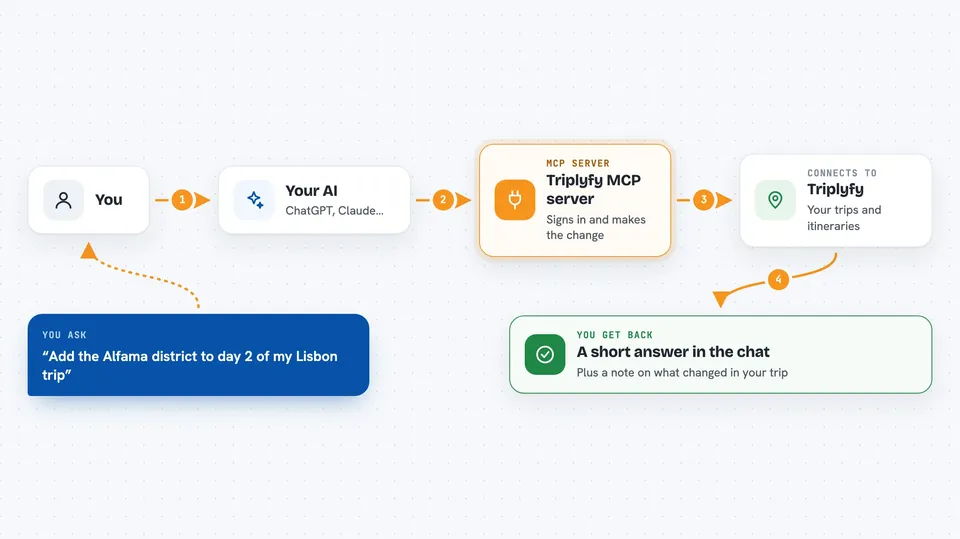
You ask your AI something about your trips, like adding a place to a day or finding a flight. Your AI sends that request to this Triplyfy helper. The helper signs in to Triplyfy on your behalf and performs the action, like creating a trip, editing an itinerary, or searching flights. Then it sends the result back, and your AI shows it to you in the chat. You can also just ask questions and get answers about what is already in your trips.
 Click to zoom
What you can do with it
- Create new trips in Triplyfy
- Read your existing trips and itineraries
- Update trips by adding or moving places and notes
- Search for flights
- Save flights to a trip
- Ask questions about what is planned on a given day
Try asking your AI
- “Create a 4-day trip to Lisbon in Triplyfy”
- “Add the Alfama district to day 2 of my Lisbon trip”
- “Move the museum visit from day 3 to day 4”
- “Find flights from Berlin to Lisbon on May 12 and save the best one”
What it gives back to you
You get answers and confirmations in the chat, like a short summary of the trip or a note that a place was added. When you search flights, it shows you options with times and prices. If it changed something in your trip, it tells you what it did. You can always open Triplyfy to see the full itinerary on a map.
Before you start
What you need
- A Triplyfy account (sign in with Google)
- The Claude desktop app with MCP servers enabled
Good to know
It can create and change trips in your Triplyfy account, so double-check before approving big edits.
Install it with your AI
Add Triplyfy MCP server to your AI, no technical skills needed
You don't install anything by hand. You copy one prompt, paste it into an AI that can work on your computer, and it checks, installs and connects the server for you, asking you when it needs something.
Sign in to get the install prompt
Members get a ready-made prompt that lets the Claude desktop app check Triplyfy MCP server, install it and connect it for them, step by step. You don't need any technical skills: you copy, paste and answer a few questions. Your connected AI can also find and install any of the 4,609 MCP servers here for you.
Who it's for
Anyone who plans trips and wants to build or tweak itineraries by chatting instead of clicking.