MCP server · Developer tools
Podium MCP server
by hoainho
Lets your AI control iPhone simulators and Android devices, tap buttons, and run app tests for you.
Podium is a helper that connects your AI assistant to mobile app testing tools on your Mac. It can drive iPhone simulators, real iPhones, and Android devices, tap buttons, type text, and check that things actually work. It is handy if you test mobile apps and want your AI to do the repetitive tapping and checking.
What is an MCP server? The 30-second version
On its own, your AI can only chat. An MCP server is a small helper program that gives your AI a new skill or a connection to an app or service. This one connects your AI to mobile device testing tools, so it can open apps, tap around, and read what is on screen. You just ask in plain words, and the helper does the technical work behind the scenes.
What this MCP server does
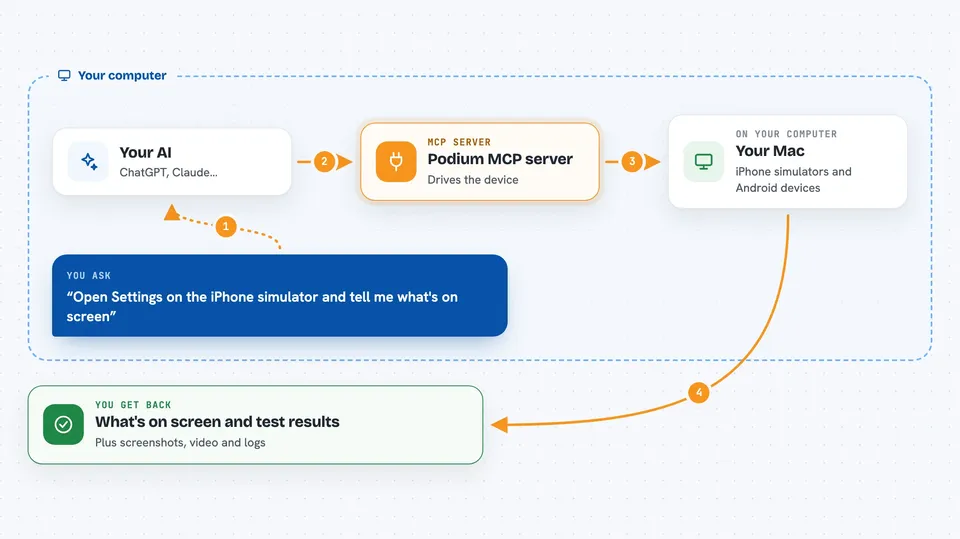
You ask your AI to do something on a phone or simulator, like open an app or tap a button. Your AI sends that request to Podium, which talks to the device using Apple's and Android's built-in tools. Podium then reports back what it found or what it did, in plain structured text. It can also run longer test flows and tell you whether they passed or failed, with evidence. Everything happens on your Mac, not in the cloud.
 Click to zoom
What you can do with it
- List available iPhone simulators and Android devices
- Launch an app and tap, swipe, or type on the screen
- Take screenshots and record video of the device
- Run automated test flows and check if they pass
- Inspect web views inside apps and read network traffic
- Read React Native debug logs and crash reports
- Control canvas and WebGL games without screenshots
Try asking your AI
- “Open the Settings app on the booted iPhone simulator and tell me what is on screen”
- “Tap the login button and type test@example.com into the email field”
- “Run the checkout flow test and tell me if it passed”
- “Show me the last crash report from the app”
What it gives back to you
You get back clear answers in the chat: lists of devices, what is currently on screen, whether a test passed or failed, and any errors it found. It can also give you screenshots, video recordings, and log files. Everything is in plain text or as a file you can open. If something goes wrong, it tells you what happened instead of crashing.
Before you start
What you need
- A Mac with Xcode command-line tools installed
- Node.js version 22 or newer
- Optional: Maestro installed for running test flows
- Optional: Android SDK and adb for Android devices
Good to know
This tool can control your phone or simulator, so be careful when asking it to tap or change things, especially on a real device.
Install it with your AI
Add Podium MCP server to your AI, no technical skills needed
You don't install anything by hand. You copy one prompt, paste it into an AI that can work on your computer, and it checks, installs and connects the server for you, asking you when it needs something.
Sign in to get the install prompt
Members get a ready-made prompt that lets the Claude desktop app check Podium MCP server, install it and connect it for them, step by step. You don't need any technical skills: you copy, paste and answer a few questions. Your connected AI can also find and install any of the 4,361 MCP servers here for you.
Who it's for
Mobile app developers and testers who want their AI to help with repetitive device testing on a Mac.