
MCP server · Finance and crypto
Stooq MCP server
by hoqqun
Lets your AI look up current and past stock prices from Stooq for the US, Japan, UK, Hong Kong and Germany.
This is a small helper that connects your AI assistant to Stooq, a free website that lists stock prices from around the world. Once it is set up, you can just ask your AI for a price or a bit of history, and it fetches the numbers for you. It is handy if you follow a few shares or need quick price checks without opening a browser.
What is an MCP server? The 30-second version
On its own, your AI can only chat with you. An MCP server is a small helper program that gives your AI a new skill or a connection to an app or service. This one connects your AI to Stooq, so when you ask about a stock, the AI can go and look up the price there. You do not have to visit the site yourself.
What this MCP server does
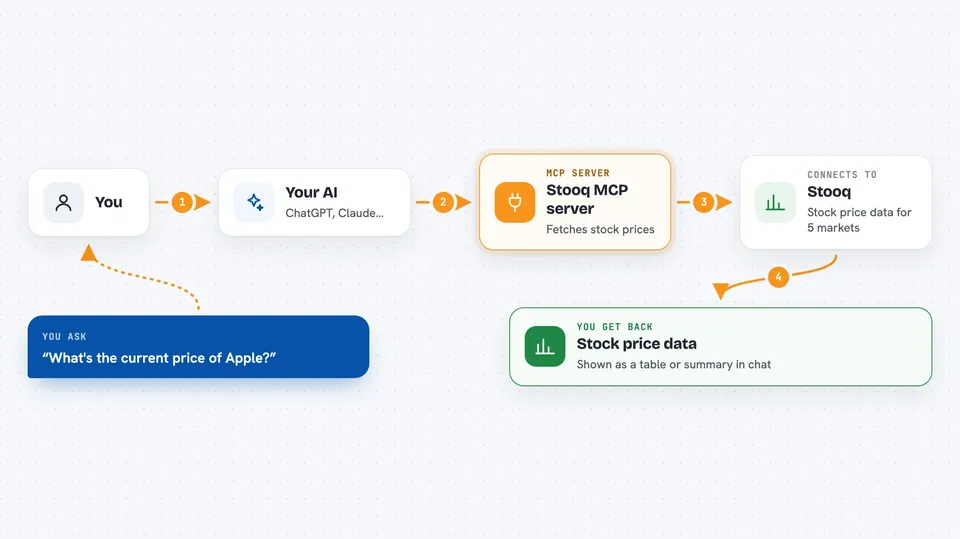
You ask your AI something like the current price of Apple. The AI passes your question to this helper. The helper asks Stooq for the latest price, or for a range of past prices if you gave dates. Stooq sends the numbers back, and the AI shows them to you in the chat. It works for five markets: the US, Japan, the UK, Hong Kong and Germany.
 Click to zoom
What you can do with it
- Look up the current price of a stock in one of five markets
- Get the daily open, high, low, close and volume for a stock
- Pull a range of past prices between two dates you choose
- Check prices for companies in Japan, the US, the UK, Hong Kong or Germany
- Compare a few tickers by asking one after another
Try asking your AI
- “Get the current stock price for Toyota (7203) in Japan market.”
- “What is the latest AAPL price from the US market?”
- “Get Sony (6758) stock price history from January 1, 2024 to December 31, 2024.”
- “Show me the last few days of prices for a UK stock I name.”
What it gives back to you
You get the numbers back in the chat, usually as a small table or a list of rows. For a current price you see the date, time, open, high, low, close and volume. For history you get one row per day with the same fields. The AI can also summarise the numbers in a sentence if you ask.
Before you start
What you need
- The Claude desktop app or Claude Code
- Rust and Cargo installed on your computer (the README says Rust 1.75 or newer)
- A terminal where you can run a few commands
Good to know
Stooq is an unofficial source with daily rate limits, so do not rely on it for trading decisions and avoid hammering it with requests.
Install it with your AI
Add Stooq MCP server to your AI, no technical skills needed
You don't install anything by hand. You copy one prompt, paste it into an AI that can work on your computer, and it checks, installs and connects the server for you, asking you when it needs something.
Sign in to get the install prompt
Members get a ready-made prompt that lets the Claude desktop app check Stooq MCP server, install it and connect it for them, step by step. You don't need any technical skills: you copy, paste and answer a few questions. Your connected AI can also find and install any of the 4,609 MCP servers here for you.
Who it's for
Anyone who wants quick stock price checks while chatting with their AI, especially people who follow a few shares in the US, Japan, UK, Hong Kong or Germany.



