MCP server · Music
Smartest TV MCP server
by Hybirdss
Let your AI play shows, cast links, and control your smart TV just by asking in plain words.
Smartest TV is a small helper program that lets your AI control your smart TV. You can ask it to play a show by name, cast a link, change the volume, or turn everything off. It is handy if you have an LG, Samsung, Android TV, or Roku and you would rather talk than hunt through menus with a remote.
What is an MCP server? The 30-second version
On its own, your AI can only chat with you. An MCP server is a small helper program that gives your AI a new skill or a connection to an app or service. This one connects your AI to your smart TV, so when you ask for something, the AI can actually make it happen on the screen. You do not need to know how it works inside. You just talk, and the helper does the button pressing.
What this MCP server does
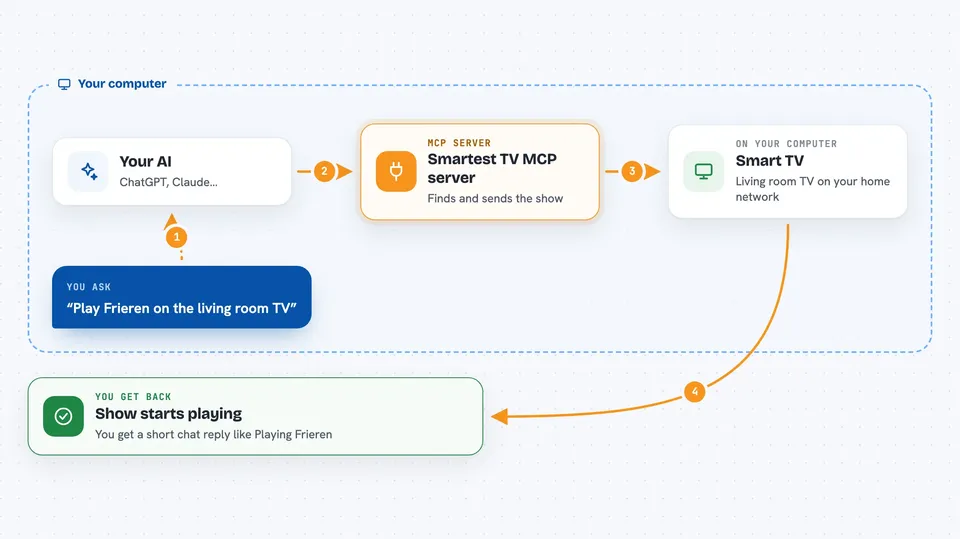
You type a request in plain words, like play Frieren on the living room TV. Your AI reads that, then hands the job to this helper program. The helper looks up the show, finds where it is streaming, and sends the right signal to your TV over your home network. A few seconds later, the show starts playing. The same idea works for volume, casting a link, or turning the TV off.
 Click to zoom
What you can do with it
- Play a show or movie by name on a chosen TV
- Cast a link you paste, like a YouTube or Netflix URL
- Change the volume, mute, or turn the screen on and off
- Set a scene like movie night, kids, or sleep with one request
- Play music on several TVs at once with the screens off
- Show a clock, message, or dashboard on a TV screen
- See what you have been watching and how much time you spent
Try asking your AI
- “Play Frieren season 2 episode 8 on the living room TV”
- “Turn the volume down a bit”
- “Cast this link to the bedroom TV: https://youtu.be/dQw4w”
- “Good night, turn off all the TVs”
What it gives back to you
You get a short answer in the chat, like Playing Frieren on Living Room, or Volume set to 18. If you ask for suggestions, it gives you a small list of shows with the platform next to each one. If you ask about your watching habits, it gives you simple numbers, like hours watched or cost per hour. When it changes something on the TV, it tells you what it changed.
Before you start
What you need
- A smart TV on the same home network (LG, Samsung, Android TV, Fire TV, or Roku)
- Python installed on your computer (the free programming tool this runs on)
- The stv program installed and your TV paired once with the setup command
Good to know
This helper can turn your TVs on and off, change the volume, and start playback, so it is worth checking what you asked for before saying yes to something like turning everything off.
Install it with your AI
Add Smartest TV MCP server to your AI, no technical skills needed
You don't install anything by hand. You copy one prompt, paste it into an AI that can work on your computer, and it checks, installs and connects the server for you, asking you when it needs something.
Sign in to get the install prompt
Members get a ready-made prompt that lets the Claude desktop app check Smartest TV MCP server, install it and connect it for them, step by step. You don't need any technical skills: you copy, paste and answer a few questions. Your connected AI can also find and install any of the 4,361 MCP servers here for you.
Who it's for
Anyone with a smart TV who likes asking their AI for things in plain words, especially people who watch a lot of streaming shows or want easy control of several TVs at home.