
MCP server · Security
Bitwarden and Vaultwarden MCP server
by icoretech
Lets your AI look up, create, and organize passwords and secure notes in your Bitwarden or Vaultwarden vault.
This is a helper that connects your AI assistant to your Bitwarden or Vaultwarden password vault. Once it is set up, your AI can search your vault, read logins, create new entries, and tidy things into folders, all through normal conversation. It is handy for people who keep work logins in Bitwarden and want their AI to help manage them without copying passwords around by hand.
What is an MCP server? The 30-second version
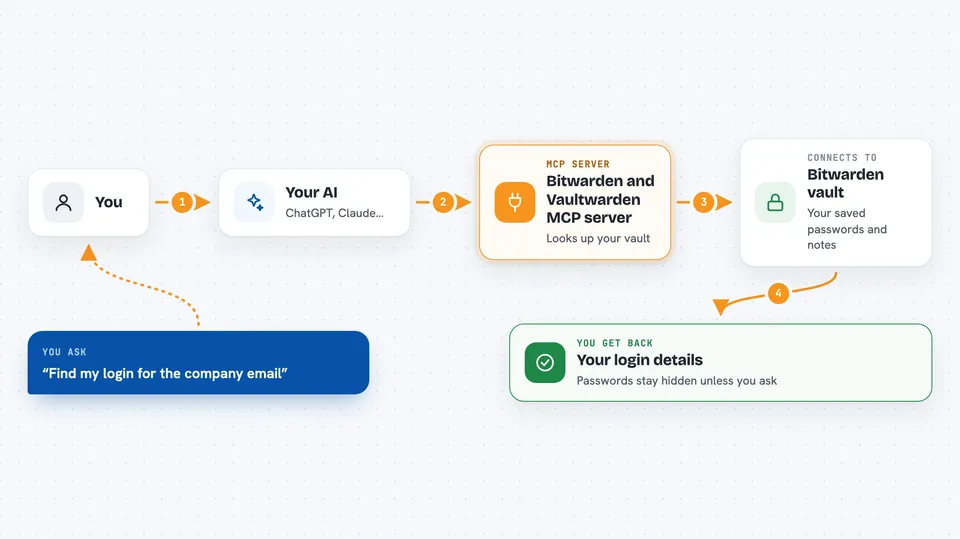
On its own, your AI can only chat. It cannot open your password vault or look anything up there. An MCP server is a small helper program that gives your AI one new skill, and this one gives it a connection to your Bitwarden or Vaultwarden vault. When you ask a question, your AI passes the request to this helper, the helper talks to your vault, and the answer comes back into the chat.
What this MCP server does
You ask your AI something about your vault, like finding a login or adding a new note. Your AI sends that request to this helper program. The helper talks to Bitwarden or Vaultwarden using the official Bitwarden command line tool, which does the real work of logging in and reading or changing items. Then the result comes back to your AI, and your AI explains it to you in the chat. By default, secret values like passwords and codes stay hidden unless you explicitly ask for them.
 Click to zoom
What you can do with it
- Search your vault for logins, notes, cards, identities, or SSH keys
- Read a username from a saved login
- Reveal a password or a one-time code when you ask for it
- Create new logins, secure notes, cards, or identities
- Move items into folders or organization collections
- List your folders, organizations, and collections
- Delete or restore items you no longer need
Try asking your AI
- “Find my login for the company email account”
- “What is the username saved for the AWS account”
- “Create a new secure note called Office wifi with the password we discussed”
- “Move all my old project logins into the Archive folder”
What it gives back to you
You get answers in plain chat text, like the name of a matching item, its username, or a short list of results. When you create or change something, it tells you what it did, for example that a new login was created or an item was moved. Passwords and one-time codes stay hidden unless you ask your AI to reveal them, and even then the tool has to allow it. Attachments can come back as a file name and its contents when you request them.
Before you start
What you need
- A Bitwarden or Vaultwarden account
- Node.js 22 and npm 10 installed on the computer running the helper
- Your vault master password
- Either a Bitwarden API key pair or your vault username and password
Good to know
This helper can read, change, and delete items in your real password vault, so only connect it to AI tools you trust and keep secret reveal turned off unless you truly need it.
Install it with your AI
Add Bitwarden and Vaultwarden MCP server to your AI, no technical skills needed
You don't install anything by hand. You copy one prompt, paste it into an AI that can work on your computer, and it checks, installs and connects the server for you, asking you when it needs something.
Sign in to get the install prompt
Members get a ready-made prompt that lets the Claude desktop app check Bitwarden and Vaultwarden MCP server, install it and connect it for them, step by step. You don't need any technical skills: you copy, paste and answer a few questions. Your connected AI can also find and install any of the 4,609 MCP servers here for you.
Who it's for
Anyone who keeps work logins in Bitwarden or Vaultwarden and wants their AI assistant to help find, add, or organize them.



