MCP server · Research
Algora Bounties MCP server
by idapixl
Let your AI browse and search open-source bounties on Algora, filter by org, tech or amount, and show stats.
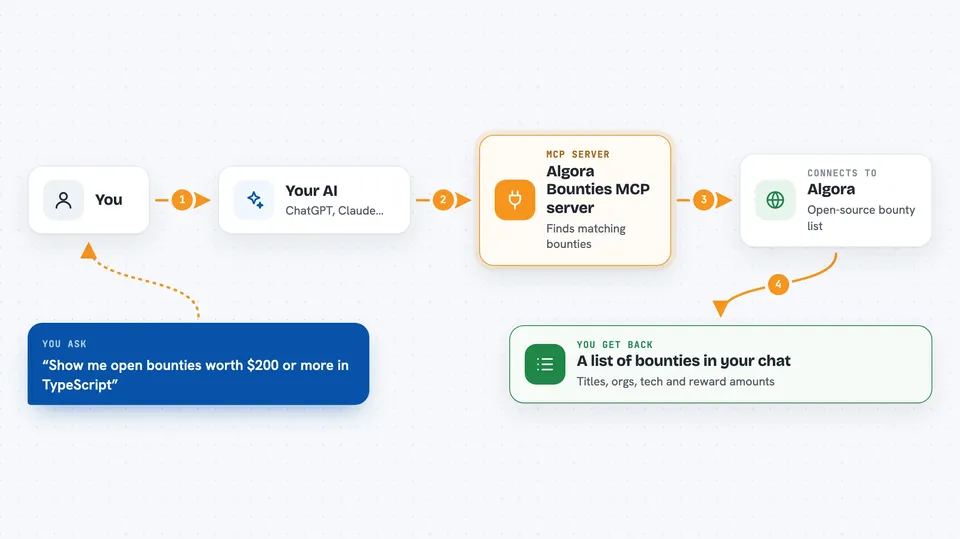
This is a small helper that connects your AI to Algora, a website where open-source projects post paid tasks called bounties. Once it is set up, you can just ask your AI things like which TypeScript bounties pay over $200, and it will look them up for you. It is handy if you are hunting for paid open-source work or just curious what is out there.
What is an MCP server? The 30-second version
On its own, your AI can only chat with you using what it already knows. An MCP server is a small helper program you connect to your AI that gives it a new skill, in this case the ability to talk to Algora. So when you ask about bounties, your AI quietly asks this helper, the helper asks Algora, and the answer comes back into your chat. You do not need to understand how it works under the hood, you just need to set it up once.
What this MCP server does
You type a question in plain English, like which bounties pay the most right now. Your AI passes that request to this helper program. The helper then asks Algora's public bounty list for the matching entries. It sorts and filters the results, for example by tech, organisation or reward amount. Then it hands the list back to your AI, which writes it up for you in the chat.
 Click to zoom
What you can do with it
- Browse open bounties with filters for organisation, tech or reward amount
- Search bounties by keyword across titles, descriptions and repositories
- See the highest paying open bounties right now
- List every open bounty for one specific organisation
- Get overall stats like total value, average reward, and breakdown by tech or org
Try asking your AI
- “Show me open bounties worth $200 or more in TypeScript”
- “What bounties does projectdiscovery have open?”
- “Find bounties related to MCP or model context protocol”
- “What is the total value of all open bounties on Algora?”
What it gives back to you
You get back a written answer in your chat, usually a list of bounties with their title, organisation, tech and reward amount. For stats questions you get numbers, like how many bounties are open and what they are worth in total. It only reads information, it does not change anything on Algora. If nothing matches, your AI will simply tell you it found no results.
Before you start
What you need
- Node.js 18 or newer installed on your computer
- An MCP-compatible app like Claude Desktop, Cursor or Windsurf
- No account or API key, Algora's bounty list is public
Good to know
It only reads public bounty information, so it will not change or delete anything, but reward amounts and listings can change on Algora, so double-check details on the site before acting on them.
Install it with your AI
Add Algora Bounties MCP server to your AI, no technical skills needed
You don't install anything by hand. You copy one prompt, paste it into an AI that can work on your computer, and it checks, installs and connects the server for you, asking you when it needs something.
Sign in to get the install prompt
Members get a ready-made prompt that lets the Claude desktop app check Algora Bounties MCP server, install it and connect it for them, step by step. You don't need any technical skills: you copy, paste and answer a few questions. Your connected AI can also find and install any of the 4,361 MCP servers here for you.
Who it's for
Developers and anyone curious about paid open-source work who wants to quickly scan or filter Algora bounties without browsing the site by hand.