
MCP server · Developer tools
DiscoMCP server
by ieranama
Teaches your AI how you actually use another MCP server, safely and read-only, so it stops guessing.
DiscoMCP is a helper that watches how you use another AI tool server and writes a short guide for your AI about your own habits. It is handy if you connect your AI to a big tool with lots of actions and it keeps fumbling around. Think of it as a friendly scout that maps the place for you, without touching anything.
What is an MCP server? The 30-second version
On its own, your AI can only chat. An MCP server is a small helper program that gives your AI a new skill or a connection to an app or service. DiscoMCP is itself an MCP server, and its skill is to study another MCP server and learn how you use it. So instead of your AI wandering through a hundred actions, it gets a short guide about the ones you really use, in the order you use them.
What this MCP server does
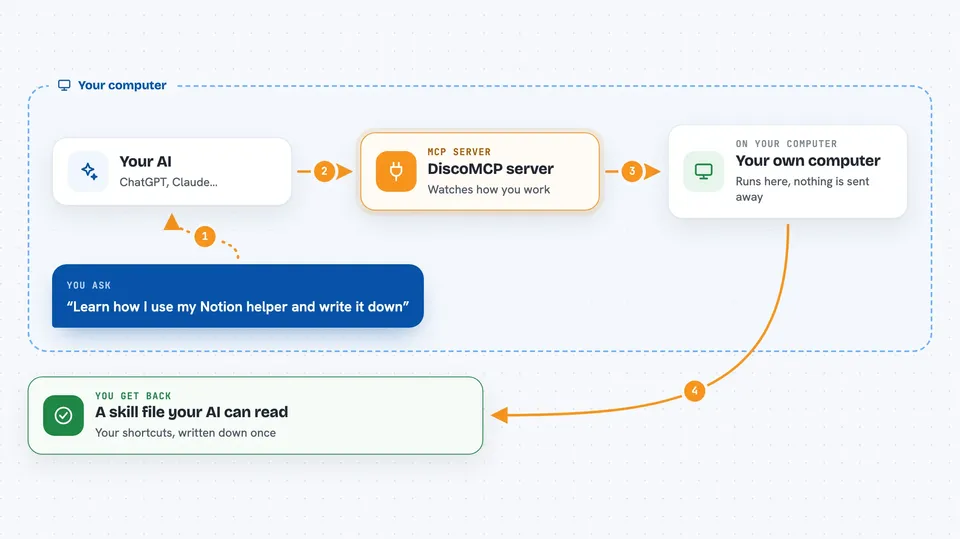
You point DiscoMCP at another MCP server, the kind that connects your AI to some app or data. Your AI then explores that server through DiscoMCP, which only allows steps it can prove are safe reads. DiscoMCP watches which actions get used, in what order, and against which data, and turns that into a written skill file. You then hand that file to your AI, and next time it knows your shortcuts instead of guessing. Nothing is ever changed or deleted while it learns.
 Click to zoom
What you can do with it
- Profile how you use any MCP server into a reusable skill file
- Learn the workflows and call chains that answer your real questions
- Label each tool with a safety class so your AI knows what is safe
- Keep the whole exploration read-only, with a default-deny gate
- Strip secrets from anything it saves
- Run with a single command and no setup
- Point your AI at a big unfamiliar server and cut down the back-and-forth
Try asking your AI
- “Profile my Notion MCP server and write a skill for how I use it”
- “Explore this MCP server read-only and tell me which actions I actually use”
- “Generate a SKILL.md for my database MCP server based on my recent usage”
- “What are the safe read-only tools on this server and how do they chain together”
What it gives back to you
You get a skill file written to a profiles folder, usually named SKILL.md, that your AI can read. It describes your workflows, the order of steps, the data you actually work with, and a safety class for each tool. In the chat you will see a summary of what was learned and where the file was saved.
Before you start
What you need
- Node.js installed so you can run npx
- The MCP server you want to profile, already set up
- A config file pointing DiscoMCP at that server
- An AI agent that can use MCP servers
Good to know
It explores other MCP servers on your behalf, so only point it at servers you are allowed to inspect, even though it refuses anything that is not a proven read.
Install it with your AI
Add DiscoMCP server to your AI, no technical skills needed
You don't install anything by hand. You copy one prompt, paste it into an AI that can work on your computer, and it checks, installs and connects the server for you, asking you when it needs something.
Sign in to get the install prompt
Members get a ready-made prompt that lets the Claude desktop app check DiscoMCP server, install it and connect it for them, step by step. You don't need any technical skills: you copy, paste and answer a few questions. Your connected AI can also find and install any of the 4,609 MCP servers here for you.
Who it's for
People who connect their AI to big tool servers and want it to follow their own habits instead of guessing.



