MCP server · Analytics
Flash Props MCP server
by iFan6oy
Lets your AI look up live player prop lines and projections across major sports.
Flash Props is a hosted service that gathers player prop lines from sportsbooks and adds its own projections and context. This connector lets your AI ask that service questions for you, like which games are on tonight or how a player's line has moved. It is handy if you follow sports and want quick answers without clicking around a dozen betting sites.
What is an MCP server? The 30-second version
On its own, your AI can only chat with you. An MCP server is a small helper that gives your AI a new skill or a connection to an outside service. This one connects your AI to Flash Props, a sports data service. Once it is set up, you can ask your AI about games and player props, and it will fetch the answer from Flash Props for you.
What this MCP server does
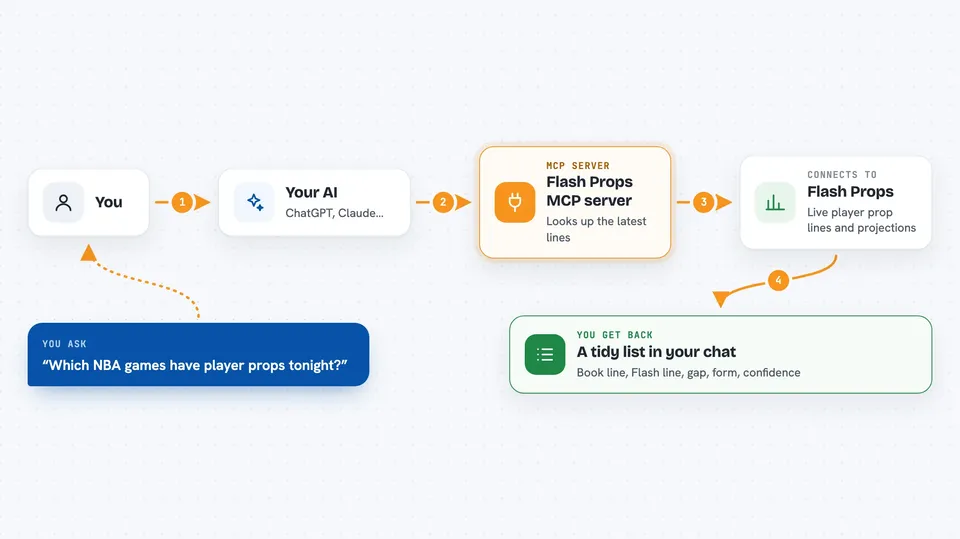
You ask your AI something like which NBA games have props tonight. Your AI sends that question to the Flash Props helper. The helper talks to the Flash Props service, which pulls the latest lines and projections from sportsbooks. The service sends back a tidy list or summary. Your AI shows it to you in the chat, in plain words.
 Click to zoom
What you can do with it
- List the sports and games that have player props right now
- Look up every active prop for one player
- Scan the whole slate for props in a market you care about
- See the book line, the Flash projection, and the gap between them
- Check how a line has moved over time
- Find the biggest line movers in a recent window
- See ranked boards for gap, form, and sample strength
Try asking your AI
- “Which NBA games have player props tonight?”
- “Show me all the active props for LeBron James.”
- “What are the biggest line movers in the NFL in the last hour?”
- “Give me the top 10 leaders by gap for MLB today.”
What it gives back to you
You get back lists, tables, or short summaries in the chat. For a prop, you might see the book line, the Flash line, the gap, recent form, and confidence. For a scan, you get a ranked list of rows. If something is not modeled, the service says so instead of making up a number.
Before you start
What you need
- A Flash Props API key (free tier available at api.flashodds.live/billing/free)
- A chat app that can connect to MCP servers, like Claude Desktop
Good to know
The data is for information only and is not betting advice. Some tools need a paid tier for full results, and the free tier gives you a limited preview.
Install it with your AI
Add Flash Props MCP server to your AI, no technical skills needed
You don't install anything by hand. You copy one prompt, paste it into an AI that can work on your computer, and it checks, installs and connects the server for you, asking you when it needs something.
Sign in to get the install prompt
Members get a ready-made prompt that lets the Claude desktop app check Flash Props MCP server, install it and connect it for them, step by step. You don't need any technical skills: you copy, paste and answer a few questions. Your connected AI can also find and install any of the 4,066 MCP servers here for you.
Who it's for
Sports fans, fantasy players, and anyone who follows betting lines and wants quick answers from their AI.