
MCP server · Finance and crypto
HLedger MCP server
by iiAtlas
Ask your AI about your hledger books and let it add or edit entries for you.
This is a helper that connects your AI assistant to hledger, a free plain text accounting program. Once it is set up, you can ask questions about your money in normal words instead of typing hledger commands. It is handy if you already keep your books in hledger and want a friendlier way to look things up or add entries.
What is an MCP server? The 30-second version
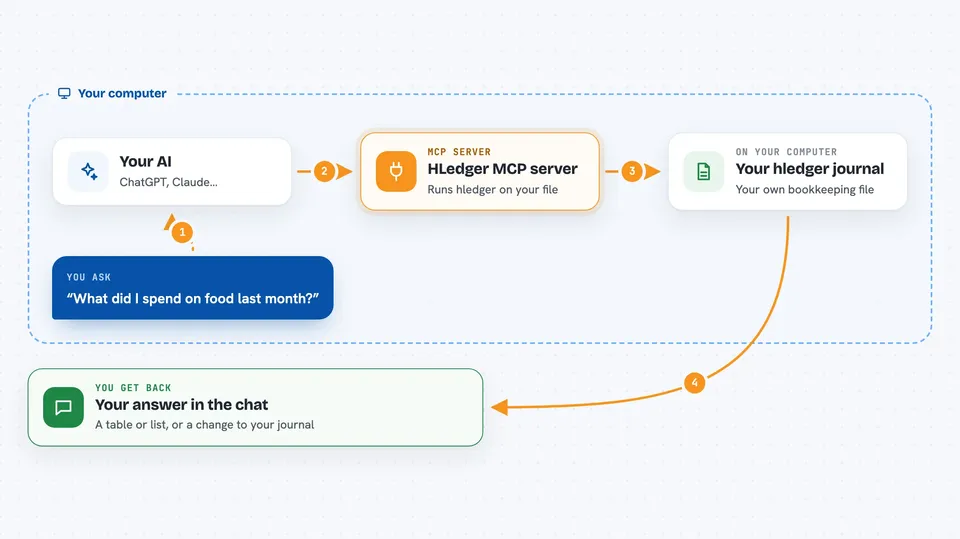
On its own, your AI can only chat. An MCP server is a small helper program that gives your AI a new skill or a connection to an app. This one connects your AI to hledger, the accounting program on your own computer. So when you ask about your balances or want a new entry added, the AI can actually look it up or do it in your journal for you.
What this MCP server does
You ask your AI a question about your books, like what you spent on food last month. The AI passes that request to this helper. The helper runs the matching hledger command on your journal file and reads the result. Then it hands the answer back to the AI, which explains it to you in the chat. If you allow writing, it can also add, change, or remove entries after checking them first.
 Click to zoom
What you can do with it
- Check your account balances and account names
- Generate reports like a balance sheet, income statement, or cash flow
- Look through your transaction register and print entries
- See your top payees, tags, notes, and account activity
- Add a new transaction to your journal
- Find, replace, or remove an existing entry
- Open the hledger web view from inside the chat
Try asking your AI
- “What's my current account balance?”
- “Show me a balance sheet for last quarter”
- “What were my food expenses last month?”
- “Add a 42 dollar grocery expense from my checking account today”
What it gives back to you
You get answers in plain text in the chat, usually as a table or a short list. Reports come back as readable summaries, and you can ask for csv, json, or html if you want to save them. When it changes your journal, it tells you what it did and where. If you asked for a dry run, it shows you the change without saving it.
Before you start
What you need
- The hledger program installed on your computer
- Node.js version 18 or newer
- The path to your hledger journal file, like master.journal
- The Claude desktop app or another app that supports MCP servers
Good to know
If you turn off read-only mode, the AI can add, change, or delete entries in your journal, so keep backups and try the dry run option first.
Install it with your AI
Add HLedger MCP server to your AI, no technical skills needed
You don't install anything by hand. You copy one prompt, paste it into an AI that can work on your computer, and it checks, installs and connects the server for you, asking you when it needs something.
Sign in to get the install prompt
Members get a ready-made prompt that lets the Claude desktop app check HLedger MCP server, install it and connect it for them, step by step. You don't need any technical skills: you copy, paste and answer a few questions. Your connected AI can also find and install any of the 4,609 MCP servers here for you.
Who it's for
People who already keep their books in hledger and want to ask questions or make entries in plain language instead of typing commands.



