
MCP server · Research
Hacker News MCP server
by imprvhub
Lets your AI browse, search and read Hacker News stories and comments for you.
This is a small helper that connects your AI assistant to Hacker News, the popular tech news site. Once it is set up, you can just ask your AI for the latest stories, the top ones, or search for a topic, and it will go and fetch them for you. It is handy if you follow tech news and want a quick summary without opening lots of browser tabs.
What is an MCP server? The 30-second version
On its own, your AI can only chat with you using what it already knows. An MCP server is a small helper program that gives your AI a new skill or a connection to an app or service. This one connects your AI to Hacker News, so when you ask about a story or a topic, the AI can actually look it up on Hacker News and bring the answer back to you.
What this MCP server does
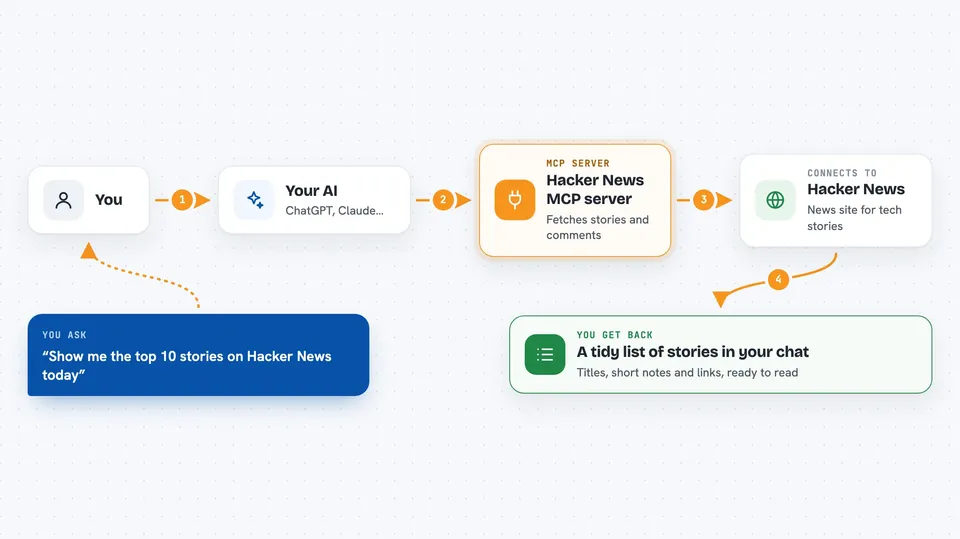
You ask your AI something like show me the top stories on Hacker News. The AI passes that request to this helper program running on your computer. The helper then talks to the Hacker News website and pulls back the stories, details or comments you asked for. The AI tidies up the text so it reads nicely and shows it to you in the chat. You never have to open Hacker News yourself.
 Click to zoom
What you can do with it
- See the newest stories posted on Hacker News
- See the top ranked and best rated stories
- Search Hacker News for a keyword, sorted by relevance or by date
- Open a specific story to read its details
- Read the top comments on a story without the thread flooding your chat
- Ask for a set number of stories, from 1 up to 50
- Ask your AI to translate the results into another language
Try asking your AI
- “Show me the top 10 stories on Hacker News today”
- “Search Hacker News for stories about machine learning”
- “Get the comments for the third story in that list”
- “What are the 20 latest Hacker News posts?”
What it gives back to you
You get back a tidy list of stories, usually with the title, a short description and a link. If you ask for a specific story, you get its details. If you ask for comments, you get the top level comments, with a note about how many there were in total. Everything appears right in your chat, so you can read it without leaving the conversation.
Before you start
What you need
- Node.js version 20 or newer installed on your computer
- The Claude Desktop app
- An internet connection
Good to know
It only reads from Hacker News, so it cannot post, vote or change anything on the site.
Install it with your AI
Add Hacker News MCP server to your AI, no technical skills needed
You don't install anything by hand. You copy one prompt, paste it into an AI that can work on your computer, and it checks, installs and connects the server for you, asking you when it needs something.
Sign in to get the install prompt
Members get a ready-made prompt that lets the Claude desktop app check Hacker News MCP server, install it and connect it for them, step by step. You don't need any technical skills: you copy, paste and answer a few questions. Your connected AI can also find and install any of the 4,609 MCP servers here for you.
Who it's for
Anyone who follows tech news and wants quick Hacker News updates or searches without browsing the site by hand.


