
MCP server · Developer tools
imqueue MCP server
by imqueue
Lets your AI look up @imqueue docs and draft typed service code for you.
This is a helper for your AI that connects it to @imqueue, a toolkit for building services that talk to each other. Once it is set up, your AI can search the @imqueue documentation and write starter code for you instead of guessing. It is handy if you build or maintain @imqueue services and want fewer copy-paste mistakes.
What is an MCP server? The 30-second version
On its own, your AI can only chat with you using what it already knows. An MCP server is a small helper program you connect to your AI that gives it a new skill or a link to something outside the chat. This one links your AI to @imqueue, so it can look up the official docs and draft service code when you ask. You set it up once in your AI app, and after that you just talk to your AI like normal.
What this MCP server does
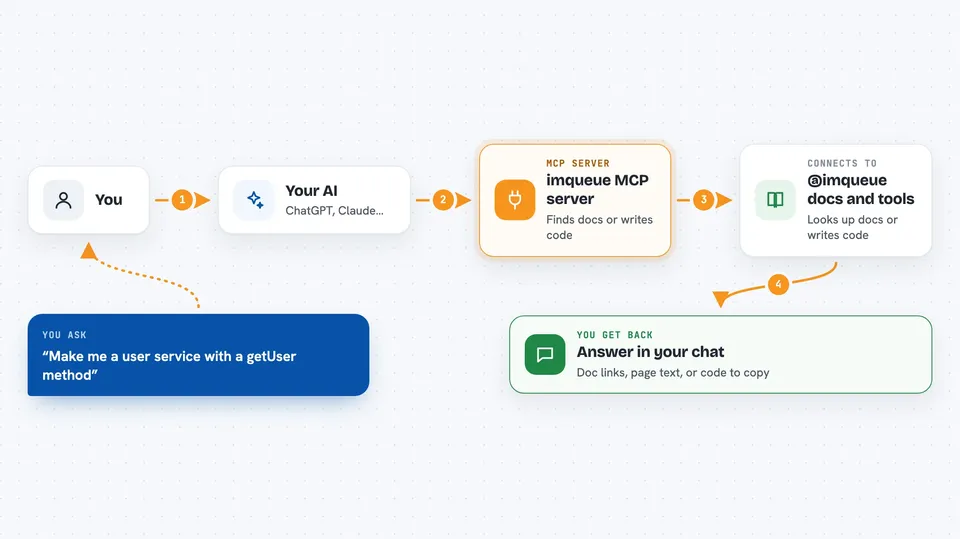
You ask your AI something like "show me how to run a service" or "make me a user service." The AI passes that request to this helper. The helper then either fetches the right page from the @imqueue docs, or writes out ready-to-paste code for a service or client. The result comes back into your chat as text or code you can copy. If you install the local version and have the imq command line tool, it can also run real imq commands on your computer for you.
 Click to zoom
What you can do with it
- Search the @imqueue docs and get the most relevant pages with links
- Fetch the full text of any doc page
- List @imqueue packages with install commands and versions
- Check the current version and licence of a package
- Draft a typed service class with methods ready to paste
- Show how to generate and use a typed client for a service
- Run imq commands on your machine (local install only)
Try asking your AI
- “Create an @imqueue user service with a getUser(id) method”
- “How do I run an @imqueue service?”
- “What is the latest version of the @imqueue/core package?”
- “Show me how to generate a typed client for my UserService”
What it gives back to you
You get answers right in the chat. Sometimes that is a short list of doc pages with links, sometimes the full text of one page, sometimes a block of code you can copy into your project. If you use the local version with the imq tool, you also see the output of the command it ran, like a status report or a version number.
Before you start
What you need
- Node.js 18 or newer (for the local install)
- An AI app that supports MCP servers, like Claude Code, Cursor, or VS Code
- Optional: the @imqueue/cli tool installed if you want it to run imq commands for you
Good to know
The local version can run real imq commands on your computer, which can create, change, or stop services, so check what it is about to do before saying yes.
Install it with your AI
Add imqueue MCP server to your AI, no technical skills needed
You don't install anything by hand. You copy one prompt, paste it into an AI that can work on your computer, and it checks, installs and connects the server for you, asking you when it needs something.
Sign in to get the install prompt
Members get a ready-made prompt that lets the Claude desktop app check imqueue MCP server, install it and connect it for them, step by step. You don't need any technical skills: you copy, paste and answer a few questions. Your connected AI can also find and install any of the 4,609 MCP servers here for you.
Who it's for
Developers and teams who build or maintain @imqueue services and want their AI to write correct code and look up docs for them.




